Visualize customer experiences with Insight7’s customizable journey maps. Highlight key touchpoints and interactions to improve engagement and satisfaction by mapping the customer journey clearly.
What is a Customer Journey Map: #
Customer Journey maps helps visualize customer experiences and touchpoints, offering valuable insights for improving customer engagement.
How This Works: #
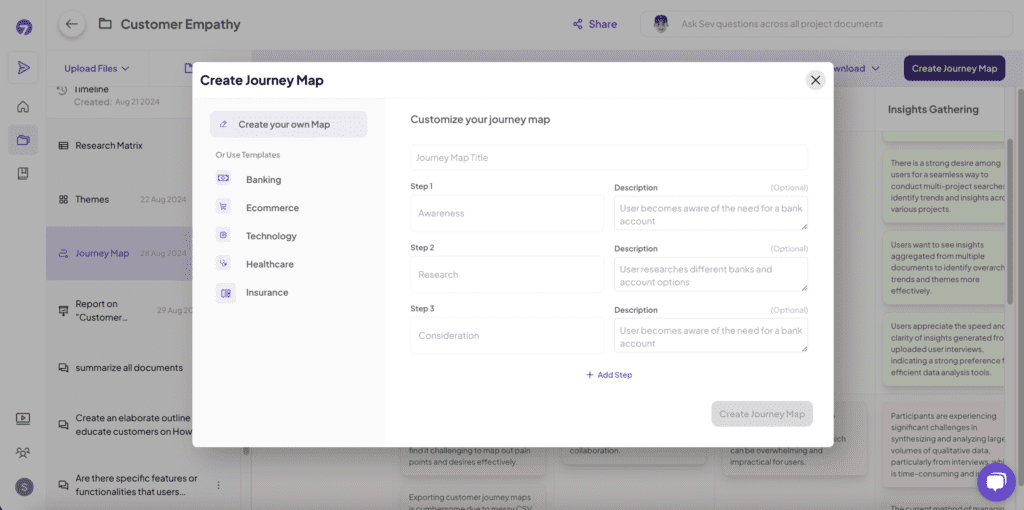
Once you’ve created a project, You can create your customer journey maps based on the insights gathered, tailoring them to specific use cases.
How to Do It: #
- Go to “Create Journey Maps.”
- Select “Steps” and add in “Descriptions”,
- Click on Create Journey maps
Pro tip: Use preloaded industry templates or create your own templates to speed up your analysis and quickly gather insights. Templates are only available on selected plans.
Download Journey Map: #
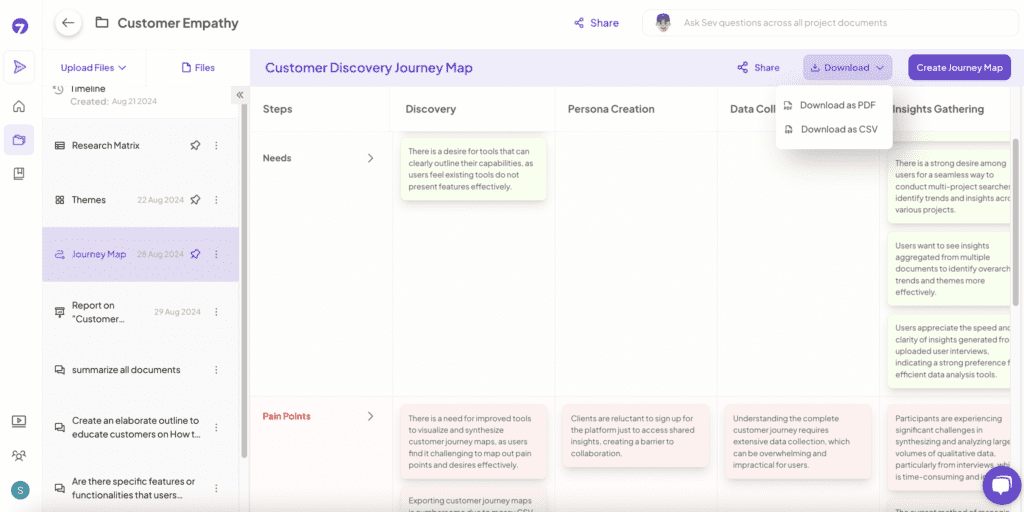
Downloading journey maps provides a ready-to-share visual representation of customer journeys, useful for presentations and strategic planning.
How This Works: #
After creating your Journey Map, download the journey map in your desired format for easy sharing.
How to Do It: #
- After Generating the journey map, Click on “Download Journey Maps.”
- Choose your preferred file format (PDF, CSV, etc.).
- Download the Journey maps to your device.