
The most common mistake when you update an AI voice agent script is pushing one live edit with no review or retest. It can silently delete the AI disclosure, consent wording or opt-out line. The cost is a fine or a lost customer. Six steps prevent it.
Draft one change at a time
Write each edit as its own version, with one change in it. A version needs a number, a change note saying why, and a named owner. Say a collections lead wants softer fee wording. That is v14, with a note like "fee line reworded after complaints" and one person who answers for it. Bundled edits hide what broke.
Then keep a list of locked lines. No edit may remove or weaken them:
- The AI disclosure
- The consent and recording notice
- The opt-out line
- The human handover offer
- The calling hours
These rules apply in many places, so treat them as fixed:
- EU: Article 50 of the AI Act has applied since 2 August 2026. Any AI that talks to people, including automated phone systems, must say it is AI from the first interaction.
- US federal: AI-voice calls already need consent under the TCPA, per the FCC's 2024 ruling. A "say it is AI" rule was still not final in mid-2026.
- Colorado: public-facing conversational AI must disclose it is AI from 1 January 2027.
- Nigeria: the CBN's March 2026 AML guidance accepts AI but asks for transparency, governance and independent model validation at least yearly.
Handover is locked for a plain reason. Gartner found that 87% of 3,566 customers say a company using GenAI for service must offer a way to reach a human. Buyers also ask how polite the handover is, and who chases one nobody picked up.
Also keep campaign settings out of the script. Campaign type, consent marking, calling hours and the do-not-call list already live on the campaign. A second copy will drift out of date.
Review the diff with compliance and operations
Review only what changed. Put the new version next to the old one and check the diff against your locked-line list. Rereading the whole script invites skimming, and one deleted line is easy to miss.
Two people must sign. One is a compliance reviewer. The other owns the channel or product the script serves, such as collections, onboarding or surveys. Between them they know what is allowed and whether a new line works on a real call.
Rules shift by channel and industry, so check both:
- Voice: the AI disclosure and consent notice must be spoken early, in the call itself.
- Chat and SMS: the same duties may need written wording and a clear way to opt out.
- Lending, insurance and healthcare: have your compliance reviewer check fee, rate, cover, price, consent and privacy wording against the rules that apply to you.
Next, check every claim the agent makes. List the fees, rates and deadlines in the new text, plus anything the agent could promise, like "no penalty". If your business cannot honour the promise, cut it.
Regulators also want a record. Your version log, change notes and reviewer names are that record.
Regulated buyers, banks first, fear an agent that goes off script and makes a public mistake. Answer that fear with paper. A signed diff for every version shows who approved what.
Retest before anyone approves
Run the same fixed set of cases on every version. The set has three parts: the change itself, every locked line, and your known edge cases. A fixed set means v14 and v15 are judged by the same test, so the results can be compared.
Cover these edge cases each time:
- The caller asks, "Are you AI?"
- The caller says, "Wrong person."
- The caller says, "Stop calling me."
- The caller is angry.
- The caller asks something the agent does not know.
- The caller asks for a human.
In Insight7's Voice AI campaigns, which are in beta, you can talk to a campaign's agent in the browser, with no phone number needed. A campaign also includes a test call to your own phone. Use browser tests for the first pass, because they are fast. Use a phone call to check how the voice sounds on a real line.
Then read the transcript, not just the score. Look for each locked line by name. Did the agent disclose it is an AI? Did it offer a human when asked? A call can be perfect on procedure and still leave the customer angry, and one critical error should fail the whole call. So make "disclosure missing" an automatic fail.
A caller who understands the agent, and is understood by it, has passed the test. Fooling the caller is not the goal.
Test advice is in demand, and people search for "how to test voice ai agents". Keep your case list in the version log, next to the change note.
Approve, then release in stages
Approval needs four things: a named approver, a dated sign-off tied to the version number, the test results attached, and a one-click way back to the previous version. "Approved v14, 9 Oct, by the compliance lead" is a record. "Looks fine" is not. Keep the old version ready to restore, because a rollback you must rebuild is not a rollback.
Duplicate the campaign instead of editing it live. In Insight7's Voice AI campaigns, which are in beta, any campaign can be duplicated with its contacts, and anyone added to the do-not-contact list since the original is left out of the copy. Your live campaign keeps running while the new version waits.
Then start small. Regulated buyers ask for a short, low-risk pilot on a small sample, with a measured result. We advise the same for a script update. Send v14 to a small slice of one segment, such as early-stage reminders, and compare it with v13.
Release in this order:
- One channel at a time. Do not push voice, chat and SMS together.
- One segment at a time, widening only after the pilot passes.
- Calling hours and retry rules unchanged, unless the edit is about them.
Finally, write the rollback rule before launch. For example: any missed AI disclosure, or any caller refused a human, means you restore the previous version at once. Decide it now, while nobody is under pressure.
Monitor every call after release
Score every call on the new version, not a sample. A sample can miss the one call where the disclosure vanished. Compare v14 with v13 on four measures: disclosure rate, opt-out handling, handover rate and complaints.
Measurement is the weak spot in AI service. Gartner looked at 432 AI customer-service use cases. Only a quarter showed positive ROI, and 42% could not be measured at all. If you do not track the new version, you will not know whether it helped.
Set your rollback triggers before launch:
- Any missed AI disclosure
- Any critical error
- A rise in callers refused a human
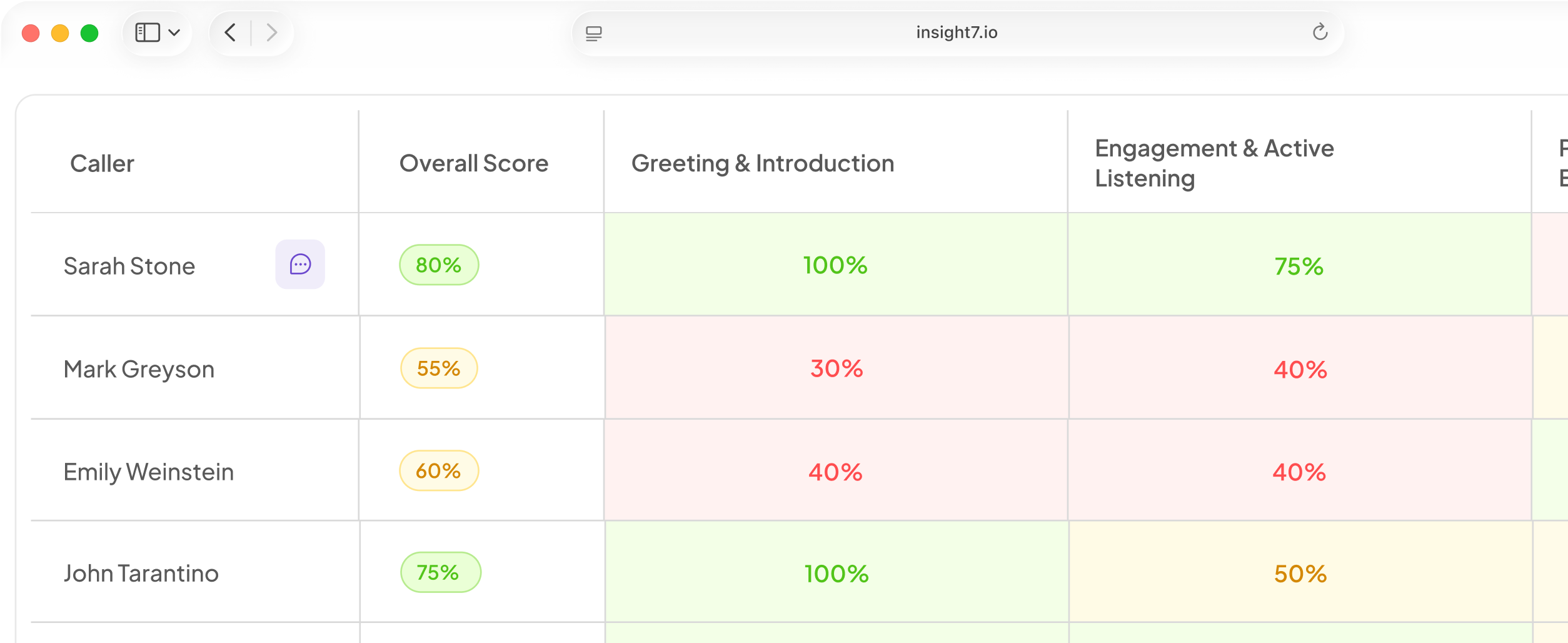
Insight7 covers this step. In its beta Voice AI campaigns, a dashboard shows calls in progress, and a reviewer can read each transcript when the call ends. In those beta campaigns, calls where only the AI spoke are not counted as reached, so silent calls do not flatter your numbers. The released scoring runs on a weighted scorecard your team owns, applied to every call, so build one line per locked line and a missing disclosure lowers the score. Its compliance monitoring scans every call for mandatory disclosures and builds the audit trail. Alerts can watch keywords and low scores, send a weekly digest of the weakest calls, and notify by email or Slack.
Related reading: AI Voice Agent Use Cases for Banks With Example Scripts for Inbound and Outbound Calls, How to Pause or Take Down an AI Voice Line Safely During an Incident and How to Run One AI Agent Across Phone, WhatsApp and Website Chat.
Questions people also ask
How do I test an AI voice agent before going live?
Run your fixed case list in the browser first, then place a phone test. Repeat each edge case several times, because a voice agent can word answers differently on every run. Beta features include browser and phone tests.
What must an AI voice agent say at the start of a call?
Say who is calling, for which business, and why. Say it is an AI from the first interaction, as the EU rule requires. Add the recording notice, if you record.
What are the consent requirements for AI voice outbound calling?
In the US, the FCC treats AI voices as "artificial or prerecorded voice" calls, so you need consent before calling. Record that consent on each contact. Have counsel confirm your regional rules.
How often should I update an AI voice agent script?
Update when something gives you a reason: a complaint pattern, a rate or product change, or a new rule. Release each single-change version on its own schedule, with its own review and retest.
Who should approve changes to a live AI voice agent script?
Someone other than the drafter. A compliance reviewer signs for the rules, and the channel owner signs for how the line works on calls. Record both names and the date against the version.
How do I roll back a bad AI voice agent script update?
Pause the new campaign and restart the previous version. If you released by duplicating, keep the original untouched until the new version has proved itself. Log what triggered the rollback, then fix the script as a new version.
How do I check AI voice agent compliance after a script change?
Score every call against a rubric with one line per locked line. Read the lowest-scoring transcripts first, then review a few passing calls to catch scoring errors.
Check your locked lines first
A script update is a controlled change, and Insight7 scores every call against a weighted scorecard your team owns. Before you start, list your locked lines and confirm the live version has each one.