
Integrating RingCentral with automated QA tools can significantly enhance the efficiency of quality assurance processes in B2B companies. This step-by-step guide will walk you through the technical architecture, capabilities, and implementation of this integration, ensuring that you can leverage customer feedback effectively to drive product development and go-to-market strategies.
Technical Architecture: How RingCentral and Automated QA Tools Connect
RingCentral operates as a cloud-based communication platform that facilitates voice, video, and messaging services. However, many organizations face challenges in utilizing the valuable data generated through these communications for quality assurance (QA) processes. The integration of RingCentral with automated QA tools addresses these challenges by streamlining data flow and enhancing analysis capabilities.
Technical Bottlenecks:
- Lack of real-time data synchronization between RingCentral and QA tools
- Manual data entry leading to errors and inefficiencies
- Insufficient integration capabilities with existing QA tools
- Limited reporting and analytics capabilities
System Inefficiencies:
- Time-consuming manual testing processes
- Delayed feedback loops between developers and QA teams
- Fragmented communication channels
- Lack of comprehensive visibility into QA metrics
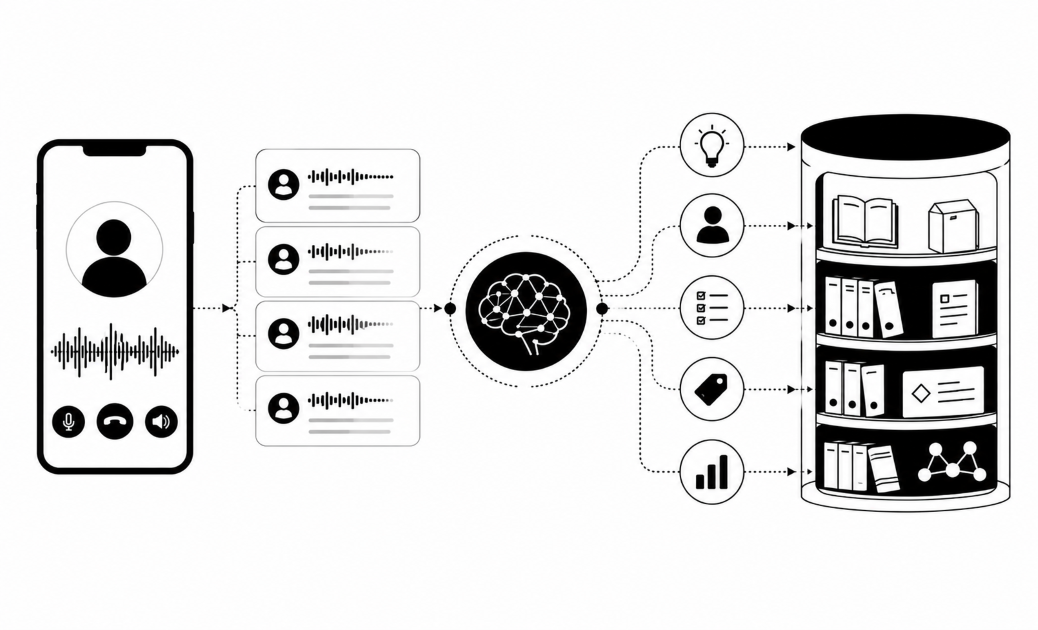
Integration Architecture: By connecting RingCentral to automated QA tools, organizations can create a seamless flow of data that enhances the QA process. This integration allows for real-time analysis of customer interactions, enabling teams to derive actionable insights quickly.
What Technical Capabilities Do Automated QA Tools Enable?
Technical Integration Overview: Automated QA tools provide several capabilities that enhance workflow efficiency and improve the quality of insights derived from customer interactions.
Automated Test Case Management
- The QA tool automatically manages test cases based on data from RingCentral, reducing manual effort and ensuring comprehensive coverage of customer interactions.
- This capability allows teams to focus on strategic tasks rather than administrative ones, improving overall productivity.
Real-time Communication for QA Teams
- Integration facilitates real-time communication and collaboration among QA teams, enabling immediate feedback and issue resolution.
- This capability enhances team dynamics and ensures that quality issues are addressed promptly.
Enhanced Reporting and Analytics
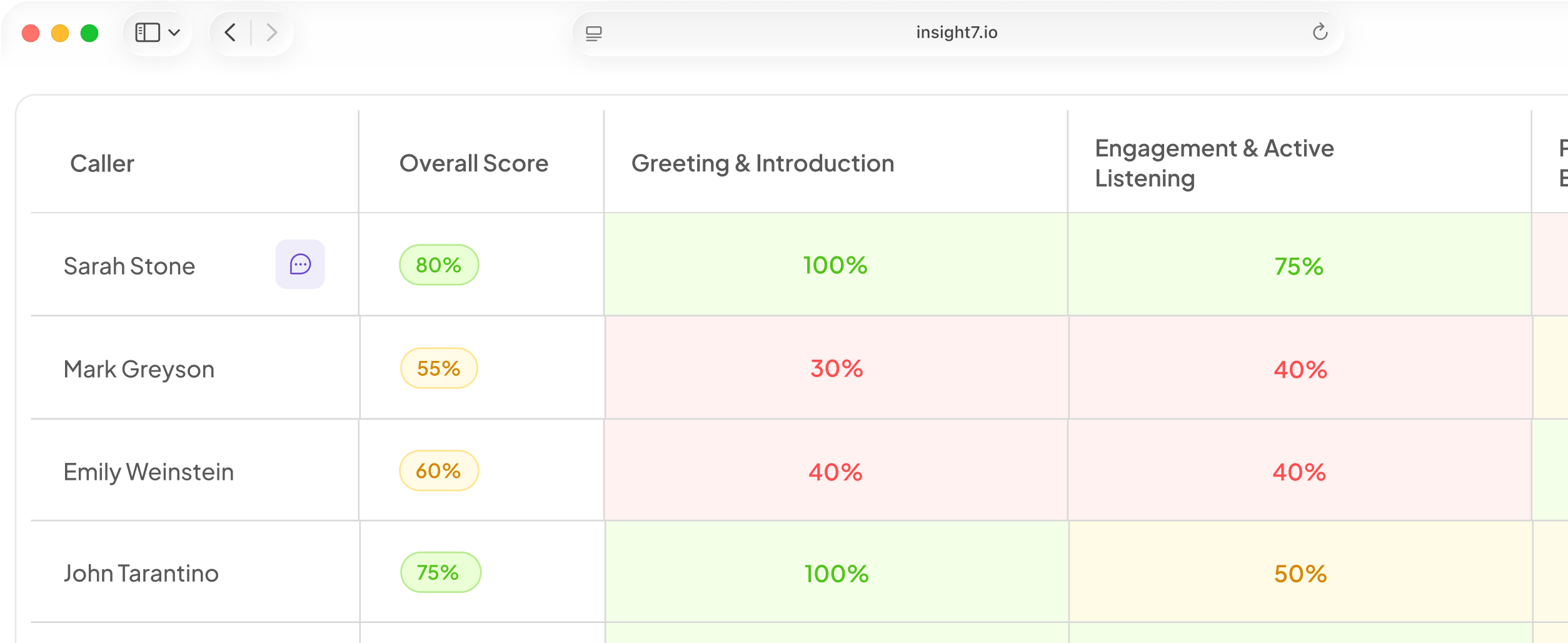
- The integration provides advanced reporting capabilities, allowing teams to generate insights from data collected through RingCentral.
- Enhanced analytics enable organizations to track QA metrics effectively, leading to informed decision-making.
Continuous Integration and Delivery (CI/CD) Support
- Automated QA tools support CI/CD pipelines by integrating testing processes with RingCentral communications.
- This capability ensures that testing is an integral part of the development lifecycle, leading to faster release cycles.
Issue Tracking and Resolution Automation
- The integration automates issue tracking based on communications in RingCentral, streamlining the resolution process.
- This capability allows teams to manage issues more effectively, reducing the time spent on manual tracking.
Technical Integration Benefits: Overall, the integration of RingCentral with automated QA tools leads to improved efficiency, reduced manual work, and enhanced data insights, ultimately driving better product outcomes.
System Performance and Technical Requirements
Performance Challenge: Traditional manual testing approaches struggle to scale with the complexities of modern applications and the volume of data generated through customer interactions.
Automated Processing: Automated QA tools streamline workflows that previously required manual intervention, such as test case management and issue tracking.
System Consistency: Automation ensures reliable and consistent QA processes, allowing teams to maintain high standards of quality across all customer interactions.
Real-time Capabilities: Real-time integration enables immediate responses to QA issues, eliminating the delays associated with batch processing.
Technical Reliability: The integration provides consistent performance regardless of data volume, ensuring that QA processes remain effective even as demand increases.
Technical Implementation Guide
Implementation Approach: This section outlines the technical deployment methodology for connecting RingCentral to automated QA tools.
Step 1: System Prerequisites
- Ensure RingCentral API access is configured.
- Verify that the automated QA tool is compatible with RingCentral.
- Confirm any additional technical requirements or system compatibility checks.
Step 2: Connection Configuration
- Set up API keys for both RingCentral and the QA tool.
- Configure webhook settings for real-time data transfer.
Step 3: Data Pipeline Setup
- Define the data flow from RingCentral to the QA tool.
- Establish data transformation rules as needed.
Step 4: Processing Configuration
- Set up automated testing triggers based on RingCentral events.
- Configure processing options for different types of QA tests.
Step 5: Output Configuration
- Define output formats for QA reports and metrics.
- Set up notification preferences in RingCentral for test results.
Step 6: System Monitoring
- Implement monitoring tools to track the integration's performance.
- Set up alerts for failures or issues in the data flow.
Technical Validation: To verify the success of the technical implementation, conduct thorough testing and validation processes to ensure that data flows correctly and that QA metrics are accurately reported.
Automated RingCentral Processing
The integration provides automated processing for QA workflows, significantly reducing manual effort. Teams can configure the system to adapt to various testing scenarios or data types within RingCentral communications, ensuring that QA processes are both flexible and robust.
Technical Data Extraction and Processing
Data Pipeline Overview: The integration allows technical teams to receive both raw and processed data outputs, enhancing the quality of insights derived from customer interactions.
Technical Data Points:
- Test case results from RingCentral communications
- Issue tracking updates linked to QA metrics
- Communication logs relevant to testing outcomes
Processing Context: Each data point comes with contextual information, ensuring effective integration and analysis.
How Does This Compare to Traditional QA Methods?
Traditional QA Methods:
- Manual testing processes leading to longer cycles
- Lack of integration with communication tools
- Inconsistent reporting and metrics
With Automated QA Tools Integration:
- Automated test management and reporting
- Real-time collaboration and feedback
- Enhanced visibility into QA performance metrics
Technical Efficiency Statement: The integration significantly improves performance and resource savings, allowing teams to focus on strategic initiatives rather than manual tasks.
System Integration: From Communication to Quality Assurance
This integration goes beyond simple data processing to deliver complete QA workflow automation. By aggregating processing, organizations can reveal patterns and opportunities for optimization in QA processes, translating insights into actionable improvements.
Technical Value Statement: This approach provides intelligent automation, enhancing the overall quality assurance process rather than merely processing data.
Common Challenges and Solutions
Challenge 1: API limitations can hinder integration efforts.
- Solution: Utilize middleware solutions to bridge gaps between RingCentral and the QA tool.
Challenge 2: Data synchronization issues may arise.
- Solution: Implement robust data validation processes to ensure consistency across systems.
Technical FAQ
Q: What are the system compatibility requirements for the integration?
A: Ensure that both RingCentral and the automated QA tool meet specified technical requirements for seamless integration.
Q: How can I ensure the integration is secure?
A: Implement industry-standard security measures, including encryption and access controls.
Q: What is the expected timeline for implementation?
A: The typical implementation timeline can vary based on system complexity but generally ranges from a few weeks to a couple of months.
Q: How do I handle performance scaling with this integration?
A: Design the system architecture to accommodate growing data volumes and user demand, ensuring scalability.
Technical Conclusion: Why QA Teams Should Implement Automated QA Tools for RingCentral Integration
Technical Challenge Restatement: Extracting value from RingCentral for QA processes should not require complex manual workflows.
Technical Solution Summary: Automated QA tools provide a clear path to automated quality assurance, enhancing efficiency and insights.
Key Technical Benefits: The main advantages include improved efficiency, reduced manual work, and enhanced data insights.
Technical Evolution: This integration represents a significant shift from manual QA processes to intelligent automation, positioning organizations for success in a data-driven landscape.
System Advantage: The ultimate technical value proposition lies in the performance advantage this integration provides for QA teams, enabling them to deliver higher quality products faster.