
Your AI voice agent says "Oluwaseun" wrong in the first five seconds, and the customer decides it's a bot and hangs up. AI voice agent mispronunciation has a fix. Build a pronunciation list, respell hard words phonetically, and test them on repeated calls.
List the words your agent gets wrong
Start with a list of the words your agent actually says badly. Pull them from three places:
- Listen to a batch of real or test calls.
- Read the transcripts for moments where the customer asks "sorry, what?" or repeats a word.
- Scan the name column of your contact list for spellings that look hard.
Sort every word into one of three types:
- Customer names: Oluwaseun, Nguyen, Siobhan.
- Brand and product names: invented words, blended words, odd capital letters.
- Acronyms and numbers: APR, KYC, account IDs, dates.
These words fail for one reason. Text-to-speech turns spelling into sounds by guessing from common patterns, mostly English ones. Names from many languages, made-up brand names and letter strings do not follow those patterns, so the guess is wrong.
Listeners notice, and they judge the whole voice by it. A mobility company stopped recommending a voice AI because its voice sounded fake. Staff also tune out voices that sound foreign to them.
Rank the list by how often each word is spoken. Start with the most-spoken words.
Add custom vocabulary and a pronunciation dictionary
Use two different tools, because "custom vocabulary" means two things.
- Speech-to-text vocabulary (phrase hints, or boosting) helps the agent hear a word. If a caller says "Oluwaseun" and the transcript reads "all a way sun," boosting fixes that.
- A pronunciation dictionary (a lexicon) helps the agent say a word. It changes only the voice output.
Adding a name to the first list does nothing for how the voice speaks it. Your step 1 list is a speaking problem, so it needs the dictionary.
A lexicon maps a written word to a pronunciation. The engine checks your text before it speaks and swaps in your version every time the word appears. The W3C publishes a standard format for this, the Pronunciation Lexicon Specification, and many engines accept it or something close.
Entries come in two forms:
- Alias: replace the word with words that sound right, such as "Nginx" becoming "engine x".
- Phoneme: give exact sounds in a phonetic alphabet.
Rules differ by vendor, so check your vendor's docs. Is matching case-sensitive? Does it match whole words only? Which voice models accept phoneme entries? On ElevenLabs, for example, searches are case sensitive, and phoneme tags are documented for specific models. A dictionary entry for "Apex" will not catch "APEX".
You usually set the dictionary once per agent or per language, in the platform settings or through the API. Choose the campaign language before the voice, because pronunciation rules belong to a language.
Put only repeating words in the dictionary: brands, products, acronyms and common names. A name that belongs to one contact needs a per-contact field, which comes in the next step.
Respell hard words phonetically
Respell any word the dictionary cannot fix by writing it the way it sounds. Use hyphens between syllables and capitals on the stressed one. ElevenLabs advises this for models without phoneme tags. It names capital letters, dashes and apostrophes as tricks that work.
Here are four worked examples:
- Name: Oluwaseun becomes "oh-loo-wah-SHAY-oon". Siobhan becomes "shi-VAWN". Nguyen is a rough "nwin", and a native Vietnamese speaker should confirm it, because the sound varies by region.
- Brand name: Kuda becomes "KOO-dah".
- Acronym read as letters: APR becomes "A-P-R", or "ay pee ar" if the engine reads hyphens badly.
- Acronym read as a word: SWIFT stays a word. Write "swift" in lowercase so the engine does not spell it out.
Decide letter by letter or as a word for every acronym, and write the choice next to the entry. Do the same for numbers. Phone numbers and zip codes can be misread when they are rare in the model's training data. Group the digits the way a person would say them: "0803, 456, 7890".
Per-contact field. If your platform lets you pass a custom field into the script, add a "say it like" column beside the name in your contact list. Fill it only for names that matter, such as your top accounts. The agent reads the respelling aloud and your CRM keeps the real spelling. Check that your vendor supports this before you build around it.
Advanced option. SSML phoneme tags give exact sounds in IPA or CMU Arpabet. Support varies by engine. ElevenLabs, for example, limits phoneme tags to certain models and to single words. Test a tag on your own voice first.
Fallback for the hardest names. Let the agent ask, "Am I saying your name right?" Then log the answer. Most customers will take the question as care.
Local voices. Where a local-language voice exists, pick it first and respell second. English respelling pushes those names toward a foreign accent, and listeners tune out foreign voices.
Test every fix before real customers hear it
Write a test script first. Use one short sentence for each tricky word, such as "Hello, is this Oluwaseun?" Then add the full opening line of the call, because the first five seconds decide whether a customer stays.
Test in the browser first. It is quick and needs no phone number, so you can retry a respelling in seconds.
Then call your own phone. Phone audio is often compressed and can sound different from browser audio, so a word that sounds clean in the browser can sound muddy on a handset.
Judge each word with a plain pass or fail rule:
- Pass: two or three listeners all say the word sounds natural.
- Fail: any listener hesitates, winces or asks for a replay.
Include a native speaker of the name's language. Only they can tell "close enough" from "wrong".
Change one thing at a time. If you edit the dictionary entry and the respelling together, you will not know which one worked. Keep a simple log with the word, the change, the date and the result.
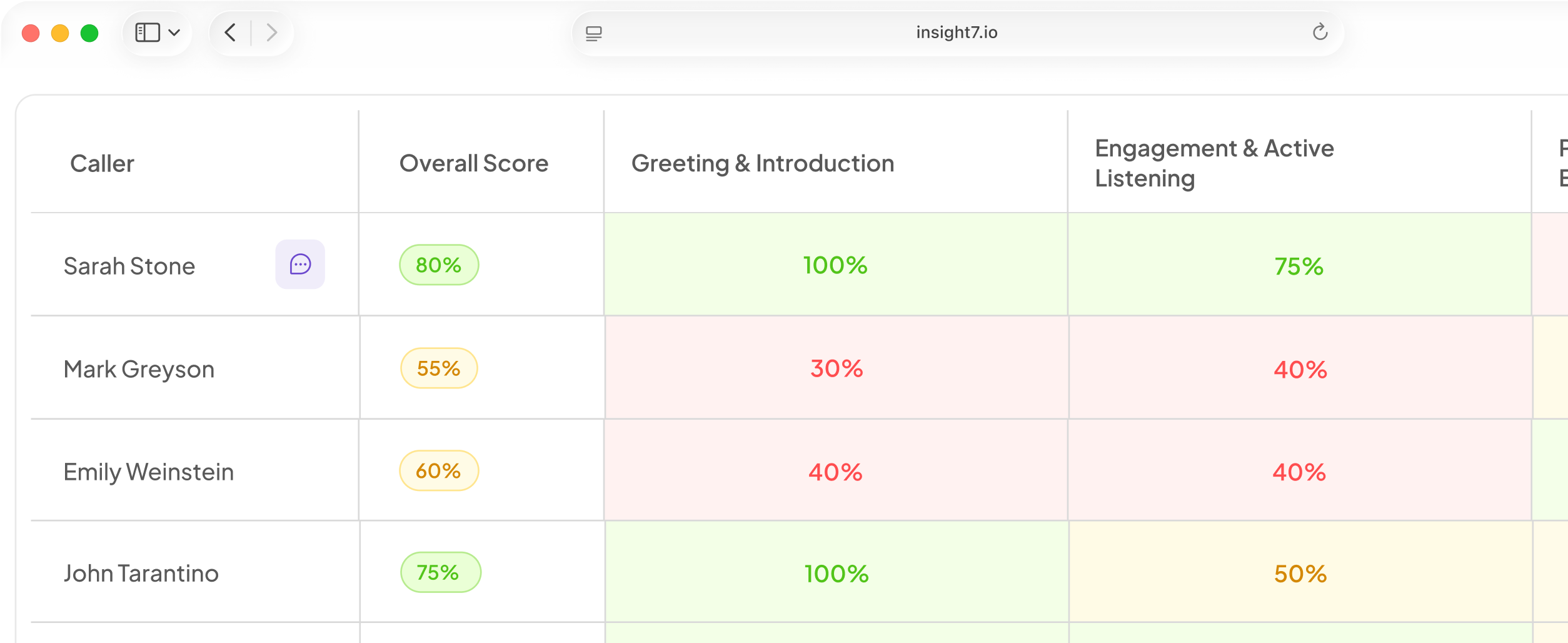
Insight7 Voice campaigns are in beta, and they support this loop. A manager can talk to the campaign's agent in the browser with no phone number, then run a test call to their own phone before launch. Confirm the test call option in your account. The engine uses the same ElevenLabs voices. For QA, every call can be scored against a weighted scorecard your team owns, so you can add a "name and brand pronounced correctly" criterion.
Retest after every voice, language or model change.
Keep checking live calls and update the list
Score every call, not a sample. Sampling lets a bad name slip by, so add a pronunciation criterion to your QA scorecard. Make a wrong name a critical error that fails the call, because a call can be perfect on procedure and still lose the customer.
Finally, keep the list alive:
- Add each new name, product and acronym when marketing launches it, then retest.
- Log every customer who corrects the agent. That correction is your next dictionary entry.
Related reading: How to Write an AI Voice Agent Opening Line That Keeps Customers on the Call, How AI Voice Agents Handle Interruptions, Background Noise and Cross-Talk and Multilingual AI Voice Agents Guide for Contact Centers Serving Customers in Several Languages.
Questions people also ask
Why does my AI voice agent mispronounce names?
The engine reads spelling with no knowledge of the name's origin. One spelling can sound different in different languages, so it picks the most common English pattern. Names from your contact list pass through as plain text, with no hints.
How do I teach an AI voice agent to pronounce a brand name?
Copy how the brand sounds in your own ads. Try an alias first, such as "engine x" for "Nginx". Respell only if the alias fails. Test the brand inside full sentences, because stress shifts with context.
What is a pronunciation dictionary in text-to-speech?
It is a saved list of word-to-sound rules the engine applies before it speaks. You edit the list and the voice changes at once, with no retraining. Many platforms let you reuse one list across several agents.
How do you make an AI voice say acronyms correctly?
Decide whether your company says each one as letters or as a word. For a first mention, you can write the full phrase instead. Check plurals such as "APRs" too, because engines read text differently depending on formatting.
What is SSML and can it fix pronunciation?
SSML is a W3C markup standard that tells a voice engine how to speak. Its phoneme tag can fix one word with exact sounds. Support varies. ElevenLabs documents phoneme tags for some models, and an engine may ignore unsupported tags.
How do I test an AI voice agent's pronunciation before launch?
Play every tricky word at the start, middle and end of a sentence, because intonation changes how a word sounds. Repeat after any voice, language or model change, and save the recordings to compare.
Can AI voice agents pronounce non-English names correctly?
Yes, if you prepare them. For mixed names, such as a first name from one language and a surname from another, respell each part separately and join them. Then have a native speaker of each language approve the result before launch.
Check your word list before you start
A fix is finished when it works on a real phone line. Before changing any setting, check that your word list comes from real call transcripts, not guesses. That list shows where to start.