
To prepare your knowledge base for an AI voice agent, you first have to decide if it is ready. That depends on three things: current content, no conflicts, and short spoken answers. Four steps settle it: audit, fix, structure, test.
Audit what the agent will be asked
Start the audit with the questions callers really ask, then check your content against them. Pull them from call recordings, transcripts, complaint logs, FAQ search terms and your help desk's top tickets. A document list tells you what you wrote. Call data tells you what people need.
Think of the agent's context in three layers. Customer context comes from CRM data. Campaign context is the goal of the call. Business context is your products, services, documents, FAQs and SOPs. Your knowledge base is the business layer, and it is the one to audit here.
Build an audit sheet with one row per question:
- The question, in the caller's words
- The source document
- The owner
- The last reviewed date
- Who is allowed to say it (any agent, or only a licensed one)
Sort the sheet by call volume and by risk. A good target is the top 50 to 100 questions. Put fees, eligibility, disputes and anything regulated at the top, even if they are rare. Wrong answers there cost you most.
Check your wording against theirs. At a consumer lender, customers were confused by product nicknames because the terms were never tied to the product's name. Your documents may use the official name while callers use a nickname. Note both on the sheet.
Insight7's AI voice and chat agents are grounded in the company knowledge base. Whatever platform you use, collect the questions the agent could not answer and review the transcripts. In Insight7's voice campaigns, which are in beta, a reviewer can read each transcript when a call ends. Those unanswered questions become a standing source for your audit sheet.
Fix gaps and conflicts before launch
Search your audit sheet for any fact that lives in two places. Fees, prices, opening hours, policy dates and eligibility rules are the usual offenders. An old PDF next to its replacement is the classic case. A caller hears one answer and acts on it, so a clash between two documents becomes a wrong promise.
Give each fact one source of truth. Name an owner, set a review date, and archive the old copy so the agent cannot retrieve it. If two teams disagree, a product or compliance lead decides, and the sheet records who.
Next, close the gaps. Every question with no answer gets one of two fixes:
- Write the answer in approved wording, and name who signed it off.
- Write a hand-off rule that says when the agent stops and passes the call to a person.
Disputed amounts, complaints and sensitive personal situations usually belong with people. Buyers raise the handover on their own. They ask whether it is polite, what happens to a disputed amount, and whether anyone chases an unanswered handover. Put those answers in the rule: warm wording, a named queue and an owner for callbacks. Gartner's 2026 survey of 3,566 customers found that 87% say companies using GenAI must offer a way to reach a human agent. Treat the hand-off path as a launch requirement.
Last, write the line where the agent says it is an AI. Rules differ by region:
- EU: Article 50 of the AI Act has applied since 2 August 2026. Any AI that talks to people, including automated phone systems, must say so from the first interaction.
- US: the FCC's 2024 ruling puts AI-generated voices under the TCPA. Outbound AI calls need consent.
Store the disclosure wording in the knowledge base like any other approved text, with an owner and a review date.
Structure content for spoken retrieval
Write each entry as a short answer that can be heard once and understood. A caller cannot scroll, click a link or reread a table. So drop "see below", drop tables, and drop anything that needs a screen.
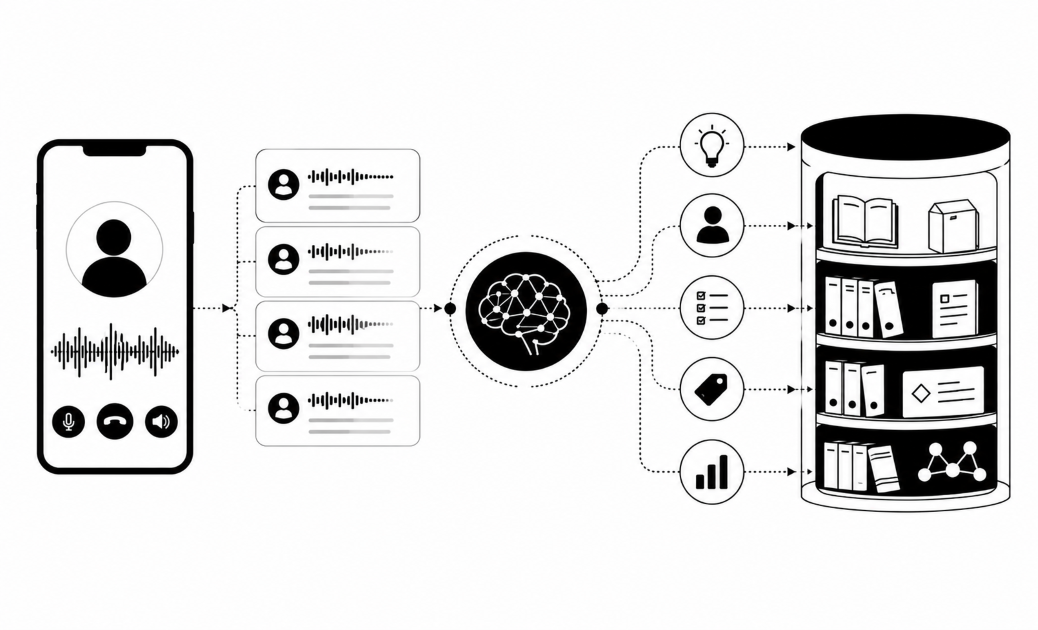
Know how the agent finds an answer. Documents are cut into chunks, because models can only take in so much text at a time. Microsoft's guidance on chunking explains the limit. The best-matching chunks go to the model, which composes the reply. So one chunk should answer one question. A page that mixes fees, eligibility and complaints gives the model a muddle to read from.
Give every entry the same fields:
- Question: the caller's own wording, plus synonyms and nicknames
- Spoken answer: one to three sentences
- Conditions: the exceptions, in plain words
- Control data: source, owner and review date
- Escalation rule: when the agent stops and hands over
Write for the ear. Say "ten thousand dollars", not "USD 10,000". Spell out acronyms on first use. Tie jargon to the official product name, so the nickname and the product's real name sit in the same entry. Use the question as the heading. Avoid "it" and "this" when they point to an earlier paragraph, because a retrieved chunk arrives without its neighbours.
Add tags for product, region, language and customer type. A caller on a business account in one country should not hear the retail answer from another.
Language is part of the content. Local languages need their own entries. For example, Insight7 Voice campaigns can run in Yoruba and Igbo, and the manager picks the language before the voice. Nigerian Pidgin is a new campaign language. Both are in beta. Keep a separate, reviewed entry per language, and have a native speaker check it.
Keep live facts out of the document store. Balances, order status and due dates belong in a lookup. Your static text should hold policy only. Insight7's inbound voice lines, where the AI agent answers a number and can look the caller up, are in beta.
Test answers with real and risky questions
Build a test set before you build a launch plan. Take 50 to 100 real questions from your audit sheet. Add each one again in two or three other wordings, the way a rushed or confused caller would ask it. Then add out-of-scope questions and a few trick ones, such as a caller asking the agent to waive a fee.
Test in the browser first. In Insight7's voice campaigns, which are in beta, you can talk to a campaign's agent in the browser with no phone number. A campaign also has a test call to your own phone.
Score each answer on five checks:
- Correct
- Complete
- In the approved wording
- Short enough to say aloud
- A clean handoff when the agent does not know
Treat a wrong answer on a regulated topic as a critical failure, not a one-point deduction. QA leaders we speak with say one critical error should fail the whole call, because a checklist score can hide what matters.
Pilot before you scale. Regulated buyers want a short, low-risk pilot on a small sample, so agree the success measure before the first call.
After launch, read the unanswered questions each week, fix the entry, then rerun your test set. Also score every call against a scorecard your team owns. Falling scores are an early sign that content has drifted.
| Step | Owner | Done when |
|---|---|---|
| Audit | Knowledge lead | Top 50 to 100 questions listed, each with a source and an owner |
| Fix | Product or compliance lead | One source per fact; every gap has an answer or a handoff rule |
| Structure | Content writer | Each entry has a short spoken answer and tags |
| Test | QA manager | Test set passes with zero critical failures |
Related reading: How to Design Tool Calls That Let AI Voice Agents Look Up Accounts, Create Cases and Book Callbacks, How to Give Customers a Case Reference Number and SLA From an AI Voice Call and How AI Agents Recognize Returning Callers and Pick Up Open Cases.
Questions people also ask
How does an AI voice agent use a knowledge base?
It matches the caller's question to the best-fitting entries, then composes a spoken reply from them. It can only say what it retrieves, so a missing or muddled entry means a missing or muddled answer.
What happens when an AI voice agent doesn't know the answer?
It should not guess. It should say so, offer a callback or hand the call to a person, and log the question. Your team then reviews the log and writes the missing entry.
What documents should go into an AI voice agent's knowledge base?
Start with FAQs, product sheets, fee schedules, SOPs, policy summaries and approved disclosure wording. Leave out drafts, old versions and internal chat. Rewrite each one as short question-and-answer entries.
How often should I update the knowledge base for an AI voice agent?
Give every entry a review date, and check fees and regulated topics most often. Update the same day any policy, price or product changes, and fix gaps the weekly report shows.
How do I stop an AI voice agent from making up answers?
Give it complete entries and a clear handoff rule for everything else. Tell it to answer only from retrieved text. Test with out-of-scope and trick questions, and treat any invented answer as a failure to fix.
How long should answers in a voice knowledge base be?
Keep each spoken answer to one to three sentences. Put the key fact first. Move exceptions into a separate conditions field, so the agent adds them only when they apply.
How do I test an AI voice agent before it talks to customers?
Run 50 to 100 real questions, each in two or three wordings, plus risky ones. Pass only if no regulated answer is wrong. Rerun the full set after every content change.
Start with your top 50 questions
A voice agent can only say answers it can find. Before you start, check one thing: does each of your top 50 customer questions have one owned, current, short answer, or a clear handoff rule?