
How to convert audio file to text recording to text
Audio transcription presents a fundamental solution for converting spoken language into written format, offering vast applications in business and professional work. It enables the efficient analysis of interviews, meetings, and customer interactions by transforming audio files into texts. This process captures essential details, such as pain points, desires, and behaviors, allowing for a deeper understanding and insight extraction. Through transcription, participants may better synthesize information, facilitating data-driven decisions that align closely with customer needs and organizational goals. Methods to Convert Audio File to Text When looking to convert audio files to text, several reliable methods can prove beneficial in enhancing the productivity and efficiency of your work. Automated audio transcription services stand out due to their speed and ease of use. Heres a concise list of noteworthy tools: Speech-to-Text Software: This technology employs advanced algorithms to interpret and transcribe spoken words into written text. Examples include Googles Speech-to-Text, IBM Watson Speech to Text, and Amazon Transcribe. Users simply upload their audio files, and the AI-powered software generates a corresponding text transcript. Manual Transcription Services: For those requiring high accuracy and detail, professional transcriptionists provide manual services that can handle complex audio with multiple speakers or background noise. Integrated Platform Solutions: Tools like Nook or NOS ai offer a more holistic approach, where apart from converting audio to text, they provide additional features such as analytics and insights into the transcribed content. When employing these methods, consider the context of use. For businesses and work environments, prioritizing accuracy and the potential to handle large volumes of audio files in bulk is crucial. Transcription services may also offer capabilities to clean up transcripts from formats such as HTML, ensuring only the relevant text is retained. Opt for a service that aligns with your specific needs, whether it may be real-time transcription or post-event transcription of recorded audio. Manual Transcription vs. Automated Transcription When deciding between manual and automated transcription services, its essential to consider accuracy, turnaround time, and cost-effectiveness for your audio transcription needs. Manual transcription involves a person listening to the audio file and typing out the content word-for-word. This method can be highly accurate if done by a skilled transcriber but usually comes with a higher cost and longer processing time. On the other hand, automated transcription utilizes advanced algorithms and speech recognition technology to convert speech into text rapidly. While this can be more cost-effective and provide faster results, it may not always match the precision of a human transcriber, especially with complex audio files that contain technical language, multiple speakers, or background noise. For businesses seeking insights from their audio recordings, consider the following transcription tools: OpenAIs GPT models offer robust automated capabilities for understanding and transcribing speech, making them suitable for generating quick transcripts. Google Cloud speech-to-text services are known for their advanced AI processing, supporting various languages and accents. AWS provides cloud-based automated transcription solutions, often used for large-scale and time-sensitive projects. Proprietary technology can tailor the transcription process to suit specific business needs, configuration for extracting key points, and providing context within the transcript. Choosing the right approach – manual, automated, or a combination of both, will depend on your transcription accuracy requirements and how critical it is to analyze the resulting text for actionable business insights. Best Practices in Audio Transcription When embarking on audio transcription, its essential to prioritize accuracy and clarity in the output text. Begin by ensuring your recordings are of high quality, with minimal background noise and clear, audible speech. If possible, use noise-cancellation tools or software to filter out any distracting sounds. Its also helpful to familiarize yourself with the subject matter to anticipate terminology and context, which can greatly enhance the transcription precision. For a seamless transcription process, its beneficial to leverage reliable transcription software or services. Notable tools include: Dragon NaturallySpeaking: Exceptionally accurate speech recognition for individual users. Google Speech-to-Text: Offers powerful real-time transcription capabilities using Googles advanced AI. Rev: Provides professional transcription services with a quick turnaround. Otter.ai: Ideal for collaborative work with its in-built AI for live transcription and note-taking. By utilizing these tools, you can convert audio files into text more efficiently. However, remember to review and edit the resulting transcriptions. Even with advanced technology, manual verification ensures the highest level of accuracy and captures the nuances of speech that AI might miss. Lastly, secure storage and organization, whether in a project management system or a dedicated library space, allow for easy retrieval and cross-referencing of transcribed materials for further insights and analysis. Tools for Converting Audio Recordings to Text When it comes to converting audio files to text, there are a number of efficient tools that offer solutions to streamline this process. Heres a quick rundown of the top software tools that can significantly aid in audio transcription, tailored for the convenience of businesses of all sizes. Speech-to-Text Services: These are online platforms like Google Speech-to-Text and IBM Watson that use advanced AI to convert spoken words into written text. Theyre ideal for handling large volumes of audio data with high accuracy. Transcription Software: Tools such as Otter.ai and Transcribe provide user-friendly interfaces and features, including automatic transcriptions, editing capabilities, and integrations with popular services, such as video conferencing apps. Desktop Software: For those who prefer offline tools, software like Dragon NaturallySpeaking offers powerful dictation and transcription capabilities directly on your computer without the need for an internet connection. Specialized Services: Services designed for specific fields, such as Rev for legal or medical transcriptions, ensure that terminology and context are accurately captured, a crucial aspect for specialized industries. For businesses looking for a seamless integration with their existing workflows, many of these tools offer APIs and plug-ins that synchronize with commonly used business applications. Whether youre dealing with customer service calls, interviews, or company meetings, utilizing these transcription tools can save time and provide valuable textual insights. Top AI Tools for Audio to Text Conversion In the bustling world of business, the ability to convert audio recordings into textual transcripts swiftly and
Transcribing interviews with Google Docs
Voice Typing Transcription simplifies the task of converting interviews into readable text, offering professionals the ability to effortlessly transcribe recordings directly within Google Docs. As the need to analyze conversations grows, particularly for those in content marketing and data analysis, the ability to accurately capture spoken words is invaluable. This introduction guides you through harnessing Google Docs for transcribing interviews, providing a streamlined method to import, transcribe, and analyze spoken content, and transforming it into actionable insights without cumbersome processes. Learn how to enhance your workflow and enrich your projects by utilizing the convenience of Voice Typing Transcription. The Essentials of Voice Typing Transcription in Google Docs Voice typing transcription in Google Docs has become a game-changer for businesses and professionals aiming to streamline their workflows and accurately document interviews. As a starting point, ensure you have a reliable microphone setup and a quiet environment to minimize errors during transcription. Then, familiarize yourself with the voice typing feature available in Google Docs, which allows for real-time speech-to-text conversion as you conduct your interviews. When transcribing, clarity and context are paramount. Remember to speak distinctly, and consider pausing slightly between sentences to give the transcription service a moment to catch up. To enhance accuracy, periodically review the transcribed text and make necessary corrections. Its important to note that while Google Docs provides a solid foundation for transcription, it may not capture every nuance, especially in technical discussions or interviews with multiple speakers. For more advanced needs or when confidentiality is a concern, third-party tools like insight7.io offer specialized services that may provide higher accuracy and additional features. Whichever tool you choose, make certain it aligns with your objectives, and dont overlook the importance of reviewing the transcript for errors or omissions. Effective transcription not only saves time but also ensures that the insights from your interviews are preserved and can be leveraged for further analysis and decision-making. Setting Up Your Device for Voice Typing Transcription Before diving into the transcription of your interviews with Google Docs, preparing your device for the voice typing transcription feature is essential for a seamless experience. First, ensure your microphone is set up and functioning correctly – this is the primary tool Google Docs will use to capture your voice. Next, check your internet connection stability, as voice typing transcription requires an online connection to Googles servers. The third step involves opening a Google Docs document and enabling the voice typing feature from the Tools menu. Finally, familiarize yourself with the voice commands that control punctuation and formatting to maximize efficiency as you transcribe. During the transcription process, it’s crucial to speak clearly and at a moderate pace. Background noise can interfere with the accuracy of voice typing transcription, so selecting a quiet environment is advisable. Remember also to periodically save your document to avoid data loss. Google Docs allows the option to upload and transcribe audio from videos. If you have pre-recorded interviews, simply import these files into your Google Docs project folder and let the software analyze and transcribe the spoken content into text, ready for your assessment and utilization. Practical Tips for Effective Voice Typing To harness the power of voice typing transcription for transcribing interviews in Google Docs, begin by ensuring a quiet environment to minimize errors in transcription. Position your microphone close enough to capture clear audio, as this will significantly improve the accuracy of the transcription. Before starting, its worthwhile to do a quick test to check that Google Docs is correctly registering your voice and punctuation commands. When youre ready to proceed with voice typing transcription, remember to speak clearly and at a moderate pace. Articulate your words and pause naturally at commas and full stops to aid in the correct formatting of the transcript. If mistakes do occur, make use of Google Docs easy editing tools to make corrections as you go. Additionally, tools like insight7.io offer enhanced features for diving into the transcribed data, allowing you to analyze themes, pain points, and behaviors within the text, streamlining the process of extracting valuable insights from your interviews. By adopting these practices, you can improve the efficiency and accuracy of voice-typed transcripts, making it an invaluable asset for any business or work-related activities. Optimizing Interviews with Google Docs Transcription To enhance the productivity and accuracy of your interview process, integrating Google Docs Voice Typing Transcription is a pragmatic approach. Firstly, ensure that your recording environment is quiet and that your microphone is properly set up to capture clear audio. This minimizes errors and omissions in the transcription. During the transcription, use the speaker identification feature selectively to distinguish between different speakers, ensuring that the conversation is accurately captured and attributed. Periodically review and correct any discrepancies in the transcription to maintain the integrity of the data. Keep focused on structuring content that is clear, concise, and valuable to the people relying on the insights derived from these interviews. It’s essential to understand that Google Docs transcription isnt foolproof. For critical interviews, consider a follow-up with professional transcription services to ensure high-quality, verbatim records. Acknowledge the limitations of automated systems, and use manual verification for complex terminology or sections with overlapping dialogue. This meticulous approach will not only save time in the long run but also contribute to more reliable, insightful data for your business. Overcoming Common Transcription Challenges in Interviews Overcoming the hurdles of transcribing interviews involves understanding the nuances of human conversation and adapting to the varied quality of audio recordings. The interview setting, whether offline or digital, can impact the transcription process significantly. In offline scenarios, the presence of note-takers may reduce the need for transcription, while digital interviews, especially across different time zones, might necessitate a more detailed transcript to ensure that no critical information is lost. To address these challenges, consider the following strategies: Utilize Noise-Cancelling Tools: Background noise can severely affect transcription accuracy. Employing noise-cancelling software helps in isolating the speakers voices and enhancing the clarity of the audio. Choose Advanced Transcription Services:
Transcribe mp3 file to text with Microsoft word
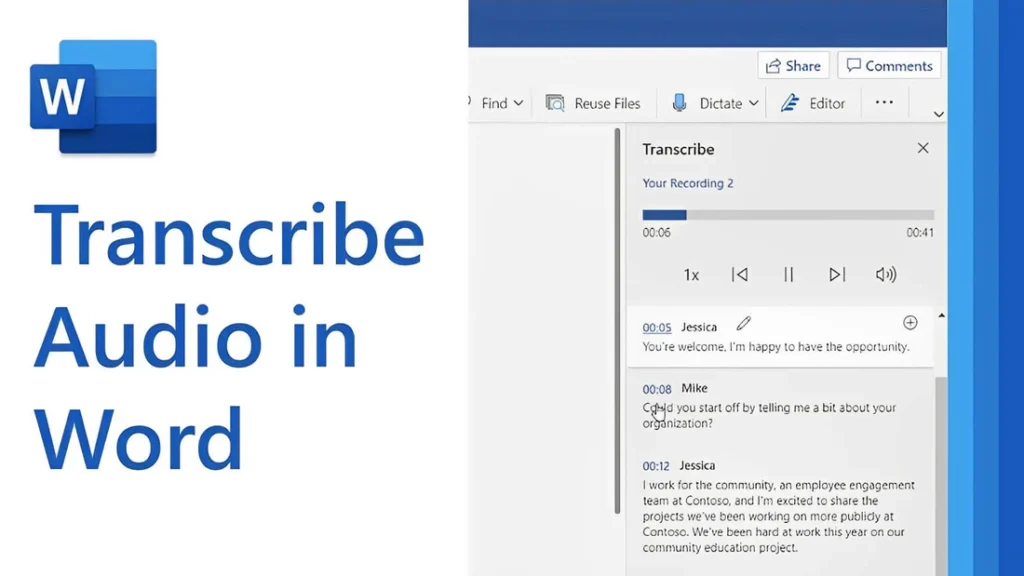
[vc_row type=”in_container” full_screen_row_position=”middle” column_margin=”default” column_direction=”default” column_direction_tablet=”default” column_direction_phone=”default” scene_position=”center” text_color=”dark” text_align=”left” row_border_radius=”none” row_border_radius_applies=”bg” overflow=”visible” overlay_strength=”0.3″ gradient_direction=”left_to_right” shape_divider_position=”bottom” bg_image_animation=”none”][vc_column column_padding=”no-extra-padding” column_padding_tablet=”inherit” column_padding_phone=”inherit” column_padding_position=”all” column_element_direction_desktop=”default” column_element_spacing=”default” desktop_text_alignment=”default” tablet_text_alignment=”default” phone_text_alignment=”default” background_color_opacity=”1″ background_hover_color_opacity=”1″ column_backdrop_filter=”none” column_shadow=”none” column_border_radius=”none” column_link_target=”_self” column_position=”default” gradient_direction=”left_to_right” overlay_strength=”0.3″ width=”1/1″ tablet_width_inherit=”default” animation_type=”default” bg_image_animation=”none” border_type=”simple” column_border_width=”none” column_border_style=”solid”][vc_column_text]Transcribing MP3 files into text is becoming increasingly essential in today’s data-driven world. Whether you’re a researcher, journalist, or business professional, converting audio recordings into text enables easy analysis, efficient documentation, and accurate reporting. While many tools exist, using Microsoft Word offers a simple, cost-effective solution for transcription. In this guide, you’ll learn how to transcribe MP3 files into text using Microsoft Word seamlessly. By the end, you’ll understand the tools required, how to avoid common transcription pitfalls, and how to get the most out of this technology for qualitative research. Understanding the Basics Before proceeding with the steps, let’s explore some foundational concepts about transcription and how Microsoft Word contributes to the process. What Is Transcription? Transcription is converting spoken words in audio or video files into written text. For qualitative researchers, transcription is crucial in analyzing interviews, focus groups, or customer calls. Accurate transcriptions provide a foundation for insights and reports. Understanding Audio Transcription in Microsoft Word Audio transcription in Microsoft Word is a feature that converts spoken words in audio files into written text. This capability is especially useful for businesses and professionals who efficiently document interactions, interviews, and meetings. Audio Transcription in Microsoft Word is revolutionizing how we convert spoken dialogue into written text. This feature allows users, such as team leads and researchers, to document and analyze interviews efficiently for actionable insights. With just a few clicks, users can upload their MP3 files into Word and witness the conversion process unfold. This powerful tool reveals not only verbatim text but also identifies speakers and key themes, such as pain points and behaviors. It is integral for those aiming to streamline their workflow and derive meaningful conclusions from their audio content, making it an invaluable asset in business and work environments. Using AI technology, Microsoft Word can identify speakers and provide a transcript that captures the nuances of conversations, enabling users to analyze and derive insights quickly. Read: Transcript Analysis AI: How It Works How Microsoft Word Transcription Works Microsoft Word now integrates with Microsoft 365’s Dictate Feature, which allows users to transcribe audio files. This feature supports MP3, WAV, and other popular formats and converts audio into editable text within minutes. To get started with audio transcription, first upload your MP3 files into the Word document library. Once uploaded, you can initiate the transcription process, during which the application will analyze the audio. The result is an editable transcript that users can review for accuracy. This transcript allows for extracting key points, such as customer pain points, desires, and behaviors—a crucial step for businesses aiming to understand their audience better. Furthermore, the functionality to add custom insights, like customer compliments, makes the transcription service adaptable to specific business needs. Preparing Your MP3 Files for Transcription Before diving into audio transcription with Microsoft Word, ensuring your MP3 files are primed and ready is crucial. Generally, files should be clear of background noise and have distinguishable speakers for the best results. Here’s a straightforward approach to preparing your recordings: Quality Check: Listen to your MP3 files. Confirm clarity and volume levels are adequate throughout the recording. If necessary, use an audio editing tool to enhance the sound quality. Unnecessarily loud sections or background buzz can hinder transcription accuracy. Format Verification: Microsoft Word supports certain audio formats for transcription. Ensure your MP3 files conform to these specifications to avoid compatibility issues during uploading. Shorten Lengths: If you have particularly long audio files, consider breaking them into shorter segments. This not only facilitates easier handling and management but can also help Microsoft Word’s transcription service process the audio more efficiently, especially if you’re dealing with limited internet bandwidth or processing power. Organize Content: For a streamlined transcription process, organize your MP3 files logically. If you’re working on several interviews or calls, label them appropriately and arrange them in the order they’ll be transcribed. This saves time and confusion later on. By preparing your MP3 files attentively, you can maximize the potential of your audio transcription efforts and gain valuable insights from your conversations. Clean and well-organized audio files are foundational for reliable transcription output, whether for business analysis or project management. Key Features of Microsoft Word’s Transcription Tool Microsoft Word’s transcription tool elevates the ease and efficiency of audio transcription, streamlining the process for businesses and professionals alike. This tool’s standout feature is its ability to distinguish between different speakers, which is highly beneficial for accurately transcribing meetings and interviews. This identification assists users in tracking the flow of conversation and attributing statements to the correct individuals, a critical aspect for clarity and organization of transcribed texts. Additionally, the transcription tool incorporates analysis capabilities, extracting key insights such as pain points, desires, and behaviors from the transcribed text. This aids in quickly identifying important themes and facilitating a deeper understanding of customer interactions or team communications. By using AI, the tool can pinpoint and extract relevant quotes as evidence of these insights, providing users with rich, contextual data for more informed decision-making. The seamless integration of transcription and analysis within Microsoft Word empowers users to unlock actionable insights from their audio files with minimal effort. How to Transcribe MP3 File to Text Using Microsoft Word If you want to convert your MP3 files into text, Microsoft Word offers a straightforward solution for audio transcription. Successfully transcribing MP3 files into text using Microsoft Word requires a clear understanding of the steps involved. Here’s how to transcribe your recordings directly within Word: Open Microsoft Word on your computer and locate the “Dictate” button, which includes the Transcribe option. Select Transcribe and then Upload the audio. Choose the MP3 file you wish to transcribe from your device. Once uploaded, Word will begin transcribing the audio file automatically. Depending on the file’s length,
Transcribe mp3 file to text with Google Drive
[vc_row type=”in_container” full_screen_row_position=”middle” column_margin=”default” column_direction=”default” column_direction_tablet=”default” column_direction_phone=”default” scene_position=”center” text_color=”dark” text_align=”left” row_border_radius=”none” row_border_radius_applies=”bg” overflow=”visible” overlay_strength=”0.3″ gradient_direction=”left_to_right” shape_divider_position=”bottom” bg_image_animation=”none”][vc_column column_padding=”no-extra-padding” column_padding_tablet=”inherit” column_padding_phone=”inherit” column_padding_position=”all” column_element_direction_desktop=”default” column_element_spacing=”default” desktop_text_alignment=”default” tablet_text_alignment=”default” phone_text_alignment=”default” background_color_opacity=”1″ background_hover_color_opacity=”1″ column_backdrop_filter=”none” column_shadow=”none” column_border_radius=”none” column_link_target=”_self” column_position=”default” gradient_direction=”left_to_right” overlay_strength=”0.3″ width=”1/1″ tablet_width_inherit=”default” animation_type=”default” bg_image_animation=”none” border_type=”simple” column_border_width=”none” column_border_style=”solid”][vc_column_text] Audio transcription tools have become invaluable for professionals looking to convert spoken words into written text. Whether you’re conducting interviews, analyzing customer calls, or collecting qualitative data, transcription transforms raw audio recordings into actionable insights. Some wonder “Can you use Google to transcribe audio files to text?” Yes you can. Although Google Drive does not have a built-in audio transcription feature, it offers several workarounds through integrations with tools like Insight7, Google Docs, Marketplace add-ons, etc. These solutions enable you to transcribe MP3 files into text, providing accessibility, analysis, and strategic decision-making opportunities. Understanding how to leverage these tools can be a game-changer for professionals aiming to refine their content strategies, derive insights from their transcripts or enhance market research efforts. Tools to Transcribe Audio (mp3) File to Text with Google Google provides several methods to transcribe audio content, often requiring creativity and the use of additional tools: Insight7: This is an AI-driven platform that integrates effortlessly with Google Drive. Insight7 offers not only transcription capabilities but also advanced analysis, making it a go-to tool for businesses that need to extract actionable insights from their video and audio content. Google Docs Voice Typing: This provides a practical workaround for those looking for a simple transcription method. By playing the audio file aloud, Google Docs’ Voice Typing converts the speech into text in real-time. This method is ideal for straightforward use cases with clear audio, though it may require manual editing to improve accuracy. Google Marketplace Add-Ons: Add-ons such as Transcripto and TranscribeKit can be integrated with Google Drive for smooth transcription processes. They’re particularly useful for teams that frequently handle audio files and need a reliable transcription tool directly in Google Docs. Google Cloud Speech-to-Text API: For more technically inclined users, Google’s API can be employed alongside a Python script to deliver precise audio transcription. Although it requires some coding knowledge, the results can be highly customizable and scalable. By utilizing these tools, you can ensure that the essential details from customer interactions, meetings, or interviews are not lost but preserved and easily accessible for future analysis. Steps for Transcribing MP3 Files Using Google Tools Here’s how to use Google tools and integrations effectively for MP3 transcription: 1. Prepare Your MP3 File for Transcription Before diving into transcription, ensure your MP3 file is in optimal condition. The quality of the audio file directly influences the accuracy of the transcription. Steps to Enhance Audio Quality: Minimize Background Noise: Record in a quiet setting or use noise-reduction software such as Audacity or Adobe Audition. Adjust Microphone Levels: Perform a sound check to avoid distortion and ensure clarity. Amplify Audio: Use tools like Audacity to enhance voice clarity. Test Transcription: Conduct a brief test transcription to gauge audio quality. By following these steps, you can improve transcription accuracy, ensuring the text reflects the audio content accurately. 2. Upload Your MP3 File to Google Drive Uploading your MP3 file to Google Drive is a necessary step before using Google tools for transcription. This centralization makes integration with add-ons and APIs seamless. Steps to Upload Audio: Navigate to Google Drive and click the New button in the top left corner. Select File upload or Folder upload if you’re managing multiple files. Choose the MP3 file from your local drive, and it will start uploading to your Drive. Organize your audio files within My Drive or specific folders and share them with your team if needed. 3. Transcribe mp3 to text: Which Tools Should I Use? Here are the tools to use to transcribe Google audio files to text: a) Use AI Tools like Insight7 While Google tools provide a basic starting point, platforms like Insight7 offer advanced transcription and analysis capabilities. Key Benefits of Insight7: Seamless Integration: Insight7 effortlessly integrates with Google Drive and other major platforms, allowing you to streamline your workflow without any disruptions. Advanced Analytics: Unlock deeper insights into customer interactions and market trends, going beyond basic transcription to uncover actionable data that drives better decisions. User-Friendly Interface: With an intuitive design, Insight7 makes transcription and analysis processes simple and efficient, even for users with minimal technical expertise. Free to Start: Begin exploring Insight7’s powerful features without any upfront cost, offering a low-risk way to enhance your transcription and analysis capabilities. High-Level Accuracy and Multi-Language Support: Insight7 provides precise transcriptions in over 100 languages, making it ideal for global teams working with diverse video content. Automatic Speaker Recognition and Timestamps: Insight7 automatically identifies speakers and adds timestamps, making it easy to follow conversations and highlight key moments. Comprehensive File Format Support: Compatible with MP3, WAV, MP4, and MOV, Insight7 simplifies transcription across various media formats. Custom Export Options: Effortlessly export transcriptions for team sharing, perfect for content creation and collaboration. Beyond transcription, Insight7 offers a comprehensive suite for analyzing video content. From highlighting key themes and extracting actionable insights to categorizing feedback and trends, it’s more than just a transcription tool – it’s a complete solution for decision-making and strategy building b) Google Docs Voice Typing You can use Google Docs to convert voice to text with Google Docs’ Voice Typing. It serves as a practical workaround for simple transcriptions. How to Use Google Docs Voice Typing: Open Google Docs and create a new document. Click on Tools > Voice Typing. A microphone icon will appear. Play your audio file aloud in a quiet environment. Click the microphone icon on Google Docs to start transcribing. The spoken words will be converted into text in real-time. This method is best for audio files with clear sound and minimal background noise. It offers a quick way to convert audio to text but may require manual editing for accuracy. c) Explore Google Marketplace Add-Ons For those seeking a more automated approach, Google Marketplace offers
Transcribe Audio File to Text with Microsoft Teams
[vc_row type=”in_container” full_screen_row_position=”middle” column_margin=”default” column_direction=”default” column_direction_tablet=”default” column_direction_phone=”default” scene_position=”center” text_color=”dark” text_align=”left” row_border_radius=”none” row_border_radius_applies=”bg” overflow=”visible” overlay_strength=”0.3″ gradient_direction=”left_to_right” shape_divider_position=”bottom” bg_image_animation=”none”][vc_column column_padding=”no-extra-padding” column_padding_tablet=”inherit” column_padding_phone=”inherit” column_padding_position=”all” column_element_direction_desktop=”default” column_element_spacing=”default” desktop_text_alignment=”default” tablet_text_alignment=”default” phone_text_alignment=”default” background_color_opacity=”1″ background_hover_color_opacity=”1″ column_backdrop_filter=”none” column_shadow=”none” column_border_radius=”none” column_link_target=”_self” column_position=”default” gradient_direction=”left_to_right” overlay_strength=”0.3″ width=”1/1″ tablet_width_inherit=”default” animation_type=”default” bg_image_animation=”none” border_type=”simple” column_border_width=”none” column_border_style=”solid”][vc_column_text] In a world increasingly reliant on virtual communication, the ability to transcribe audio files to text has become a game-changer. Whether for meetings, lectures, interviews, or team collaborations, transcription allows for accurate record-keeping and simplifies analyzing spoken content. Teams Transcription offers a robust solution for converting your Microsoft Teams audio files into written text, enabling easy analysis for actionable insights. Ideal for businesses seeking to understand customer needs and behaviors, this service automatically identifies speakers and extracts key points, such as pain points, desires, and behaviors from conversations. With the added ability to customize data extraction, your team can gain a comprehensive understanding of client interactions quickly and accurately. Teams Transcription is an indispensable tool for anyone who needs to streamline their workflow and enhance their data analysis capabilities. This guide will walk you through how to transcribe audio files to text using Microsoft Teams, highlighting its transcription capabilities, common challenges, and best practices. By the end of this article, you’ll be equipped to make the most of Teams’ AI-powered tools to boost your productivity and enhance team collaboration. Can Microsoft Teams Transcribe Audio? Yes, Microsoft Teams has transcription features designed to convert meeting audio into text automatically. This capability is part of its AI-powered toolkit, making transcription quick and accurate. However, these features are primarily available for live meetings and recordings. How Does Transcription Work in Teams? Microsoft Teams uses AI to process audio data and generate text transcriptions. Once enabled during a meeting, the platform captures audio in real time and automatically creates a text transcript. These transcripts can be accessed and shared after the meeting, making reviewing discussions or sharing summaries easier. How to Use Teams Transcription to Convert Audio Files to Text To effectively utilize Teams Transcription, first ensure that your audio files are uploaded into the app’s library section. This is where all your data—including videos and documents—is stored after upload. Once in the library, the transcription service converts your audio content into written text. This function is particularly seamless with Teams calls, enabling effortless identification of speakers and the subsequent transcription of their dialogue. After transcription, you can extract meaningful insights from the text. The default settings allow you to identify key points such as pain points, desires, and behaviors from customer interactions, which are essential for gaining customer insights. However, the system also offers customization options, allowing you to highlight additional data points such as compliments or other customer requests. Teams Transcription enables you to pull direct quotes from the transcript for each insight, providing valuable context to the identified points. Furthermore, all services are cloud-based, ensuring accessibility and secure data storage. Steps to Transcribe an Audio File in Microsoft Teams For businesses and professionals looking to optimize their workflow, transcribing audio files into text is a game-changer. Microsoft Teams offers a transcription feature that simplifies this process. Here are the necessary steps: Step 1: Enable Transcription for Your Microsoft Teams Account Before transcribing audio files, ensure transcription is enabled in your Teams settings. Key Actions: Check Admin Settings: Only administrators can enable transcription for the entire organization. Ask your IT admin to turn on the “Allow Transcription” setting in the Teams admin center. Enable Live Captions: Navigate to the meeting options in Teams and ensure live captions are turned on. Transcription relies on this feature. Verify Recording Permissions: Confirm that your account has permission to record meetings, as transcription is linked to recordings. Common Mistake to Avoid: Not checking admin permissions in advance, which can delay transcription availability. Step 2: Record the Audio in a Teams Meeting Transcription in Teams is most effective when paired with recorded meetings. Key Actions: Start the Meeting: Begin a meeting in Teams as usual. Start Recording: Click the three-dot menu (…) and select “Start Recording.” This activates both the recording and transcription features. Enable Live Transcription: Click the three-dot menu again and select “Start Transcription.” Pro Tip: Inform participants that the meeting is being recorded and transcribed for transparency and compliance. Step 3: Access the Transcription After the Meeting Once the meeting ends, Teams automatically saves the transcript alongside the recording. Key Actions: Locate the Transcript: Go to Teams’s meeting chat or recording link. The transcript is saved under the “Recordings & Transcripts” tab. Download the Transcript: Click on the transcript and select “Download” to save it as a text file or Word document. Edit for Accuracy: Review the downloaded transcript for any inaccuracies or formatting issues, especially if multiple speakers were involved. Pro Tip: Use the time-stamped transcript to locate specific sections of the recording quickly. Step 4: Transcribe Pre-Recorded Audio Files If you need to transcribe an audio file outside of a Teams meeting, use a workaround since Teams doesn’t directly support file uploads for transcription. Key Actions: Play the Audio File During a Meeting: Start a Teams meeting and share your system audio while playing the file. Enable Recording and Transcription: Follow the steps in Step 2 to record and transcribe the audio. Common Mistake to Avoid: Forgetting to optimize audio quality, which can lead to inaccurate transcriptions. Step 5: Share and Utilize the Transcript Once your transcript is ready, share it with your team or use it for further analysis. Key Actions: Share via Teams: Upload the transcript to the meeting chat or a shared channel for easy access. Analyze with Insight7: Use Insight7 to extract key themes and actionable insights from the transcript. Incorporate Findings: Summarize the transcript’s key points in presentations, reports, or meeting follow-ups. With these steps, leveraging Teams Transcription goes beyond mere text conversion; it enables users to extract key points that may help make data-driven decisions. Remember to regularly save your work and review the transcription for accuracy, ensuring the final text serves its
Transcribe video file to text with Google Docs
[vc_row type=”in_container” full_screen_row_position=”middle” column_margin=”default” column_direction=”default” column_direction_tablet=”default” column_direction_phone=”default” scene_position=”center” text_color=”dark” text_align=”left” row_border_radius=”none” row_border_radius_applies=”bg” overflow=”visible” overlay_strength=”0.3″ gradient_direction=”left_to_right” shape_divider_position=”bottom” bg_image_animation=”none”][vc_column column_padding=”no-extra-padding” column_padding_tablet=”inherit” column_padding_phone=”inherit” column_padding_position=”all” column_element_direction_desktop=”default” column_element_spacing=”default” desktop_text_alignment=”default” tablet_text_alignment=”default” phone_text_alignment=”default” background_color_opacity=”1″ background_hover_color_opacity=”1″ column_backdrop_filter=”none” column_shadow=”none” column_border_radius=”none” column_link_target=”_self” column_position=”default” gradient_direction=”left_to_right” overlay_strength=”0.3″ width=”1/1″ tablet_width_inherit=”default” animation_type=”default” bg_image_animation=”none” border_type=”simple” column_border_width=”none” column_border_style=”solid”][vc_column_text]In the age of digital transformation, videos are a dominant medium for communication, learning, and research. Video Transcription with Google Docs is a pivotal tool for professionals seeking efficient ways to convert video content into textual form. From interviews to webinars, video files often contain valuable information that needs to be converted into text for easier analysis, sharing, and documentation. It serves as a bridge, enabling users to upload video files directly from their computers or Google Drive and swiftly transcribe them into text. Whether for capturing crucial points discussed in a meeting, analyzing interview data, or enhancing content marketing strategies, the transcription feature within Docs streamlines the process. It saves time and allows easy integration of transcripts into project folders for subsequent analysis. By unlocking the potential of Video Transcription in Docs, businesses, and individuals can easily accelerate their workflow and derive actionable insights from their video files. In this guide, we’ll explain how to use Google Docs to transcribe video files to text, explain the benefits and limitations of this method, and discuss how advanced tools like Insight7 can enhance your transcription and qualitative analysis processes. By the end of this guide, you will: Understand how Google Docs Voice Typing works for video transcription. Learn step-by-step how to transcribe a video file to text. Discover how Insight7 can complement transcription workflows by turning raw transcripts into actionable insights. Understanding Video Transcription with Google Docs What Is Video Transcription? Video transcription involves converting spoken words from a video file into a written format. It’s widely used for creating subtitles, extracting insights from interviews, and documenting video content for reference or analysis. Why Use Google Docs for Video Transcription? Google Docs offers a built-in Voice Typing feature that uses speech recognition technology to capture spoken words and convert them into text. Although not specifically designed for transcription, this feature can transcribe audio from a video file played through your device’s speakers. How Does It Work? The Voice Typing tool listens to audio through your device’s microphone and transcribes it in real time. By playing the video near the microphone, the tool converts the spoken content into text within Google Docs. Limitations of Google Docs for Transcription While Google Docs Voice Typing is free and easy to use, it does have limitations: Audio Quality Dependency: Clear audio is essential for accurate transcription. Limited Features: Unlike professional transcription tools, it lacks advanced capabilities such as speaker identification or automated punctuation. Manual Editing Required: You’ll need to review and correct the text for accuracy. Read: Transcribe mp3 file to text with Microsoft word Steps to Transcribe Video Files to Text with Google Docs A streamlined process ensures efficiency and accuracy when transcribing video files to text using Google Docs. Begin by uploading your video into a transcription tool such as Insight7.io, which can automatically convert speech into a written transcript. After the transcription is complete, you can import this text directly into Google Docs for further editing and refinement. Google Docs’ Voice Typing feature offers an accessible way to transcribe video files into text. Follow these steps to complete the process effectively: Step 1: Set Up Your Workspace Before you start, create an ideal environment for transcription. Quiet Environment: Ensure there is minimal background noise to avoid interference with the transcription. Functional Microphone: Test your microphone to ensure it captures audio clearly. Tools You’ll Need: A computer or laptop. A video file you want to transcribe. Import your video file into a transcription service from your computer or Google Drive. Access to Google Docs via a browser (preferably Chrome for optimal performance). Step 2: Enable Voice Typing in Google Docs Open Google Docs and create a new blank document. Navigate to the Tools menu at the top of the screen and select Voice Typing from the dropdown. A microphone icon will appear on the left-hand side of your screen. Pro Tip: Ensure you have a stable internet connection, as Google Docs relies on cloud processing for voice recognition. Step 3: Play Your Video File Now, it’s time to prepare your video file for transcription. Open the video file on your computer using your preferred video player. Position your device’s microphone close to the speakers to capture audio effectively. Set the video volume to a moderate level to ensure clarity. Step 4: Start Transcribing Click the microphone icon in Google Docs to activate Voice Typing. Press play on your video file and allow the audio to play naturally. Watch as Google Docs begins transcribing the audio into text in real time. Common Tip: Pause the video periodically to make corrections or ensure the transcription is capturing the content accurately. Step 5: Edit and Save Your Transcript Once the video is fully transcribed: Pause the transcription by clicking the microphone icon again. Carefully review the document to fix any errors, punctuation issues, or formatting inconsistencies. Save your transcript to Google Drive or download it in your preferred format (e.g., Word or PDF). Optional Step: Route Audio Internally for Higher Accuracy If you want to improve transcription accuracy and bypass ambient noise: Use tools like VB-Audio Cable or Soundflower to route audio directly from your video player to Google Docs. These tools eliminate background noise by feeding the audio directly to the transcription software. Through this technique, you can harness AI-based transcription services to streamline the conversion of video content into text, optimizing for both time and effort. Whether for content marketing or data analysis, this transcription process allows for more accessible data extraction and deeper insights into customer behaviors, desires, and pain points. By integrating these steps, businesses can enhance their content strategy and capitalize on the rich information embedded in their video files. Read: Transcribe audio file to text with Google Docs
Transcribe audio file to text with Google Drive
[vc_row type=”in_container” full_screen_row_position=”middle” column_margin=”default” column_direction=”default” column_direction_tablet=”default” column_direction_phone=”default” scene_position=”center” text_color=”dark” text_align=”left” row_border_radius=”none” row_border_radius_applies=”bg” overflow=”visible” overlay_strength=”0.3″ gradient_direction=”left_to_right” shape_divider_position=”bottom” bg_image_animation=”none”][vc_column column_padding=”no-extra-padding” column_padding_tablet=”inherit” column_padding_phone=”inherit” column_padding_position=”all” column_element_direction_desktop=”default” column_element_spacing=”default” desktop_text_alignment=”default” tablet_text_alignment=”default” phone_text_alignment=”default” background_color_opacity=”1″ background_hover_color_opacity=”1″ column_backdrop_filter=”none” column_shadow=”none” column_border_radius=”none” column_link_target=”_self” column_position=”default” gradient_direction=”left_to_right” overlay_strength=”0.3″ width=”1/1″ tablet_width_inherit=”default” animation_type=”default” bg_image_animation=”none” border_type=”simple” column_border_width=”none” column_border_style=”solid”][vc_column_text] Audio Transcription is a vital tool for professionals aiming to harness the power of spoken word analysis, offering a seamless path from voice to text. With the right tools, such as those provided through Google Drive, users can easily convert interviews, calls, and meetings into editable text that can be sifted for insights. This process not only streamlines the documentation of discussions but also allows for the extraction of customer pain points, desires, and behaviors, thus providing invaluable data for business strategists and team leaders. Understanding how to transcribe audio files effectively with Google Drive can be a game-changer for anyone looking to enhance their workflow and derive meaningful conclusions from their interactions. Google Drive, coupled with Google Docs’ voice typing feature, offers a cost-effective way to transcribe audio files to text. This guide will walk you through the process of using Google Drive to transcribe audio, highlighting practical steps, common pitfalls, and advanced strategies to ensure accuracy and efficiency. Additionally, you’ll learn how Insight7 can complement this workflow, enhancing your transcription and analysis process with its advanced features. By the end of this guide, you’ll have a clear understanding of how to leverage Google Drive for transcription and how Insight7 can take your qualitative research to the next level. How Does Google Drive Help with Transcription? Transcription is the process of converting spoken language from an audio file into written text. It is particularly valuable for qualitative researchers who need to analyze recorded interviews, meetings, or lectures. Accurate transcriptions form the basis for extracting actionable insights. Google Drive itself doesn’t directly transcribe audio files. Instead, it acts as a storage and access platform for audio files that can be processed using Google Docs’ voice typing tool. This feature allows you to play an audio file and dictate the text in real-time, producing a transcription. Why Use Google Drive for Transcription? Accessibility: Google Drive integrates seamlessly with Google Docs, allowing you to store, share, and access files from anywhere. Cost-Effective Solution: Both Google Drive and Google Docs are free, making them an excellent choice for individuals and small teams. Ease of Use: Google’s intuitive interface simplifies the transcription process, even for beginners. Step-by-Step Guide to Transcribe Audio Files to Text When it comes to converting your audio files into accurate text documents, an audio transcription feature within Google Drive can streamline the process for your business workflow. Follow these steps to ensure smooth transcription: Step 1: Upload the Audio File to Google Drive Before diving into audio transcription, its crucial to get your audio files onto Google Drive. The first step is to store your audio file securely in Google Drive. Uploading is straightforward and here’s how to do it: Navigate to your Google Drive homepage and log in using your Google account credentials. Once there, look for the New button on the top left and select File upload from the dropdown menu. Locate the audio files on your computer and start the upload process. Wait for the file to upload. Larger files may take a few minutes depending on your internet speed. Place the audio file in a specific folder to keep your Drive organized. Rename the file for easy identification, especially if you’re transcribing multiple files. Remember, the audio files need to be in a format supported by the transcription tools you intend to use. Use supported audio formats such as MP3 or WAV to avoid compatibility issues with third-party transcription tools. After your audio files are uploaded, they will appear in My Drive, ready to be integrated into your projects. If you’re collaborating with a team, you can move the files into shared folders to ensure all team members have access. For bulk uploads, while the current process may require uploading files one by one, it still streamlines the workflow significantly. Once in place, these files can be transcribed into text, paving the way for easier data analysis, content creation, or record-keeping for your business or work. Step 2: Opeen Google Docs and Enable Voice Typing Then, access Google Docs and select “Voice typing” from the Tools menu. Click the microphone icon, and play your audio file clearly into the system. Choose your desired language from the dropdown menu. Google Docs supports multiple languages, but it works best with widely spoken ones like English, Spanish, and French. Use an external audio player, such as VLC Media Player, to play the file. Adjust the playback speed for better synchronization with the voice typing tool. Step 3: Transcribe the Audio Using Voice Typing Now that you’ve set up voice typing, the next step is to create the transcription. Play the audio file from your external audio player. Adjust the volume so the microphone captures the audio clearly. Click the microphone icon in Google Docs to start voice typing. Google’s powerful voice recognition technology will transcribe the spoken words into text in real-time. You can pause the audio playback to allow the voice typing tool to catch up, and also resume playback once the transcription is in sync. Step 4: Edit and Format the Transcription After completing the voice typing process, your transcription will appear in the Google Docs document. The next step is to refine and format it for clarity and accuracy. It’s imperative to review the transcribed text for accuracy, since nuances in speech, such as accents or jargon can result in minor errors. Voice typing tools can misinterpret words, especially if the audio quality is poor or there are multiple speakers. Edit the document as necessary to ensure the transcription reflects the original audio with complete accuracy. Correct any misheard phrases or unclear text. Bold or italicize critical statements or action points for easy reference. Save the Google Docs file and export it as
Transcribe Video File to Text With Google Drive
Transcribing video content manually can be a tedious and time-consuming process. Whether you’re a student, content creator, or business professional, manually typing out what’s spoken in a video file can feel overwhelming. Yet, transcribing videos is critical for accessibility, creating accurate records, and repurposing content into articles, reports, or presentations. Whether it’s for accessibility, enhanced searchability, or extracting deeper insights, having a video-to-text transcription saves time and increases productivity. While Google Drive itself doesn’t directly transcribe video files, there are effective workarounds and integrations with tools like Google Docs, add-ons, Cloud speech-to-text and AI-powered platforms like Insight7. These solutions convert audible content into text, nurturing the potential for deeper analysis and insight extraction. This capability ensures that insights from customer interactions, such as interviews or meetings, are not lost in translation but preserved and made searchable, enabling a more efficient workflow for professionals and other stakeholders. Understanding these tools and methods can be a game-changer for those looking to refine their content strategies or enhance market research efforts. Understanding the Basics: Google Transcribe Video to Text Video transcription refers to converting spoken words in a video into written text. This is particularly important in fields such as education, content creation, and business, where accurate records of discussions, interviews, or presentations are necessary. For videos stored in Google Drive, transcription enhances accessibility by providing text formats that are easy to search and analyze. With tools like Insight7, video transcription becomes an effortless process, especially if you want Google Drive video to text transcription that integrates seamlessly and provides accurate, detailed transcriptions. It is designed for cloud-based video transcription, making it an ideal solution for Google Drive video transcription. Google-related Tools for Video Transcription Google offers several ways to transcribe video content, though it may require some creativity and additional tools: Google Docs Voice Typing Insight7 Google Marketplace Add-Ons Google Cloud-Speech-to-Text API Google Docs Voice Typing: Google Docs comes with a built-in voice typing feature, which can be used to transcribe video files by playing the audio into the microphone. Use Google Docs’ Voice Typing feature as a workaround to transcribe video content. Play the video aloud while the tool converts speech to text in real-time or consider using Free AI transcription platforms like Insight7 that integrate with Google Drive to offer a comprehensive transcription and analysis solution. Insight7 helps simplify Google Drive video transcription, allowing you to extract insights and use video content more effectively. Google Marketplace Add-Ons: Add-ons like Transcripto or TranscribeKit can be integrated with Google Drive to facilitate transcription. Google Cloud Speech-to-Text API: For more technical users, Google Cloud’s API can be used with a Python script to achieve accurate video transcription. Steps for Transcribing Video Files Using Google Tools Here’s how you can leverage Google tools and integrations to transcribe video files effectively: 1. Enhance Audio Quality Before Transcription Before transcribing your videos, it’s vital to ensure the audio quality is at its best. Clear audio translates to higher accuracy in video transcription, which is paramount for professional settings where precise documentation is essential. Steps to Enhance Audio Quality: Eliminate Background Noise: Record in a quiet environment or utilize noise-cancellation software like Audacity or Adobe Audition. Adjust Microphone Levels: Avoid distortion by performing a sound check prior to recording. Amplify Audio: Use tools like Audacity to ensure voices are audible and distinct. Test Transcription: Conduct a test transcription of a short segment to gauge audio quality. By following these guidelines, you can optimize the transcription process, saving time and ensuring the text reflects the video content accurately. 2. Upload Your Video to Google Drive The first step in the process is to upload your video file to Google Drive. Google Drive supports various video file formats, including MP4, AVI, and MOV, making it compatible with most video types. Log in to Google Drive: Start by logging into your Google Drive account. If you don’t have an account, you can easily create one for free. Upload your video file: Click the “New” button on the left-hand side, then select “File Upload.” Locate the video file on your computer that you want to transcribe and upload it to Google Drive. Wait for the upload to finish: Depending on your file size and internet speed, the upload might take a few minutes. Google Drive offers up to 15GB of free storage, so ensure your video file fits within that limit. For larger files, consider upgrading to a Google One plan. Organize your video files within My Drive or specific folders, and share them with your team if needed. Ensure that your video formats are supported by Google Drive for seamless uploading and subsequent transcription processes. 3. Transcribe: What tools should I use? a) Using Google Docs Voice Typing While Google Drive doesn’t directly transcribe videos, Google Docs’ Voice Typing feature can serve as a practical workaround for simple transcriptions. Steps to Use Voice Typing: Open Google Docs and create a new document. Click on Tools > Voice Typing. A microphone icon will appear. Play your video aloud in a quiet environment. Click the microphone icon to start transcribing. The spoken words from the video will be converted into text in real-time. This method works best for videos with clear audio and minimal background noise. It’s a quick way to convert audio into text but may require some manual editing for accuracy. b) Use AI Tools like Insight7 While Google tools provide a starting point for video transcription, platforms like Insight7 offer advanced solutions that provides quality transcription and analysis capabilities. With Insight7, you can connect your Google Drive directly, eliminating the need to download and re-upload video files. This integration makes the entire transcription process more efficient, especially for projects requiring large or multiple files. Going beyond simple transcription, Insight7 enables you to unlock deeper insights from your video content through features like theme extraction, sentiment analysis, and data visualization. This is perfect for users looking to analyze interviews, focus group discussions, or other qualitative content. Key Benefits of
AI Transcript: Tools and Applications
AI Communication Tools are revolutionizing how we interact with both customers and colleagues. Imagine a workplace where conversations are automatically transcribed, analyzed, and summarized, allowing teams to focus on what really matters. These tools convert spoken dialogues into actionable insights, transforming raw data into valuable information that can influence decision-making. As organizations increasingly rely on data-driven strategies, understanding the capabilities of AI Communication Tools becomes essential. They not only save time but also enhance clarity in communication by capturing important details in real-time. By integrating these technologies, businesses can streamline operations and gain a competitive edge in the marketplace. Understanding AI Transcript Technology AI communication tools have revolutionized the way we handle and interpret spoken content. These tools utilize advanced algorithms to convert audio or video data into written text, known as transcription. This technology is especially beneficial for businesses, as it allows for accurate documentation of discussions, meetings, and customer interactions. By streamlining the transcription process, companies can ensure that vital information is captured reliably. Another exciting aspect of AI transcription technology is its ability to enhance data analysis. By providing text output from conversations, organizations can extract insights and identify trends more effectively. This capability facilitates better decision-making and fosters a culture of transparency within teams. As organizations continue to embrace these tools, understanding their functionality and applications becomes crucial for maximizing efficiency and improving communication strategies. Key Features of AI Transcription AI transcription tools offer several key features that enhance communication efficiency and accuracy. Firstly, they provide real-time transcription, which allows users to access text as conversations unfold. This capability is particularly beneficial for meetings and interviews where immediate notes can improve focus and retention. Secondly, advanced speech recognition algorithms continually improve transcription precision, supporting various accents and dialects, thus ensuring inclusivity in diverse environments. Additionally, many AI transcription tools integrate seamlessly with existing communication platforms. This integration allows for a streamlined workflow, enabling users to easily convert audio or video files into text. The tools often come equipped with features like speaker identification and keyword tagging. These features make it simpler to navigate through long transcripts and extract critical information efficiently. Overall, the innovative functionalities of AI communication tools empower users to enhance their productivity and optimize their collaborative efforts. Evolution of AI in Language Processing The evolution of AI in language processing can be understood through several key milestones that reflect its growing sophistication. Initially, AI communication tools were primarily rule-based systems, which relied on pre-defined scripts and patterns to understand human language. This early framework limited the ability of these tools to effectively engage with users in a natural manner. As machine learning techniques emerged, AI began to analyze vast amounts of text data, enabling it to recognize patterns and improve its understanding of grammatical structures and contextual meanings. With advancements in deep learning, the capabilities of AI communication tools expanded significantly. Modern systems can now generate coherent and contextually relevant responses in real time. This transformation has made AI invaluable in various applications, such as chatbots, virtual assistants, and transcription services. As these tools continue to evolve, they present new opportunities and challenges in how we interact with technology, emphasizing the need for continuous refinement and understanding of language nuances. AI Communication Tools in Everyday Applications AI Communication Tools have seamlessly integrated into various everyday applications, significantly enhancing how we interact. Imagine a virtual assistant that can summarize your meetings or highlight key points from discussions. These tools not only boost productivity but also ensure that valuable insights are not lost. By automatically capturing essential information, they allow users to focus on meaningful interactions rather than note-taking. In addition to summarization, AI Communication Tools can personalize messaging by analyzing past interactions. This capability enables them to suggest responses or provide context for future communications based on historical data. As a result, users can maintain more engaging and relevant conversations. By understanding individual preferences, these tools facilitate smoother collaboration in both personal and professional settings, making them indispensable in our digitally driven lives. Enhancing Business Communication Effective communication is fundamental to any business interaction. AI communication tools can significantly enhance this aspect by streamlining processes and ensuring clarity. These advanced tools help analyze conversations, highlight recurring topics, and provide actionable insights. This comprehensive understanding enables teams to adjust their communication strategies proactively, aligning them with customer inquiries and expectations. Incorporating AI communication tools not only improves response times but also fosters a culture of continuous feedback. Businesses can better assess training programs and adjust their marketing content to meet customer needs. Enhanced communication empowers organizations to create informative materials and training modules, ensuring that employees are well-equipped to engage with clients. Ultimately, using these innovative tools paves the way for stronger business relationships and increased customer satisfaction. Educational Benefits of AI Transcription AI Communication Tools have the potential to revolutionize educational environments by enhancing learning experiences and accessibility. The transcription of lectures, meetings, and discussions allows students to focus on content rather than taking notes, improving retention and comprehension. By providing text versions of spoken material, AI transcription ensures that all learners, including those with hearing impairments, have equal access to information. Moreover, AI transcription tools can facilitate collaborative learning. Students can easily share transcripts, highlight key concepts, and engage in discussions based on recorded sessions. This level of accessibility fosters a more inclusive educational atmosphere and promotes active participation among peers. Furthermore, educators can use transcripts to identify students' challenges, allowing for tailored support and intervention. Overall, the integration of AI transcription in education not only enhances communication but also encourages a deeper understanding of complex topics, ultimately enriching the learning experience. Conclusion: The Future of AI Communication Tools As we look to the future of AI communication tools, it becomes clear that these innovations will transform how we interact and share information. These tools will enable more seamless conversations, allowing users to access insights quickly and efficiently. Additionally, enhanced data analysis capabilities will lead to better understanding of audience needs, making
Convert Transcript to Meeting Minutes AI
In today's fast-paced business environment, capturing critical insights from meetings is more important than ever. The challenge lies not just in collecting information, but in transforming that data into actionable meeting minutes. AI-Powered Summarization offers a groundbreaking solution to this common dilemma, making note-taking more efficient and effective. By automatically distilling lengthy transcripts into concise summaries, AI-Powered Summarization enables teams to focus on what truly matters. This innovative technology captures key themes and insights, enhancing collaboration and decision-making processes. With its ability to streamline the administrative tasks associated with meetings, organizations can redirect their efforts towards strategic initiatives and drive productivity. The Role of AI-Powered Summarization in Modern Meetings AI-Powered Summarization is transforming how meetings are conducted and recorded in today's digital age. By converting lengthy discussions into concise and meaningful meeting minutes, it enhances clarity and efficiency for participants. This technology sifts through the data generated in meetings, extracting essential points while filtering out superfluous details. The benefits of this technology are manifold. Firstly, it saves time, allowing participants to focus on action items instead of recalling every detail discussed. Secondly, it ensures consistency in documentation, capturing the essence of conversations without bias. Thirdly, AI-Powered Summarization enhances accessibility by making notes readily available for future reference, promoting transparency and collaboration among teams. As meetings evolve, leveraging this summarization tool will be crucial in optimizing productivity and improving communication within organizations. Understanding AI-Powered Summarization Technologies AI-powered summarization technologies play a crucial role in transforming extensive conversations, such as those found in meetings, into concise and actionable meeting minutes. By analyzing audio transcripts, these tools discern the vital points, emerging themes, and key insights, making it easier to digest large amounts of information. They excel at identifying recurring topics and sentiments expressed throughout various discussions, allowing organizations to capture the essence of what was discussed efficiently. Such technologies operate on advanced algorithms that understand context, tone, and urgency. They can compile summaries that highlight important themes, such as resource allocation and feedback analysis, alongside specific quotes from participants. The result is a streamlined output that facilitates decision-making and enhances communication within teams. Understanding these AI capabilities can significantly improve how organizations document and utilize the insights garnered from their conversations, ensuring that no valuable information goes overlooked. Benefits of Using AI for Creating Meeting Minutes AI-Powered Summarization provides significant advantages when creating meeting minutes. First, it enhances efficiency by rapidly converting lengthy transcripts into concise summaries. This saves time for team members who would otherwise spend hours sifting through notes to capture key points. Additionally, AI can ensure that important details are not overlooked, helping to maintain accuracy and completeness in documentation. Moreover, consistency is another benefit gained from using AI in this context. By standardizing the summarization process, organizations can expect uniformity in the formatting and content of meeting minutes. AI tools can also be programmed to highlight action items and deadlines, promoting accountability among team members. Ultimately, adopting AI-powered summarization transforms the way organizations document meetings, leading to more effective communication and improved follow-up actions. By integrating AI into the meeting documentation process, teams can focus more on strategic discussions and less on manual minute-taking tasks. How AI-Powered Summarization Transforms Meeting Transcripts AI-Powered Summarization is revolutionizing the way we handle meeting transcripts. Traditionally, reviewing transcripts can be a time-consuming task, often leaving important details overlooked. With AI, the process becomes streamlined and efficient. Significant insights and recurring themes can be extracted with remarkable accuracy, allowing teams to focus on decision-making rather than sifting through pages of dialogue. By employing advanced algorithms, AI-Powered Summarization identifies key points, highlights essential discussions, and organizes information clearly. This not only enhances productivity but also ensures that critical matters are communicated effectively. Teams can quickly generate actionable meeting minutes that capture the essence of discussions, ensuring everyone stays on the same page. With this transformative technology, organizations can turn lengthy conversations into concise, meaningful summaries that drive progress. Key Features of Transcript to Meeting Minutes AI Tools AI-Powered Summarization revolutionizes how we convert transcripts into meeting minutes. These tools utilize advanced algorithms to analyze spoken dialogue, identify key discussion points, and create concise summaries. This feature significantly enhances efficiency by reducing the time spent on manual note-taking and ensuring that critical information is not overlooked. Another essential aspect is real-time processing. These AI tools can generate meeting minutes as discussions unfold, allowing participants to focus on conversation rather than note-taking. Users benefit from customizable templates that cater to various industries or specific meeting formats. Integration capabilities with popular collaboration platforms allow seamless workflows, further streamlining the process. The ability to search through past meeting minutes and transcripts quickly ensures that team members can refer back to previous discussions with ease. Overall, these features together contribute to more productive meetings and comprehensive documentation. Best Practices for Implementing AI Solutions in Your Organization When implementing AI-powered summarization in your organization, start by ensuring a clear understanding of your objectives. Define what you aim to achieve with AI solutions, as this will guide your implementation process. Aligning AI capabilities with organizational goals helps streamline the transition and minimizes disruption. Next, involve key stakeholders early in the process. Their insights can identify potential challenges and opportunities, fostering a collaborative approach that enhances acceptance of the technology. Provide comprehensive training to your teams, ensuring they know how to utilize AI tools effectively. Finally, continuously monitor performance after implementation. Regular feedback and adjustments will optimize the system and enhance its efficacy in converting transcripts to meeting minutes. Following these best practices will help your organization embrace AI solutions smoothly and successfully. Conclusion: The Future of AI-Powered Summarization in Business Meetings AI-Powered Summarization is reshaping the way businesses document their meetings. It streamlines the process of converting extensive transcripts into concise meeting minutes, making it easier for teams to focus on critical decisions and action items. This technology not only enhances efficiency but also ensures that valuable insights from discussions are captured accurately and shared effectively. Looking ahead, the role
