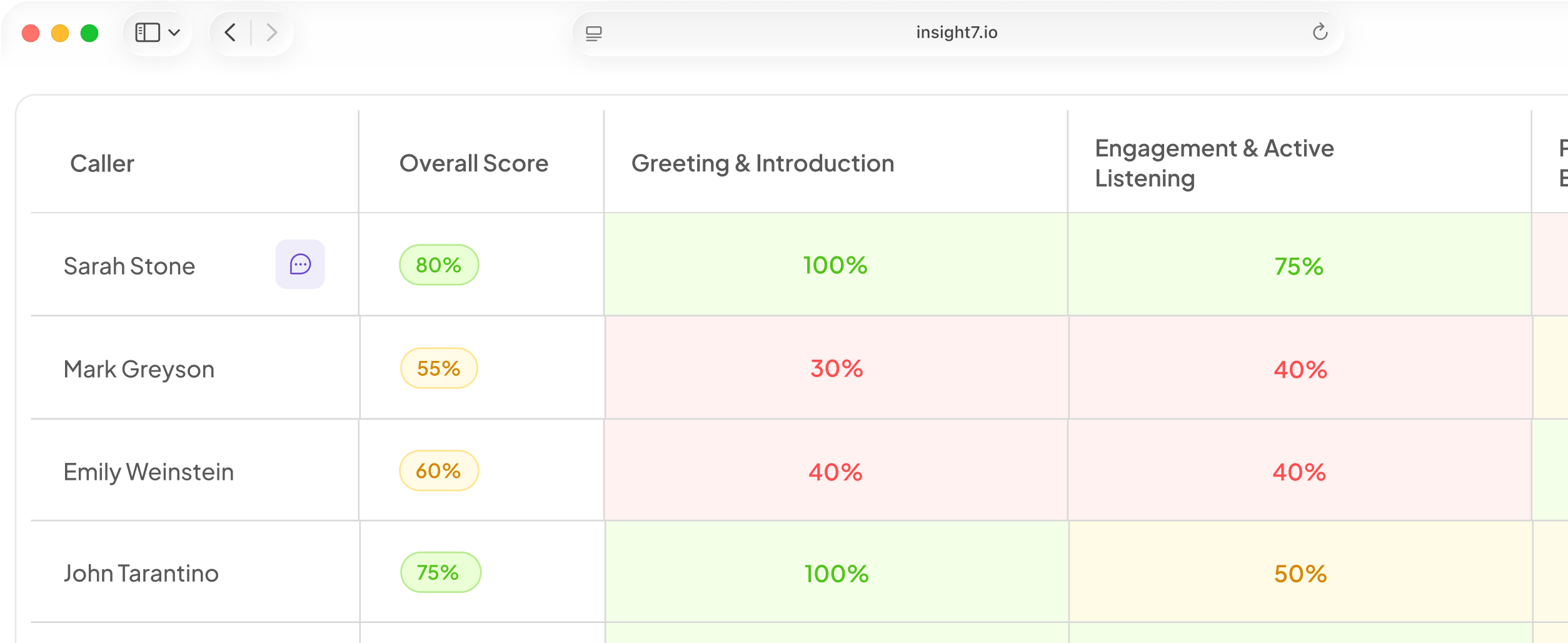

7 Best AI Tools for Video Analysis in 2026
Key Points:
- Insight7: best for turning recorded customer calls, sales, support, and coaching sessions into scored, compliance-ready coaching data.
- Google Cloud Video Intelligence: best for GCP teams tagging and searching large media archives.
- Amazon Rekognition Video: best for AWS-native security, surveillance, and identity-tracking workloads.
- Microsoft Azure Video Indexer: best for Microsoft-ecosystem teams doing ad insertion and media library management.
AI video analysis means something different depending on who is asking. A Sales Ops leader means scoring recorded calls for coaching while a developer wants an API that tags objects across a media archive.
Same search term, three different tools, and picking the wrong one wastes a trial cycle finding that out the hard way. For a Sales Ops or CX leader comparing options, the risk is evaluating a platform built for security footage against a checklist written for customer calls.
This piece covers 7 AI video analysis tools in 2026, what each one costs today, what real users say about it, and which use case it actually fits, including where a tool like Insight7 simply isn’t the right choice.
The 7 Best AI Video Analysis Tools at a Glance
|
Tool |
Best For |
Stand-Out Feature |
Starting Price |
|
Insight7 |
Customer-facing video calls (sales, support, coaching) |
Scores every call against a rubric with automatic compliance flagging |
Free plan; paid from $99/mo |
|
Google Cloud Video Intelligence |
GCP teams tagging large media archives |
Frame-level label detection piped straight into BigQuery |
Free (1,000 min/mo/feature), then from $0.048/min |
|
Amazon Rekognition Video |
AWS-native security and identity tracking |
Real-time facial and object detection at AWS scale |
$0.10/min, down to $0.04/min at high volume |
|
Microsoft Azure Video Indexer |
Microsoft-ecosystem media and ad-insertion teams |
Multi-language captioning with a no-code review portal |
Free trial (10 hrs); custom per-minute quote after |
|
Clarifai |
Developers needing flexible, custom-trainable vision models |
Train and deploy custom models via API or no-code UI |
Free (1,000 ops/mo); paid from $30/mo |
|
Twelve Labs |
Teams building natural-language video search into their product |
Marengo + Pegasus foundation models understand video natively |
Free (600 min); pay-as-you-go from $0.042/min |
|
Mixpeek |
Engineering teams building custom video-intelligence infrastructure |
One API across video, audio, images, PDFs, and text |
From $25/mo minimum |
1. Insight7: Best for Customer-Facing Video Calls
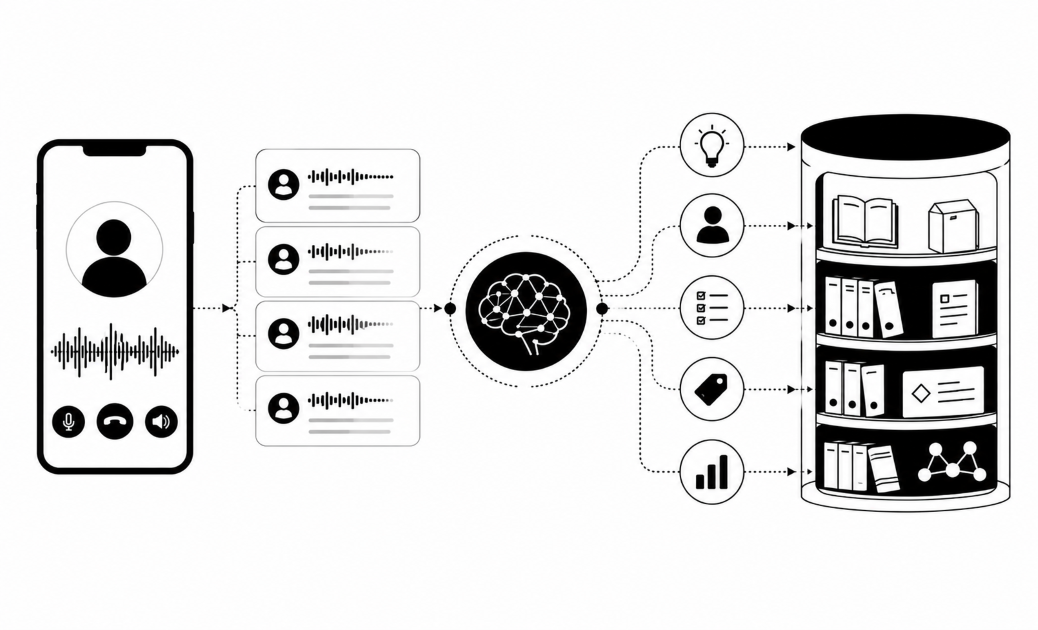
Insight7 analyzes recorded customer-facing video calls, sales calls, support calls, coaching sessions, turning them into scored, compliance-ready coaching data instead of raw footage nobody has time to review.

Unlike the cloud vision APIs and dev-infrastructure platforms later in this list, Insight7 isn’t a general-purpose video tagging tool adapted for calls. It’s built specifically for human-to-human conversation, which is why it can score a call against a rubric instead of returning a list of detected objects a manager still has to interpret.
Key Features
Insight7 earns its top spot in this list through three connected capabilities:
- Automatic Call Scoring Against a Configurable Rubric
Every recorded call gets transcribed and scored against a rubric a team builds around its own criteria, compliance language, tone, discovery questions, resolution steps, instead of a generic label set.
Insight7 pairs that scoring with tone and sentiment analysis pulled directly from the conversation itself.
Call Analytics & QA flags missed disclosures, script deviations, and prohibited language across every call automatically, not just the calls a QA analyst has time to sample by hand.
- Direct Zoom and Call-Platform Integration
Calls get pulled in and evaluated without a manual export step or a separate transcription tool. Your team connects its Zoom, RingCentral, or other call source once, and every new recording flows into the evaluation queue on its own.
- Coaching Tied Directly to the Flagged Moment
A flagged call doesn’t just sit in a report. AI Coaching & Roleplays assigns practice scenarios tied to the exact gap a scored call surfaced, so a rep practices the fix before their next similar call instead of waiting for a monthly one-on-one.
Pricing
|
Plan |
Price |
Key Limits |
|
Free |
$0/month |
1 user, 3 call/transcript analyses per month, 1 project, English transcription only |
|
Pro |
$99/mo ($83/mo billed annually) |
1 user, 50 analyses/mo, 4 projects, 60+ languages, dashboards, reports and scorecards |
|
Business |
$299/mo ($250/mo billed annually) |
3 users, 200 analyses/mo, 10 projects, advanced dashboards, alerts, PII/PHI redaction, automations |
|
Enterprise |
Unlimited users, analyses, and projects; APIs; dynamic evaluation criteria; dedicated account manager |
Pros
- Purpose-Built for Conversation: not a general vision API adapted for calls, so scoring maps to what a QA or coaching manager actually needs.
Direct Call-Platform - Integration: Zoom and other recordings flow in automatically, no manual export step.
- Compliance and Coaching in One Loop: a flagged call turns into an assigned practice scenario, not just a report nobody reopens.
Cons
- Might not be the most suitable investment for micro teams under 40.
Customer Reviews
I’ve been manually reviewing Zoom recordings and using GPT, but a platform that does it simply and beautifully is perfect. Thanks for your help!
— Sean Withford, Founder & Director, Eloquent
I was able to analyze customer calls I had using Insight7 and I did find it valuable! I loved how it showed the sentiment behind each comment that the client made.
— Tobi Oluwole, Co-founder, 3skillz
Who Insight7 Is Best For
- Sales, Support, and QA Leaders: teams that already record customer calls and need those recordings scored, not just archived.
- Regulated Industries: financial services and healthcare teams that need HIPAA and SOC 2 compliant handling of sensitive conversations.
Demo Insight7 or See what your team’s calls would score with our free Call Quality Monitor
2. Google Cloud Video Intelligence: Best for GCP-Native Media Archives
Google Cloud Video Intelligence automatically detects and tags objects, scenes, actions, and speech within video files, using Google’s deep learning models, then pipes the results into BigQuery for teams already living in Google Cloud.

It’s a developer-focused API rather than a finished application: teams get raw annotations and shot-level metadata to build a search or moderation pipeline on top of, not a scored dashboard.
Key Features
- Label and Shot Detection: tags objects, scenes, and actions automatically and flags shot changes within a video file.
- Explicit Content Moderation: flags unsafe content automatically for moderation workflows.
- BigQuery Integration: results pipe directly into Google Cloud’s data warehouse for large-scale analytics.
Pricing
|
Feature |
First 1,000 min/mo |
After 1,000 min/mo |
|
Label detection |
Free |
$0.10 / minute |
|
Shot detection |
Free |
$0.05 / minute (free with label detection) |
|
Explicit content detection |
Free |
$0.10 / minute |
|
Speech transcription |
Free |
$0.048 / minute |
|
Object / text / logo detection |
Free |
$0.15 / minute |
Pros
- Scales Natively: tight BigQuery and GCP integration handles large video archives without separate infrastructure.
- Frame-Level Search: finds specific moments across long footage rather than just tagging a whole file.
Cons
- Developer Time Required: raw annotations need real engineering work to turn into something a non-technical user can act on.
- Inconsistent Speed Reported: G2 reviewers flag slower-than-expected processing on some workloads and manual credential handling as friction points.
Who Google Cloud Video Intelligence Is Best For
- GCP-Native Teams: organizations already running their data stack on Google Cloud.
- Media and Archive Teams: broadcasters and archives needing scalable tagging and search, not conversation scoring.
Customer Reviews
Sentiment on Google Cloud Video Intelligence API is mixed: reviewers call it a “great tool to optimize video content” thanks to easy-to-use pre-trained models, while others describe it as “extremely slow” for some workloads and note the API requires manually entering credentials rather than the environment handling it automatically.
3. Amazon Rekognition Video: Best for AWS-Native Security Workloads
Amazon Rekognition Video detects objects and people within footage, tracks movement across frames, and flags inappropriate content, with facial recognition and person tracking built in for teams already running on AWS.
It’s priced and built for security and identity-tracking use cases first, not conversation analysis, real-time streaming and stored-video analysis both run through the same AWS-native pipeline.
Key Features
- Object and People Detection: identifies objects, people, and activities across video frames.
- Facial Recognition and Person Tracking: matches and tracks individuals across footage.
- Streaming Video Events: processes live Kinesis Video Streams for real-time alerts.
- AWS-Native Integration: plugs directly into existing AWS infrastructure and Lambda pipelines.
Pricing
|
Volume Tier |
Price per Minute (Stored Video) |
|
First 1,000 minutes/month |
$0.10 / minute |
|
Higher-volume tiers |
Scales down to $0.04 / minute at 50,000+ minutes/month |
Pros
- Real-Time Processing: handles live streaming video events at AWS-native scale.
- Deep AWS Integration: fits directly into an existing AWS pipeline without extra infrastructure.
Cons
- Costs Climb at Volume: per-minute pricing across multiple API calls on the same footage adds up quickly.
- Facial Recognition Scrutiny: G2 reviewers and outside researchers both raise recurring bias and accuracy concerns specific to facial recognition.
Customer Reviews
On Amazon Rekognition’s G2 reviews, reviewers praise its accuracy identifying objects, scenes, and faces with “zero false positives” in some workflows, while others flag ethical and privacy concerns around facial recognition specifically, along with JSON output that’s harder to interpret than expected.
Who Amazon Rekognition Video Is Best For
- AWS-Native Security Teams: organizations needing real-time surveillance or identity tracking within AWS.
- Public Video Archives: enterprise media teams managing large footage libraries on AWS infrastructure.
4. Microsoft Azure Video Indexer: Best for Microsoft-Ecosystem Media Teams
Azure AI Video Indexer extracts insights from stored video and audio using AI: scene segmentation, face identification, and automatic captioning in multiple languages, built for ad insertion, digital asset management, and media libraries inside the Microsoft ecosystem.
It also ships a built-in web portal, which sets it apart from the raw-API approach of Google Cloud Video Intelligence and Amazon Rekognition: a non-technical stakeholder can browse and search video insights without writing a query.
Key Features
- Multi-Language Captioning: automatic transcription and translation across languages.
- Scene Segmentation and Face ID: breaks video into scenes and identifies faces automatically.
- No-Code Review Portal: lets non-technical stakeholders browse and search insights directly.
- Azure AI Toolchain Integration: connects natively with the broader Microsoft AI ecosystem.
Pricing
|
Account Type |
Allowance / Basis |
|
Free trial (website) |
Up to 10 hours of free indexing |
|
Free trial (API) |
Up to 40 hours of free indexing |
|
Paid unlimited account |
Billed per input minute across Basic, Standard, and Advanced audio and video indexing tiers; exact rate depends on region and is quoted through Azure’s pricing calculator |
Pros
- Strong Multi-Language Captioning: translation quality is a consistent positive across reviews.
- Non-Technical Access: the built-in portal means insights don’t require a developer to query them.
Cons
- Pricing Runs Expensive at Scale: G2 reviewers consistently flag cost as a concern once volume grows.
- Cloud Dependency: processing stalls without a stable connection, no offline or on-prem option.
Customer Reviews
On Azure AI Video Indexer’s G2 reviews, reviewer tags cluster around “Expensive” and “Privacy Issues” alongside consistently positive notes on caption quality: one reviewer called it “an excellent choice for businesses looking to harness AI to gain insights from their video and audio content,” while flagging that “the pricing is quite expensive.”
Who Azure Video Indexer Is Best For
- Microsoft-Ecosystem Enterprises: teams already standardized on Azure and Microsoft’s AI toolchain.
- Media and Ad-Insertion Teams: digital asset management and ad-insertion workflows needing searchable metadata.
5. Clarifai: Best for Developers Needing Custom-Trainable Models
Clarifai provides a customizable computer vision platform with pre-trained models for video tagging and object detection, plus tools to train and deploy custom models through an API or a graphical interface.
Key Features
- Custom Model Training: train models on proprietary data instead of relying only on pre-built labels.
- Flexible Deployment: runs via API, a no-code interface, or on-premise for sensitive data.
- Pre-Trained Model Library: ready-to-use models for common tagging and detection tasks.
Pricing
|
Plan |
Price |
Monthly Operations |
|
Community |
Free |
1,000 operations |
|
Essential |
$30/month |
Up to 30,000 operations |
|
Professional |
$300/month |
Up to 100,000 operations |
|
Enterprise |
Contact sales |
Custom volume with committed discounts |
Pros
- Real Custom Training: not limited to Clarifai’s own pre-built models.
- Deployment Flexibility: API, no-code UI, or on-premise, useful for defense and industrial clients with sensitive data.
Cons
- Pricing Gets Steep for Small Teams: G2 reviewers specifically cite cost as prohibitive for small-scale developers and students.
- Not Tailored for Calls: no sales or call-specific analytics out of the box, this is a general vision platform, not a conversation tool.
Customer Reviews
On Clarifai’s G2 reviews, users say it “helps experiment with computer vision and AI projects without needing to build everything from scratch,” with a simple dashboard even for non-experts, while others note documentation “is not always clear, and sometimes missing details,” and that costs can be prohibitive for smaller developers.
Who Clarifai Is Best For
- Developers and Agencies: teams needing flexible, code-or-no-code media tagging across varied use cases.
- Sensitive-Data Deployments: defense or industrial clients that need on-premise deployment.
6. Twelve Labs: Best for Natural-Language Video Search
Twelve Labs runs two purpose-built video foundation models. Marengo turns raw video into a searchable semantic layer across what’s said and what’s shown, and Pegasus turns that same footage into structured data an application can query directly.
The company raised a $100M Series B in July 2026, with Amazon investing directly and naming AWS its preferred cloud partner, taking total funding past $200M.
Key Features
- Marengo Video Embedding Model: understands speech, sound, and visual action across a video natively.
- Natural-Language Search: finds exact moments across massive video archives using plain-language queries.
- AWS Bedrock Distribution: models are available through Twelve Labs’ own API and Amazon Bedrock.
Pricing
|
Plan |
Price |
Key Details |
|
Free |
$0 |
600 minutes of indexing total, no credit card required |
|
Developer |
Pay as you go |
Indexing $0.042/min; Analyze input video $0.0292/min; Search API $4/1,000 queries |
|
Enterprise |
Custom |
Committed-use contracts, unlimited usage |
Pros
- Well-Funded and Purpose-Built: $100M Series B with Amazon backing and AWS as preferred cloud partner, real video-native foundation models instead of a workaround on generic frame sampling.
- Genuine Natural-Language Search: finds moments across huge archives with plain-language queries.
Cons
- Too New for Review Volume: its G2 profile currently shows no reviews, common for a young, enterprise-sales-led platform, but worth knowing before budgeting evaluation time.
- Developer-First, Not Turnkey: built for integrating a video-search API, not a ready-made coaching or compliance dashboard.
Who Twelve Labs Is Best For
- Media, Advertising, and Public-Sector Archives: organizations with large video libraries that need natural-language search.
7. Mixpeek: Best for Custom Video-Intelligence Infrastructure
Mixpeek ingests video, audio, images, PDFs, and text through one API, then extracts vision, audio, OCR, and face data into a single retrieval pipeline instead of stitching together separate vendor tools for each content type.
It’s infrastructure, not a finished application: a team sends raw files and gets back structured, searchable features, useful for engineering teams building their own video-intelligence product rather than buyers who want a working dashboard on day one.
Key Features
- Multimodal Ingestion: processes video, audio, images, PDFs, and text through a single API.
- Composable Extraction Pipeline: combines vision, audio, OCR, and face extractors into one unified retrieval layer.
- Object-Storage-Native: connects directly to existing buckets (S3, GCS, R2) without a data migration step.
Pricing
|
Plan |
Price |
Included Usage |
|
Build |
$25/mo minimum |
Up to 100K objects/month; video $0.05/min, audio $0.01/min metered beyond the pool |
|
Scale |
$250/mo minimum |
Up to 1M objects/month, SSO, priority support |
|
Enterprise |
Custom |
Single-tenant deployment, BYO extractors, dedicated support |
Pros
- One API, Five Content Types: avoids stitching together separate vendors for video, audio, images, PDFs, and text.
- Compliance-Ready Infrastructure: SOC 2-ready and HIPAA-ready, relevant for teams handling sensitive source video.
Cons
- No Free Trial: evaluation starts at a real monthly minimum, unlike Twelve Labs’ free indexing allowance.
- Minimal Public Review History: no meaningful G2 or Capterra presence yet, so most evaluation has to happen firsthand.
Who Mixpeek Is Best For
- Engineering Teams: building a custom video-intelligence application on top of infrastructure rather than buying a finished dashboard.
- Multi-Content-Type Workloads: teams that need video, audio, and document search unified in one retrieval layer.
How to Choose an AI Video Analysis Tool for Your Use Case
The fastest way to narrow seven tools to one is asking what kind of video is being analyzed and how it needs to be reviewed, not which platform has the longest feature list. Ask yourself these questions:
Does It Score Conversations, or Just Tag Objects?
If the video is a customer conversation, sales calls, support calls, coaching sessions, a conversation intelligence platform like Insight7 fits best. It scores calls against a rubric a manager can act on directly.
This turns raw dialogue into clear performance metrics, saving managers from scrubbing through hours of video just to figure out what went wrong.
The cloud vision APIs (Google Cloud Video Intelligence, Amazon Rekognition, Azure Video Indexer) return object and scene labels instead, which is the right output for a media archive and the wrong one for a coaching program.
How Is It Priced at the Volume You’ll Use?
Per-minute API pricing (Google Cloud, Amazon Rekognition, Twelve Labs, Mixpeek) multiplies fast once multiple features run against the same footage, label detection plus transcription plus object tracking on one call can stack three separate per-minute charges. Flat-tier subscription pricing, the model Insight7 and Clarifai use, makes monthly cost predictable regardless of how many capabilities a team turns on within a plan.
Does It Connect to Where the Video Already Lives?
A tool that requires exporting files manually before analysis adds friction that compounds at scale. Insight7 connects directly to Zoom and other call platforms so new recordings flow in automatically; Mixpeek and the cloud vision APIs connect straight to existing object storage buckets. Either pattern beats a manual upload step, but it’s worth confirming before committing to a full rollout.
Eliminating that upload step pays off fast. Case in point: TripleTen hooked Insight7 straight into Zoom, analyzed their first calls within a week, and now processes 6,000+ monthly recordings hands-free for roughly the cost of a single project manager.
https://www.youtube.com/watch?v=T2hRApeVm74
Turn Recorded Customer Calls Into Coaching Data with Insight7
Seven tools, three genuinely different categories. A platform built to tag warehouse footage is never going to score a sales call well, and a conversation intelligence tool won’t replace enterprise surveillance infrastructure. Matching the category first saves the trial cycle a generic feature checklist wastes.
For teams whose video is customer conversations specifically, Insight7 scores every recorded call automatically against a configurable rubric, catching compliance gaps before they escalate instead of after a customer complains.
See what your team’s recorded calls would surface with our free Call Quality Monitor, or book a demo today to see how the rubric gets built around your calls.
FAQs
What’s the best AI tool for analyzing customer or sales calls specifically?
Purpose-built conversation intelligence platforms like Insight7 outperform general-purpose video APIs for this, because they score calls against a rubric, compliance, tone, talk time, instead of returning object and scene labels a manager still has to translate into a coaching action.
Can AI video analysis tools handle both audio and visual data?
Most of the tools above do, though depth varies. Insight7 processes audio and visual content natively in one pass.
Is there a free AI tool to analyze video?
Yes. Insight7 offers a free Call Quality Monitor for scoring a smaller batch of calls.
How is conversation-focused video analysis different from surveillance-style video AI?
Conversation-focused tools score what was said and how it was said against a rubric: compliance, empathy, talk time, resolution. Surveillance-style tools are built to detect objects, people, and events across footage where nobody is having a two-way conversation.