Key Elements of an Effective CX Coaching Log Template
-
 Bella Williams
 - 10 min read

Contact center supervisors and QA managers spend significant time coaching frontline agents, yet most coaching activity goes undocumented or is recorded in inconsistent formats that make trend analysis nearly impossible. A well-structured CX coaching log template changes that by turning every coaching session into a trackable, comparable data point that supports agent development and program accountability.
Why Does Inconsistent Coaching Documentation Hurt Contact Center Performance?
ICMI research shows that contact centers with structured coaching documentation outperform those with informal approaches on both agent retention and CSAT improvement. Without a consistent log format, supervisors track different things, use different scales, and create records that cannot be aggregated into team-level or program-level insight. The coaching may be happening, but the organization cannot measure whether it is working.
Element 1: Agent and Session Identification
Every coaching log entry needs unambiguous identification fields at the top. These include:
- Agent name and employee ID
- Supervisor or coach name
- Date of coaching session
- Session type (scheduled 1:1, call review, corrective, recognition)
- Call or interaction ID being reviewed if the session is tied to a specific interaction
This sounds basic, but inconsistency here is the most common reason coaching logs fail as data sources. If you cannot sort by agent, supervisor, or session type, your log is a filing system, not an analytics asset.
Element 2: Observed Behavior, Not Interpreted Behavior
The core of any coaching log entry should document what actually happened in the interaction being reviewed, not a judgment about the agent's character or attitude.
Structure this section around:
- What was observed: A brief description of the specific behavior in the call or interaction.
- Where it occurred: Timestamp or interaction reference.
- Impact: How the behavior affected the customer experience or quality score.
Behavior-based documentation is more legally defensible, more actionable for the agent, and more consistent across supervisors than subjective assessments.
Element 3: Quality Score Linkage
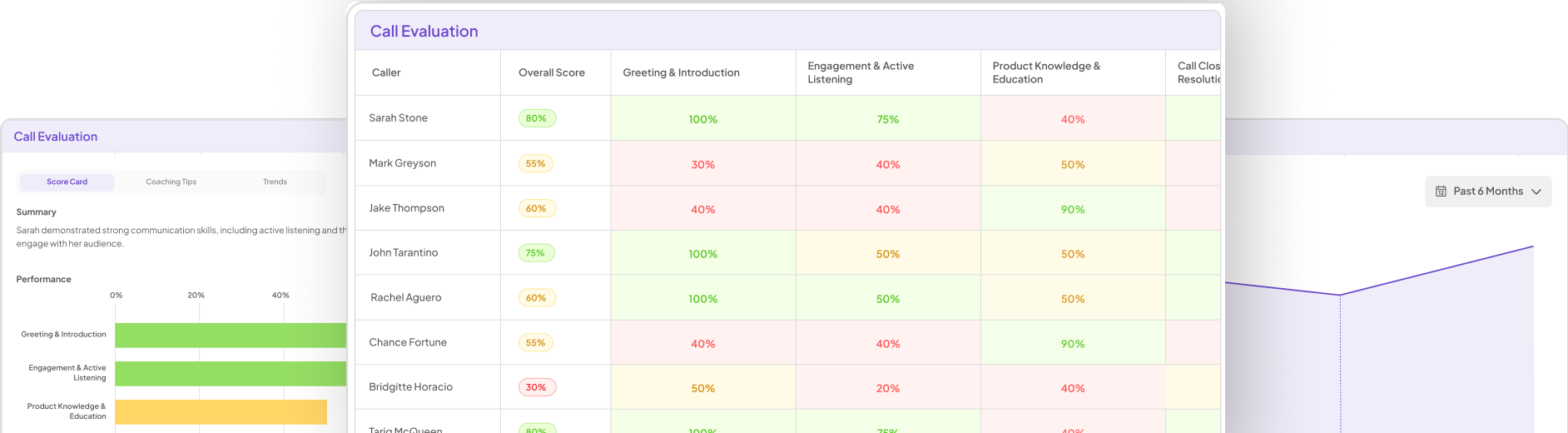
Coaching sessions should connect directly to your QA scorecard. Your log template should include:
- The overall quality score for the reviewed interaction
- Individual dimension scores for the criteria you coach against (greeting, empathy, resolution, compliance, close)
- A field noting whether this session was triggered by a score threshold breach or was a routine development session
This linkage allows you to track whether coaching on specific dimensions produces score improvement over time, which is the core outcome measure for any coaching program.
Insight7 automates this connection by analyzing 100% of calls rather than the 3 to 10% a manual QA process can realistically cover, which means coaching log entries can be triggered by systematic data rather than supervisor availability.
Element 4: Agent Self-Assessment Field
Effective coaching is a two-way conversation. Your template should include a field for the agent's own assessment of the interaction before the supervisor shares their observations. This can be a simple scale (how do you think this call went, rated 1 to 5) plus a free-text field (what would you do differently?).
Agent self-assessment does two things. First, it surfaces awareness gaps: if an agent rates their empathy as a 4 and the QA score shows a 2, that discrepancy is itself a coaching point. Second, it increases session engagement. Agents who contribute to the log feel ownership over their development rather than receiving a verdict.
Element 5: Agreed Development Actions
The most important section of any coaching log is the action plan. Document:
- Specific behavior to change or skill to develop (tied to the observation from Element 2)
- How the agent will practice it (role play, self-monitoring, peer shadowing)
- Timeline for follow-up review
- Resources provided (training module, job aid, example call)
Actions need to be specific enough that both the supervisor and agent can assess completion. "Work on empathy" is not an action. "Practice the empathy bridge phrase in the next five calls where a customer expresses frustration, then flag one of those calls for review in our next session" is an action.
Element 6: Follow-Up Status Tracking
A coaching log that ends at the session date is a historical record, not a development tool. Add a follow-up section that includes:
- Status of prior session's actions (completed, in progress, not started)
- Score change since last session on the coached dimensions
- Supervisor observation note from a monitored call since the last session
This follow-up section is what transforms individual sessions into a development arc. It also creates accountability on both sides: agents know their actions will be reviewed, and supervisors know their coaching quality is visible in the data.
Element 7: Session Outcome Classification
At the close of each log entry, classify the session outcome:
- Progressing: Agent demonstrated improvement on coached behavior
- Stable: No change observed; may need adjusted approach
- Escalating: Performance declining; formal action plan required
- Recognition: Session focused on positive reinforcement of strong performance
This classification is what makes your coaching log searchable and reportable. At a team level, you can quickly see how many agents are progressing, how many are stable, and whether any patterns suggest a training gap rather than an individual performance issue.
How Do You Know If Your Coaching Log Template Is Actually Working?
Track these indicators at the program level: score improvement rate (what percentage of coached agents show dimension-level improvement within 30 days?), action completion rate between sessions, session frequency for high-risk agents, and supervisor consistency across the team. SHRM recommends reviewing your coaching documentation process at least quarterly to ensure templates are capturing the behaviors your quality program actually cares about.
Tools for maintaining a scalable coaching log
Insight7 generates call summaries and QA scores automatically, giving supervisors the raw material for coaching log entries without requiring manual call review. This is particularly valuable for teams where supervisors manage 15 or more agents and cannot realistically monitor enough calls to inform weekly coaching.
Salesforce with a custom object works for contact centers already running their CRM there. You can build a coaching log object that ties directly to agent and case records.
Google Workspace shared spreadsheet templates work for smaller teams. The limitation is manual entry and limited trend analysis unless you build reporting on top of the sheet.
FAQ
How often should supervisors complete a coaching log entry?
At minimum, once per agent per month for steady-state performers, and once per week for agents on performance improvement plans or those new to the role. High-performing contact centers typically target bi-weekly sessions for all agents, documented every time.
Should coaching logs be shared with agents after the session?
Yes. Sharing the log immediately after the session increases action completion rates because the agent has a written record of what was agreed, not just a memory of the conversation. Use a shared document, your QA platform, or a simple email confirmation with the key fields.
Can the same template work for voice, chat, and email channels?
The core elements apply across channels, but the "observed behavior" and "call ID" fields need channel-appropriate labels. A multi-channel team should define channel-specific behavior descriptors in a reference guide alongside the template so supervisors are coaching to consistent standards regardless of interaction type.
For more on how AI tools support coaching program design and agent development at scale, visit insight7.io/improve-coaching-training.