Identify Service Quality Issues from Support Team Call Transcripts
-
 Bella Williams
 - 10 min read

Support teams running on sampled call reviews are making service quality decisions from 3 to 10% of their actual conversation data. A call quality dashboard that covers 100% of support interactions changes what you can see: the frequency of specific complaint patterns, which agents have unresolved issues clustered on their scorecards, and whether service quality is trending before it shows up in CSAT scores. This guide covers how to set one up without a long IT project.
Insight7 connects to existing call recording infrastructure (Zoom, RingCentral, Five9, Amazon Connect) and starts scoring calls within 1 to 2 weeks of contract. No custom integration build required for the most common platforms.
Why Most Call Quality Dashboards Miss the Point
The standard support team dashboard tracks operational metrics: average handle time, first call resolution rate, ticket volume by category. These metrics describe throughput but not quality. A call that closed in 3 minutes with a "resolved" status might have left the customer frustrated and about to churn.
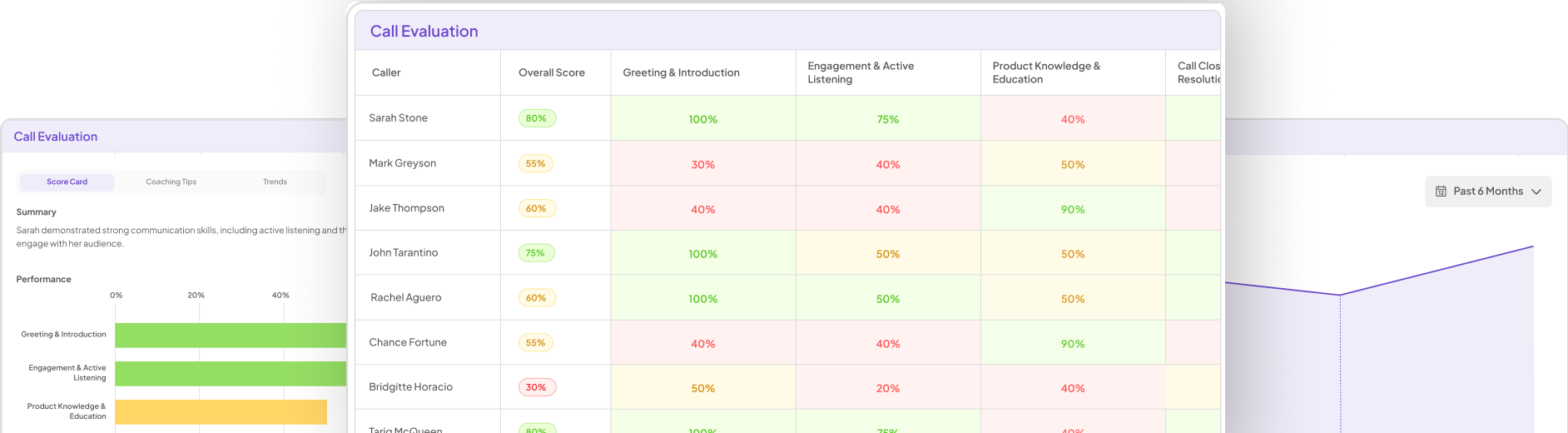
Call quality dashboards add the behavioral layer: which agents are using empathy language, which ones are following resolution protocols, and which calls contain compliance risks that the operational data never surfaces. The insight is in the conversation, not the ticket.
The barrier for most support teams is not technology. It is setup complexity. Most teams assume a custom integration with their telephony stack requires an IT project. The reality with modern QA platforms is closer to a Zoom app install than a CRM deployment.
How do I set up a call quality dashboard without a big IT project?
The fastest path to a functional call quality dashboard uses your existing call recording infrastructure as the data source. If your team records calls through Zoom, RingCentral, or a cloud contact center platform, a QA tool can pull recordings directly via API or integration without custom development. Setup time for standard integrations is 1 to 2 weeks. SFTP or manual upload works as a fallback for non-integrated systems.
Step-by-Step Setup for a Support Team Quality Dashboard
Step 1: Connect your call recording source.
Start with whichever recording platform your team already uses. Insight7 integrates natively with Zoom, Google Meet, Microsoft Teams, RingCentral, Vonage, Amazon Connect, and Five9. For platforms not on that list, SFTP bulk upload or the API handles ingestion.
The setup decision: real-time integration (calls ingest automatically after each call) versus batch upload (calls sent daily or weekly). Real-time integration is worth the configuration time for teams above 200 calls per day. Below that volume, daily batch upload is often sufficient and requires no IT involvement.
Step 2: Define your scoring criteria before you launch the dashboard.
The mistake that makes dashboards useless: launching with a generic scorecard and expecting to refine it later. Later never comes. Define 4 to 6 criteria before the first call is scored.
Standard support team criteria:
- Issue resolution quality (did the agent actually solve the problem?)
- Empathy and communication (tone, acknowledgment, patience)
- Process adherence (did the agent follow the required steps for this issue type?)
- Compliance (any required disclosures, data handling protocols)
- Call wrap-up quality (next steps confirmed, customer understands what happens next)
Insight7's weighted criteria system lets you assign weights summing to 100% and define what "good" and "poor" look like at the sub-criterion level. First-run scores without these definitions often diverge from human judgment. Plan 4 to 6 weeks of calibration before treating scores as production-grade.
Step 3: Configure alerts for the issues that need immediate attention.
Not every QA flag requires the same response. Compliance violations (required disclosures missed, data handling errors) need same-day escalation. Communication quality issues need a coaching cycle. Process adherence failures may point to a workflow problem rather than an agent problem.
Insight7 supports keyword-based alerts (a phrase triggering a compliance flag), performance-based alerts (score below threshold), and compliance alerts delivered via email, Slack, or Teams. Configure the high-severity alerts first and let the medium-severity ones run into the weekly coaching review.
Step 4: Build the coaching loop before you look at the first dashboard.
A quality dashboard without a defined response workflow produces reports that managers review and file. Before the dashboard goes live, define: who sees flagged calls, who makes coaching assignments, what the threshold is for escalation versus coaching, and how quickly feedback reaches the agent.
The target feedback loop is under 48 hours from call to coaching observation. Teams that batch coaching into weekly reviews see slower score movement than teams that close the loop within 2 days of the call.
Step 5: Measure dashboard value at 30 and 90 days.
The 30-day checkpoint: Are criterion definitions producing scores that match human judgment? If not, refine the scoring context (the "what good looks like" description). The 90-day checkpoint: Have criterion failure rates moved on coached behaviors? A dashboard that is not driving score movement is a reporting tool, not a quality management system.
If/Then Decision Framework
- If your team records calls through Zoom, RingCentral, or a major cloud contact center, start with native integration: no IT project required.
- If your telephony stack is not on the standard integration list, use SFTP bulk upload to get the dashboard running before pursuing a custom integration.
- If your support team handles fewer than 100 calls per day, daily batch upload is sufficient; real-time integration is not worth the setup time at that volume.
- If CSAT is declining but your operational metrics look fine, a quality dashboard will surface the behavioral patterns that volume metrics miss.
- If compliance is a primary concern, configure compliance alerts as your first dashboard element before adding coaching-oriented criteria.
- If your team lacks a defined QA-to-coaching workflow, build that process first; the dashboard will surface issues you have no current mechanism to address.
FAQ
How do I set up the call quality dashboard for a support team?
Connect your existing call recording platform to a QA tool that supports your stack. Define 4 to 6 scoring criteria with weights before ingesting calls. Configure alerts for high-severity issues. Set a 30-day calibration period before treating scores as production-grade. The full setup including calibration typically takes 6 to 8 weeks from contract to a reliable, actionable dashboard.
What does a call quality dashboard provide for support teams?
A call quality dashboard surfaces behavioral data that operational metrics cannot capture: which agents are struggling with specific conversation behaviors, which criteria are failing across the team, and whether coaching interventions are driving score improvement. The actionable versions show criterion-level failure rates, agent score trends over time, and compliance alert frequency. Volume metrics like average handle time tell you what happened; quality dashboards tell you why.
Support team managers who want a call quality dashboard running in weeks rather than months: Insight7 connects to your existing recording infrastructure and surfaces service quality patterns without a custom IT build. See it at insight7.io/improve-quality-assurance/.