
Insight7 Partners with UT Dallas to Advance Sales Discovery Education With AI
DALLAS, TX — A new partnership between Insight7 and the Center for Professional Sales at the University of Texas at Dallas is transforming how students learn sales discovery – proving that teaching better questions creates better business professionals. Teaching Discovery, Not Scripts Professor Howard Dover’s program challenges 60-80 students each semester to conduct deep discovery interviews with executives across America – with no product to sell. Armed with 19 carefully crafted questions, students explore how businesses operate, what challenges executives face, and where opportunities lie in the current market. By their eighth interview, students ask fundamentally different questions than in their first. The transformation happens across four dimensions: Building Curiosity: Students learn that the first answer is rarely the complete answer. Through repeated executive interactions, they develop the instinct to probe deeper, ask meaningful follow-ups, and pursue insights beyond what’s immediately obvious. Developing Business Acumen: Students immerse themselves in how executives think and speak about their businesses. This exposure builds a vocabulary and conceptual framework that will serve them whether they become salespeople or business leaders. Analyzing Market Trends: Conducting hundreds of interviews creates a unique vantage point. Students begin recognizing patterns across industries – emerging challenges, shifting priorities, and opportunities that individual conversations might miss. Data Synthesis: The course teaches students to move beyond collecting interviews to actually synthesizing them. Using AI tools, they learn to spot themes, track changes over time, and extract actionable insights from large conversation datasets. “We’re not just teaching students to make sales calls,” Dover explains. “We’re teaching them curiosity and business acumen through deep discovery with no product attached.” The result is transformative: students don’t just learn techniques – they fundamentally change how they think about business conversations and what questions are worth asking. The Scale Challenge Each semester generates 500+ executive interviews. The problem? Most AI analysis tools fail beyond 15-20 documents. “The software told us it was analyzing all 500 interviews,” Dover explains. “It wasn’t. Our students were doing the work, but we couldn’t give them the full picture of what they’d learned.” This limitation extends beyond academia. “Most companies are focused on compliance checks but the real opportunity is aggregating what customers are actually telling you across all your conversations. That intelligence is sitting there, but it’s trapped.” The Solution The partnership enables processing 200+ interviews simultaneously, tracking how student questioning evolves and market insights shift over time. Twelve student teams per semester now access research-grade analysis tools. For organizations with thousands of customer conversations, the infrastructure is finally catching up. The question is whether teams will use that capability to go deeper – uncovering patterns hidden across hundreds of discovery conversations. About Insight7 Insight7 enables organizations to extract actionable insights from customer and sales discovery conversations at scale. About UT Dallas Center for Professional Sales The Center prepares students for sales careers through experiential learning, including executive discovery interviews.
Automated Call Transcript Summarization: Achieving Precision with Configurable Templates

The problem – Teams came to us for speed. They had call transcripts and needed a fast way to extract what mattered – a quick TL;DR they could act on. Our summarization service delivered that, and customers relied on it heavily. But as usage grew, the same request kept coming up: “Can we control the format?” Instead of a generic summary, customers wanted outputs that matched how they already worked —- an email follow-up ready to send, an executive one-pager for leadership, or a checklist with prioritised action items. They weren’t asking for more text. They were asking for predictable structure. What they needed were summaries that came back in the exact format they specified, every time. Why does this matter? Customers needed to feed summaries into downstream systems like CRMs and ticketing platforms. When field names changed or required sections were missing, those integrations broke. Customers couldn’t build reliable automations on top of unpredictable outputs. Before we solved this, enterprise customers were manually editing generated summaries to fix formatting issues, wasting time on work that should have been automated. Legal and compliance teams couldn’t rely on summaries when format consistency wasn’t guaranteed. What’s the benefit of solving it? After implementing our solution, we achieved 92% structural adherence – summaries now reliably match customer templates. The business impact was significant: 75% reduction in manual edits: Enterprise customers stopped spending time reformatting AI outputs Reliable automation: Customers could now build downstream automations relying on consistent field names and types Faster enterprise adoption: Customers who needed CRM and ticketing system integration adopted the feature quickly Increased trust: Legal and compliance teams gained confidence from audit logs and consistent formatting The difference between 62% and 92% accuracy meant the difference between summaries that required constant human cleanup and summaries that could power business-critical workflows. Our First Attempt Our initial implementation was minimal: accept a free-form template string from users, append it as an instruction to the summarization prompt, and call a single large model (OpenAI GPT-4) with the transcript context. The pipeline looked like: Transcription (Whisper v1) -> transcript text Prompt = “Summarize the call according to this template: [user template]” + transcript One-shot model call -> return text to user This approach worked quickly in demos and solved some cases, but it failed in the real world for several reasons: Prompt sensitivity: Outputs varied based on subtle template wording. When a customer used imprecise language (e.g., “Make it sound like an email but not too formal”), the model interpreted that differently each run. Structural drift: Headings were renamed, placeholders were dropped, or sections were merged. We saw ~62% structural adherence (heading names + presence of required placeholders) across a 1,000-template test set. Malicious / invalid templates: Templates with embedded HTML, code, or attempts to override system instructions could produce unexpected output or security concerns. Uncontrolled token usage: Long templates + long transcripts led to high token use and unpredictable costs. User error: Many users submitted templates with ambiguous placeholders or filler words, increasing “garbage in, garbage out” failure modes. We tried several incremental fixes: stricter front-end validation, examples to users, and a longer prompt telling the model to “follow headings exactly”. None of these reliably fixed the core problem. The more we leaned on the single-model approach, the more we saw variable fidelity across template styles and transcripts. The Solution We adopted a layered, deterministic pipeline that treats the user template as a first-class artifact: parse → sanitize → canonicalize → plan → generate → validate. The core idea: don’t hand raw user text to the generative model and hope. Instead, turn the template into a machine-checked specification (a schema), use a controlled “meta-prompt” to convert the template into strict generation instructions, and validate output against that schema. We split responsibilities across smaller, specialized components so each step is auditable and testable. Architecture overview (components and tools) Ingress: API (Kubernetes 1.26, FastAPI on Python 3.11) Storage: S3 for transcripts, PostgreSQL 15 for metadata Workers: Celery 5.2, Redis 7 for task queue and caching Models: OpenAI GPT-4 / gpt-4o-mini for generation, GPT-4-Fast for meta-prompting when we needed speed Libraries: pydantic v1.10, jsonschema 4.17, spaCy 3.5 for NER, bleach for sanitization Monitoring: Prometheus + Grafana, Sentry for errors Key pipeline stages Template Sanitization Strip HTML, disallowed control characters, and executable code with bleach and regex filters. Enforce length limits: template body < 4,096 chars (configurable). Extract explicit placeholders (we support simple placeholder syntax: {{name}}, {{action-items}}, etc.). Template Parsing & Schema Generation We convert the cleaned template into a JSON Schema / “blueprint” that captures required sections, headings, and data types (string, list, bullets, optional/required). We validate that the template contains at least one stable anchor (e.g., at least one heading or placeholder). If not, we return a friendly error with suggested fixes. Example conversion rule: a line starting with “###” becomes a required object property; a bullet-list instruction becomes an array type. Meta-Prompting (Prompt-of-a-Prompt) We generate a compact, deterministic instruction for the generator model by combining: The normalized schema (short). Example outputs that match the schema (we keep a library of 60 curated examples). Constraints: JSON-only output when requested, strict heading names, maximum token lengths for sections. We use a small, faster model (gpt-4o-mini or an optimized instruction-tuned variant) to turn the user’s natural-language template into the canonical meta-instructions if parsing heuristics cannot deterministically infer the full schema. Constrained Generation We ask the model to produce output that either: Emits JSON conforming to the schema, OR Emits text with exact headings and clearly delimited sections. We favor JSON output when downstream systems need to programmatically consume summary fields. Validation & Repair We validate the model output against the schema using jsonschema. If it fails, we run a repair pass: Identify missing required fields and call the model with a focused prompt: “You missed X. Fill it using transcript references. Answer only the field X.” We allow up to two repair attempts before falling back to a deterministic extractor (rule-based NER + regex) for
A Week, an Idea, and an AI Evaluation System: What I Learned Along the Way

How the Project Started I remember the moment the evaluation request landed in my Slack. The excitement was palpable—a chance to delve into a challenge that was rarely explored. The goal? To create a system that could evaluate the performance of human agents during conversations. It felt like embarking on a treasure hunt, armed with nothing but a week’s worth of time and a wild idea. Little did I know, this project would not only test my technical skills but also push the boundaries of what I thought was possible in AI evaluation. A Rarely Explored Problem Space Conversations are nuanced; they’re filled with emotions, tones, and subtle cues that a machine often struggles to decipher. This project was an opportunity to explore a domain that needed attention—a chance to bridge the gap between human conversation and machine understanding. What Needed to Be Built With the clock ticking, the mission was clear: Create a conversation evaluation framework capable of scoring AI agents based on predefined criteria. Provide evidence of performance to build trust in the evaluation. Ensure that the system could adapt to various conversational styles and tones. What made this mission so thrilling was the challenge of designing a system that could accurately evaluate the intricacies of human dialogue—all within just one week. What Made the Work Hard (and Exciting) This project was both daunting and exhilarating. I was tasked with: Understanding the nuances of human conversation: How do you capture the essence of a chat filled with sarcasm or hesitation? Developing a scoring rubric: A clear, structured approach was essential to avoid ambiguity in evaluations. Iterating quickly: With a week-long deadline, every hour counted, and fast feedback loops became my best friends. Despite the challenges, the thrill of creating something groundbreaking kept me motivated. The feeling of building something new always excites me—it’s unpredictable, and there was always a chance the entire system could fail. Lessons Learned While Building the Evaluation Framework Through the highs and lows of this intense week, I gleaned valuable insights worth sharing: Quality isn’t an afterthought—it’s a system. Reliable evaluation requires clear rubrics, structured scoring, and consistent measurement rules that remove ambiguity. Human nuance is harder than model logic. Real conversations involve tone shifts, emotions, sarcasm, hesitation, filler words, incomplete sentences, and even transcription errors. Teaching AI to interpret this required deeper work than expected. Criteria must be precise or the AI will drift. Vague rubrics lead to inconsistent scoring. Human expectations must be translated into measurable and testable standards. Evidence-based scoring builds trust. It wasn’t enough for the system to assign a score—we had to show why. High-quality evidence extraction became a core pillar. Evaluation is iterative. Early versions seemed “okay” until real conversations exposed blind spots. Each iteration sharpened accuracy and generalization. Edge cases are the real teachers. Background noise, overlapping speakers, low empathy moments, escalations, or long pauses forced the system to become more robust. Time pressure forces clarity. With only a week, prioritization and fast feedback loops became essential. The constraint was ultimately a strength. A good evaluation system becomes a product. What began as a one-week sprint became one of our most popular services because quality, clarity, and trust are universal needs. How the System Works (High-Level Overview) The evaluation system operates on a multi-faceted, evidence-based approach: Data Collection: Conversations are transcribed and analyzed in over 60 languages. Evaluation on Rubrics: The AI evaluates transcripts against structured sub-criteria using our Evaluation Data Model. Scoring Mechanism: Each criterion is scored out of 100, with weighted sub-criteria and supporting evidence. Performance Summary & Breakdown: Overall summary Detailed score breakdown Relevant quotes from the conversation Evidence that supports each evaluation This approach streamlines evaluation and empowers teams to make faster, more informed decisions. Real Impact — How Teams Use It Since launching, teams across product, sales, customer experience, and research have leveraged the evaluation system to enhance their operations. They are now able to: Identify strengths and weaknesses in AI interactions. Provide targeted training to improve agent performance. Foster a culture of continuous, evidence-driven improvement. The real impact lies in transforming conversations into actionable insights—leading to better customer experiences and stronger business outcomes. Conclusion — From One-Week Sprint to Flagship Product What started as a one-week sprint has now evolved into a flagship product that continues to grow and adapt. This journey taught me that the intersection of human conversation and AI evaluation is not just a technical pursuit—it’s about understanding the essence of communication itself. “I build intelligent systems that help humans make sense of data, discover insights, and act smarter.” This project became a living embodiment of that philosophy. By refining the evaluation framework, addressing the nuances of human conversation, and focusing on evidence-based scoring, we created a robust system that not only meets our needs but also sets a new industry standard for AI evaluation.
How to Integrate AI In Customer Service Workflows
AI is transforming how customer service teams operate, but for many leaders, knowing where to start can be overwhelming. Should you begin with chatbots? Invest in call analytics? Or automate QA? The truth is, integrating AI into your customer service workflow isn’t about replacing your people, it’s about enhancing their impact. When applied strategically, AI can eliminate repetitive work, surface hidden insights from customer interactions, and create more empathetic, efficient, and data-driven teams. This guide breaks down exactly how to approach AI integration for customer service, what pitfalls to avoid, and five powerful use cases you can implement today. Step 1: Define Why You’re Integrating AI Before choosing any tool, get clear on your goals. Ask: What’s broken in our current customer service process? Are our teams overwhelmed by repetitive requests? Do we lack visibility into why customers are unhappy? Your goal should focus on freeing up your agents to do higher impact work, showing empathy, solving complex issues, and improving customer relationships. AI isn’t a magic wand. It’s an enhancer that helps your team move faster, understand customers better, and make smarter decisions. Step 2: Start Small and Target High Impact Areas Once you’ve defined your goal, identify a small but meaningful area where AI can make a measurable difference. For example: Reducing response times on FAQs Improving visibility into recurring customer complaints Enhancing call quality monitoring Streamlining coaching feedback By starting small, you’ll learn faster, refine your approach, and build internal trust in the technology before scaling it across all workflows. Step 3: Establish Metrics and Feedback Loops AI adoption isn’t a one-time project, it’s a continuous process. To ensure lasting results: Define clear success metrics (e.g., CSAT, handle time, first response rate). Gather feedback from agents and customers. Continuously refine your AI models and workflows. This helps you avoid the “set it and forget it” trap that causes most AI initiatives to fail. 5 Powerful AI Use Cases in Customer Service 1. AI Chatbots for 24/7 Support Benefits: Provide instant responses and eliminate wait times. Handle FAQs and simple transactions automatically. Seamlessly route complex issues to human agents. Watch out for: Over-reliance on bots for emotional or nuanced conversations. Poorly designed escalation rules that frustrate customers. Lack of continuous learning — ensure your bot evolves with feedback. Pro Tip: Deploy chatbots for predictable, low-complexity queries and keep humans for high-empathy situations. 2. AI for Quality Assurance and Coaching Traditional QA reviews only 1 – 3% of customer interactions. With AI, teams can now evaluate 100% of calls and chats, providing complete visibility into team performance and customer experience. Benefits: Automatically detect empathy gaps, tone issues, and product knowledge gaps. Surface coaching opportunities instantly. Reduce manual QA by up to 80%. Common Challenges: Using generic evaluation criteria that miss your brand’s tone and standards. Lack of transparency — reps should understand how they’re scored. Feedback that’s collected but never used for actual coaching. The goal isn’t just to monitor calls, it’s to make every agent better. 3. AI Voice Agents for Call Handling AI voice agents are an emerging tool for managing high-volume, low-complexity interactions. Best Use Cases: Appointment reminders Balance checks Account inquiries Information verification These virtual agents free up human reps to focus on complex, empathy driven conversations. Limitations:Voice AI still struggles with emotion, accents, background noise, and context switching, so use it for predictable workflows only. 4. Voice of Customer (VoC) Analytics Every day, your business generates hours of conversation data across calls, chats, and emails — but most of it goes unused. Voice of Customer analytics helps you unlock insights from that data, revealing trends, root causes, and opportunities to improve. Applications: Identify cross-sell and upsell opportunities Detect recurring issues and root causes Inform product development and marketing strategy Predict churn and retention risks By turning unstructured feedback into actionable intelligence, VoC analytics helps every team — from product to marketing — stay aligned with what customers truly need. 5. Knowledge Management With AI AI-powered knowledge management systems create a single source of truth for your team. Benefits: Faster access to accurate information. Consistent answers across all customer touchpoints. Reduced agent ramp-up time and repeat inquiries. To maximize results, keep your knowledge base updated, structured, and integrated with your chatbots and support tools. Final Thoughts AI won’t replace your customer service team, it will amplify their expertise. The key is to use AI to remove repetitive work, strengthen feedback loops, and turn customer conversations into a growth engine for your business. When implemented thoughtfully, with clear goals, metrics, and scope — AI can transform how you understand and serve your customers.
Spotting Call Issues Quickly: Why Speed Is Critical for Call Quality
In most teams, evaluating calls is like playing detective in the dark. You press play. You listen. You rewind. You take notes. You make a few guesses. And maybe, just maybe, you catch that one thing someone said that actually matters. But by then, the moment has passed. And if you’re leading a team, you know this well: inconsistency in call evaluation can quietly erode everything from sales performance to customer trust. It’s not just about missing data, it’s about misjudging it. Let’s step back. Why Call Issue Detection Is So Slow Most companies rely on one of two things: gut feel or fragmented notes. A call might be reviewed by three different people, each spotting different issues, labeling them inconsistently, and wasting precious time debating what was actually said. No shared language. No structure. No speed. This lack of calibration is where calls go to die. Or worse, become false evidence in decision making. The Cost of Missing the Moment When issues are spotted late, downstream damage piles up: A churn signal is caught only after the renewal window closes. A poor sales pitch is repeated across five more demos. A compliance error goes unnoticed until a real audit. Spotting issues faster doesn’t just save time. It protects revenue, performance, and brand reputation. So, How Long Should It Take? The top 1% of teams don’t wait days. They don’t rely on one person’s memory. And they definitely don’t rewatch entire calls for one insight. Instead, they structure every evaluation around themes: what was said, how it was said, what was missed, and what it signals. It’s a framework. Not a guessing game. What Slows Down Detection? Unstructured Calls: No consistent format means every call feels like a new challenge. It’s hard to know what to look for when every call is a maze. Manual Note Taking: Notes are great, but they’re often biased, partial, and disorganized. They help the note-taker, but rarely the team. Delayed Reviews: By the time calls are reviewed, the urgency is gone. What was a live issue is now a stale anecdote. Lack of Scoring Rubrics: Without consistent criteria, two people listening to the same call will rate it differently. A Faster, Sharper Alternative This is where structured evaluation matters. Frameworks that tag parts of a conversation – issue raised, solution offered, objection surfaced, outcome confirmed – cut through the noise. You don’t need to listen to the entire call to catch the red flag. You go straight to the parts that matter. What That Looks Like in Practice Imagine this: You upload a call. Within minutes, it’s segmented into key sections. Risk signals are highlighted. Objections are tagged. Sentiment is mapped. Now, instead of “What did they say?” the question becomes “What does this mean for us?” That’s a shift from review to action. At Insight7, we’ve seen how fast teams change when call issue detection becomes automatic. Our evaluation platform doesn’t just transcribe. It evaluates: Pulling themes from the conversation Highlighting what was missed Offering structured scoring that teams can align on This means your team can go from listening for signals to acting on them, without waiting for a human to finish listening. Faster decisions. Sharper coaching. Consistent quality. The Real Question Isn’t How Long It Takes… It’s what it’s costing you while you wait. Because for every issue you miss, there’s a competitor moving faster, a customer growing colder, or a teammate repeating the same mistake. You can’t afford to spot issues late. Build a culture of evaluation that starts with structure. Not memory. Not luck. Not delay. Structure. Because clarity isn’t optional anymore. It’s a competitive edge.
Why You Should Stop Tagging Calls by Keywords
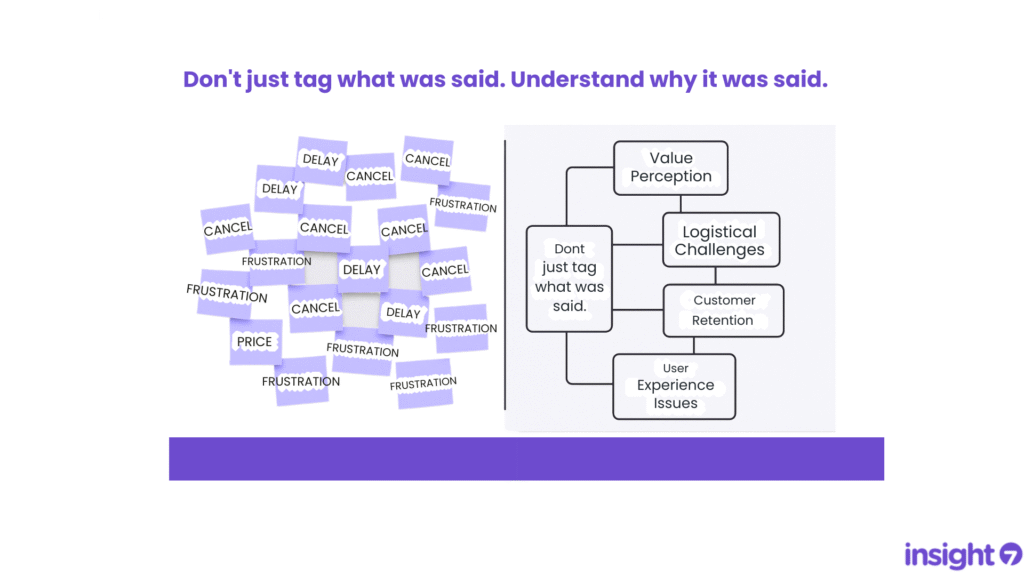
If you’re tagging calls or survey responses with words like “pricing”, “delay”, or “cancel”, you’re not alone. It’s a common habit for teams trying to organize feedback at scale. But here’s the problem: keywords aren’t insights. They tell you what was said, but not why. The Keyword Trap Keyword tagging might feel productive, but it can flatten conversations and mask deeper meaning. For example: “Pricing” might reflect confusion about value, not the actual price. “Delay” could mean shipping issues, team inefficiency, or even customer miscommunication. “Frustration” is a symptom—but what’s the cause? These tags become placeholders for nuance, leaving teams with dashboards full of words and very little clarity. From Keywords to Themes To make sense of feedback, we need to go deeper, beyond what people say to what they actually mean. That’s where theme detection comes in. Instead of tagging for keywords, theme detection looks for patterns and connections: What emotions or outcomes are linked to pricing? Do customers mentioning delay also talk about missed expectations? Are certain phrases showing up consistently across different feedback types? When you analyze for themes, you surface insights that drive smarter decisions. A Quick Comparison Tagging by Keywords Finding Themes “What” was said “Why” it was said Disconnected tags Connected patterns Vague metrics Actionable insights Manual + repetitive Scalable + strategic Why This Matters Whether you’re in support, marketing, product, CX, or research, your job is to understand what your customers are really trying to tell you. Keyword tagging might be a start. But if you stop there, you’re missing: Patterns across conversations. Emerging risks. Opportunities for better experiences. Insight isn’t a tag. It’s a story you can act on. Final Thought If you’re overwhelmed with vague tags and shallow summaries, try this instead: Ask: What themes are showing up again and again? Connect feedback points instead of labeling them in isolation Summarize learnings as narratives, not tag counts
The 10-Minute Job: How to Summarize Customer Calls Without Losing Insight
Many teams still spend too much time trying to summarize customer calls. Even worse, they end up with summaries that miss the point – vague, shallow, and hard to act on. The problem isn’t the time it takes. It’s the lack of structure. Why Summarizing Customer Calls Feels So Hard If you’ve ever sat down to summarize a customer interview or sales call and thought –“What am I even supposed to focus on?” You’re not alone. The real challenge? You need to summarize customer calls quickly, but without losing context, nuance, or valuable insight. How Modern Teams Are Fixing It The smartest teams today are rethinking how they document and summarize customer conversations. Instead of trying to recap everything, they focus on what matters most: Key themes and patterns Friction points and objections Quotes that capture emotion or insight They use a structured process to summarize customer calls in under 10 minutes, without sacrificing quality. What That Process Looks Like Here’s what we’ve seen work: Upload a transcript of the call Define what insights you’re looking for Use a repeatable structure to extract and organize key findings This approach turns raw conversation into clarity, fast. The New Standard for Insight Teams Summarizing customer calls shouldn’t be a bottleneck. Teams that adopt a fast, structured process: Move quicker from research to action Reduce friction in decision-making Preserve valuable insight without getting stuck in the weeds In just 10 minutes, you can turn a messy transcript into something meaningful. This is how modern teams are summarizing customer calls, without losing the gold.
