Transforming client interviews into visualizations can be a game changer for understanding and leveraging customer insights. Interview Visualization Techniques play a crucial role in translating verbal data into visual formats that allow for easier digestion and analysis. By uncovering patterns and themes, these techniques help teams identify actionable insights quickly, improving strategic decision-making.
In this section, we will explore various methods and frameworks for effectively visualizing client conversations. Understanding how to harness these techniques will enable organizations to streamline their processes, ensuring that valuable insights from interviews do not remain hidden but rather become integral to their overall strategy.
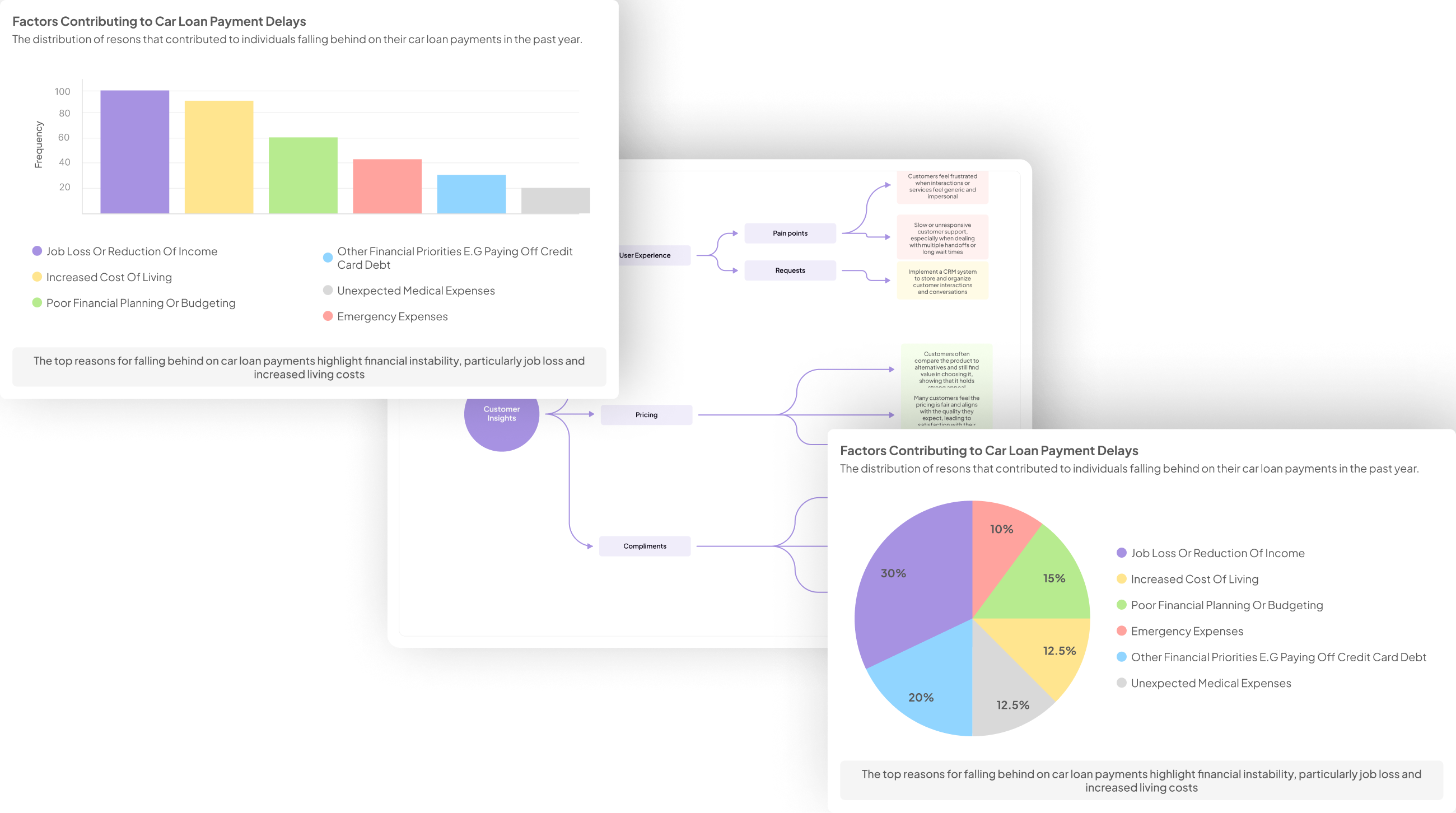
Discover how transforming qualitative data from client interviews into visual representations can reveal hidden insights and enhance data interpretation.
Transforming qualitative data from client interviews into visual representations can significantly enhance data interpretation. By utilizing Interview Visualization Techniques, subtleties within spoken insights become more apparent. These techniques allow for the conversion of raw data into visuals like charts or infographics, revealing patterns that might otherwise remain hidden. The process of visualizing data not only makes information more accessible but also fosters a deeper understanding of client sentiments and preferences.
To effectively unlock these insights, one should categorize and organize interview information based on common themes. This structured approach supports clearer visual outputs, ensuring each visualization effectively communicates key insights. Selecting the right tools, such as Tableau or Lucidchart, further streamlines this transformation. Through well-designed visualizations, businesses can connect more meaningfully with their clients’ feedback, ultimately enhancing decision-making and strategic planning.
Understanding Interview Visualization Techniques
Interview Visualization Techniques offer a transformative way to interpret qualitative data from client conversations. Understanding these techniques begins with recognizing how spoken words can be successfully translated into visual formats. By applying structured methods, you can distill complex discussions into engaging visuals that highlight key themes and patterns. This not only makes the information more digestible but also enhances audience engagement and retention.
Utilizing various visualization formats significantly aids in capturing the essence of client feedback. Techniques such as infographics, mind maps, and trend charts serve distinct purposes, with each type tailored for specific analyses. For instance, infographics can present statistics from interviews in a compelling format, while mind maps weave together different ideas expressed during discussions. Understanding these tools equips you to make informed choices that enhance clarity and effectiveness when communicating insights derived from client interviews.
Explore the foundational methods for effectively converting spoken words into visuals.
To effectively convert spoken words into visuals, it is essential to embrace a structured approach. Begin by transforming audio from interviews into written transcripts, which serve as the foundational data for creating visual representations. Once transcribed, categorize the information into key themes and insights, focusing on aspects that resonate most with client needs.
Next, select appropriate visualization techniques that best portray these insights. This could be in the form of infographics that summarize key findings, mind maps that visually connect ideas, or trend charts showing patterns in client feedback. By systematically organizing and presenting the verbal data, stakeholders can easily grasp concepts and make informed decisions. Utilizing Interview Visualization Techniques not only enhances clarity but also fosters a deeper understanding of client interactions.
By following these methods, businesses can bridge the gap between spoken feedback and visual storytelling, ultimately leading to more effective strategy development.
The Importance of Visualizing Client Feedback
Visualizing client feedback is crucial for understanding the nuances that qualitative data presents. When we translate client sentiments into visual formats, we enhance clarity and facilitate better decision-making. This transformation allows stakeholders to quickly grasp patterns and concerns, making it easier to act on insights gathered from interviews.
The benefits of using Interview Visualization Techniques extend beyond mere aesthetics; they also foster improved communication among team members. By presenting data visually, teams can engage in more productive discussions around client feedback, ensuring all perspectives are considered. Additionally, visualization helps identify trends that may not be immediately apparent in raw text, guiding strategic decisions more effectively. Ultimately, leveraging the power of visualization helps companies connect with their clients more meaningfully, enabling them to tailor their offerings to better meet client needs and expectations.
Discuss the benefits of visualizing data, including improved communication and decision-making.
Visualizing data enhances communication by converting complex information into clear, engaging formats. When clients share their feedback during interviews, visual representations like charts and infographics can encapsulate their experiences comprehensively. This transformation allows teams to identify patterns and sentiments quickly, streamlining discussions and ensuring everyone is on the same page.
Moreover, effective visualizations significantly bolster decision-making. By presenting insights derived from client interviews visually, stakeholders can more easily compare data and recognize trends. This clarity helps prioritize actions and allocate resources effectively, enhancing overall strategy alignment. In essence, utilizing Interview Visualization Techniques not only simplifies data interpretation but also empowers teams to make informed choices that resonate with client needs.
Common Visualization Types for Interviews
Visualizations play a crucial role in interpreting data derived from client interviews. The variety of visualization types available allows professionals to represent qualitative data effectively. Common visualization types include infographics, which simplify complex information and make it easily digestible, and mind maps, which visually organize thoughts and concepts to showcase relationships and hierarchies. Trend charts are also valuable, as they capture the evolution of feedback or sentiments over time, providing insights into shifting perspectives.
Additionally, employing narrative visualizations, which combine storytelling with data, can enhance engagement and comprehension. By choosing the appropriate type of visualization, teams can foster clearer communication and more informed decision-making. Each visualization method serves to highlight key themes, making it easier to extract actionable insights from interviews, ultimately leading to better product development and customer engagement strategies. Mastering these interview visualization techniques can significantly improve how feedback is interpreted and utilized.
Examine various types of visualizations such as infographics, mind maps, and trend charts.
Various types of visualizations can significantly enhance the understanding of qualitative data from client interviews. Infographics present information visually through a blend of graphics and text. They capture complex insights succinctly, making them accessible at a glance. Ideal for summarizing key points from interviews, infographics can effectively communicate feedback trends or statistics, ensuring that essential details are not overlooked.
Mind maps offer a different perspective by visually organizing thoughts and ideas related to interview findings. They encourage a holistic view, connecting various insights and themes discovered through discussions. This technique can be especially useful for brainstorming sessions or when identifying areas that require deeper exploration. Additionally, trend charts illustrate the evolution of specific feedback over time, allowing businesses to track changes in client sentiment. By selecting the appropriate visualization methods, you can transform interview data into actionable insights, ultimately enhancing decision-making processes.
Steps to Create Effective Visualizations from Client Interviews
Creating effective visualizations from client interviews involves a structured approach, bringing clarity to your insights. Begin by categorizing and organizing interview data. Analyze responses and look for common themes and patterns. This step ensures that the data you visualize is coherent, focusing on relevant information that will resonate with your audience.
Next, select the right visualization tools tailored to your needs. Consider tools like Tableau or Power BI for complex datasets, while Miro can enhance collaborative brainstorming. Each tool has unique capabilities, so choose based on your specific visualization goal. By methodically transforming qualitative data into visuals, you emphasize critical insights and facilitate more impactful decision-making. Embrace these steps to elevate your Interview Visualization Techniques, giving your audience a clearer narrative from the data collected.
Learn a step-by-step process for turning interview content into impactful visual displays.
To turn interview content into impactful visual displays, begin by employing effective Interview Visualization Techniques. Start by categorizing and organizing the data derived from your interviews. This involves analyzing responses and identifying key themes or insights, which you can then arrange meaningfully. Organizing the data not only streamlines visualization but also uncovers patterns and trends that might be overlooked without this step.
Next, selecting the right visualization tools is essential for presenting your findings. Different tools cater to various visualization needs, such as infographics for summarizing insights or mind maps for exploring relationships between ideas. Utilizing platforms like Tableau or Power BI enables you to create visually compelling representations of your data, while tools like Miro and Lucidchart facilitate collaborative brainstorming. By following this structured approach, you can effectively transform your interview content, highlighting critical insights that drive informed decision-making and enhance communication within your team.
Step 1: Categorize and Organize Interview Data
To effectively generate visualizations from client interviews, the first step involves categorizing and organizing the data you’ve collected. Begin by thoroughly reviewing the interview transcripts to identify key themes, pain points, and insights. This foundational process allows you to group similar responses, enabling easier access to the information you need for creating compelling visualizations. Organizing the data can reveal patterns that might not be immediately apparent, driving deeper understanding.
Next, consider how to dissect the categorized information further. Utilize methods such as creating matrices to highlight common pain points or frequent topics mentioned across interviews. For instance, if you've recorded several client calls in July, compiling all relevant feedback can help you establish a clear narrative around client challenges. Ultimately, this organized data acts as a springboard for more effective Interview Visualization Techniques, transforming raw insights into impactful visual stories that inform decision-making and strategy development.
Detail how to analyze and categorize interview responses for streamlined visualization creation.
Analyzing and categorizing interview responses is critical for effective visualization creation. Begin by organizing the data from your interviews into themes and categories that capture key insights. Identifying recurring patterns or trends allows you to distill complex information into digestible visual formats. For example, a matrix can help highlight the top pain points discussed across interviews. Such systematic categorization ensures that you reveal significant insights without overwhelming your audience.
Once categorized, you can visualize the data using appropriate techniques like infographics or trend charts. Each visualization should clearly communicate the findings, such as customer needs and challenges, to aid in decision-making. By adopting these interview visualization techniques, you streamline the creation process, making insights more accessible and impactful. This meticulous approach ensures that each visual element serves a purpose, ultimately driving more informed actions in your projects.
Step 2: Choose the Right Visualization Tools
Choosing the right tools is crucial in generating impactful Interview Visualization Techniques. Each tool you consider should align with your specific visualization needs, whether it's transforming raw data into easy-to-understand infographics or creating detailed flowcharts based on client insights. For instance, tools like Tableau and Power BI excel in presenting complex datasets graphically, enabling clearer interpretations of the trends and patterns emerging from your interviews.
Additionally, collaborative tools like Miro can foster creative brainstorming sessions, making it easier for teams to contribute to visualizations in real time. Lucidchart stands out for its strong diagramming capabilities, which can help illustrate user journeys or workflow processes effectively. As you explore these options, keep in mind that the goal is to select tools that not only support your visualization goals but also enhance your team’s ability to derive meaningful insights from client feedback.
Guide on selecting the appropriate tools for different visualization needs.
Selecting the appropriate tools for different visualization needs is crucial in maximizing the effectiveness of Interview Visualization Techniques. When you engage in client interviews, the raw data often needs careful analysis and contextual understanding before it can be transformed into impactful visuals. The right tools can streamline this process, enabling you to effortlessly convert complex qualitative data into easily digestible visual formats.
Consider the specific visualization objectives before making your choice. For instance, if you're focusing on feedback trends, tools like Tableau or Power BI offer powerful analytical capabilities. Alternatively, collaboration during brainstorming can be enhanced using Miro, while Lucidchart excels in creating detailed flowcharts. By aligning your tool selection with your visualization goals, you can effectively communicate insights gleaned from client interviews, thereby informing key business strategies and decisions.
Tools for Interview Visualization Techniques
To enhance understanding and engagement with client feedback, various tools for interview visualization techniques can be utilized. Selecting the right tool streamlines the process of converting qualitative interview data into visual formats that are easily digestible. Various software solutions cater to different visualization needs, ensuring that businesses can effectively interpret the insights gathered from client interviews.
-
Insight7: This platform offers powerful capabilities for qualitative data processing, allowing users to analyze large volumes of interview data efficiently. Its features are designed to simplify the transition from raw interview responses to structured visual insights.
-
Tableau: Known for its ability to handle complex datasets, Tableau transforms intricate data into clear visual stories, making it an ideal choice for delivering rich insights from interviews.
-
Power BI: With robust analytics capabilities, Power BI integrates well with various data sources, offering dynamic visualizations that facilitate informed decision-making.
-
Miro: A collaborative tool that allows teams to brainstorm and visualize concepts using digital whiteboards, Miro enhances teamwork when interpreting interview data.
-
Lucidchart: Perfect for crafting detailed flowcharts and diagrams, Lucidchart helps to visualize the flow of ideas and insights captured during interviews.
Utilizing these tools not only improves the clarity of data representation but also enhances the overall decision-making process driven by customer insights.
- insight7: Comprehensive tool for qualitative data processing.
The insight7 platform serves as a comprehensive tool designed specifically for qualitative data processing, making it easy to extract and visualize insights from client interviews. This tool democratizes access to valuable data, enabling users without technical expertise to create reports, transcripts, and analyses of customer experiences seamlessly. By integrating multiple features, insight7 allows teams to navigate through the nuances of interview content, transforming unstructured data into structured insights that drive effective decision-making.
In your quest to master Interview Visualization Techniques, insight7 stands out due to its user-friendly interface and robust analytical capabilities. It facilitates the categorization of interview responses, helping users identify key pain points, desires, and behaviors from clients. Utilizing the platform, teams can visualize conversations through interactive insight cards, showcasing direct quotes that substantiate their findings. This not only enhances understanding but also fosters collaboration within teams when tackling customer feedback and perspectives.
- Tableau: Renowned for transforming complex data sets into digestible visuals.
Transforming complex data sets into clear and engaging visuals can dramatically improve how we understand client interviews. Tableau excels in this area, allowing users to succinctly depict qualitative insights gleaned from conversations. By utilizing this powerful tool, one can distill extensive interview content into easily digestible representations, making it simpler to identify patterns and trends.
To effectively leverage Tableau in your interview visualization techniques, first, gather your interview data. Organizing this data is crucial, as it lays the foundation for successful visualization. Next, select the appropriate visualization types—such as bar charts, heat maps, or dashboards—that will best showcase your findings. Finally, create visualizations that highlight key insights, enabling stakeholders to quickly grasp the significant takeaways from your interviews. By adhering to these steps, you can transform raw interview data into actionable insights, enhancing decision-making processes across your organization.
- Power BI: Offers robust analytics capabilities with strong integration features.
Power BI stands out as a powerful tool for creating visualizations from client interviews due to its robust analytics capabilities. By consolidating and analyzing qualitative data, Power BI enables users to uncover valuable insights from interview transcripts. The platform's strong integration features allow for seamless connections to various data sources, facilitating a comprehensive view of feedback directly within visual formats.
Utilizing Interview Visualization Techniques within Power BI can transform raw data into meaningful visuals, making patterns and trends easily interpretable. Users can categorize and visualize information from multiple interviews, generating impactful reports and dashboards. This capability not only enhances understanding but also supports data-driven decision-making. By democratizing data access, Power BI ensures that insights are available to all team members, fostering collaboration and informed strategies based on real customer feedback.
- Miro: Ideal for collaborative visual brainstorming on digital whiteboards.
Incorporating Miro into your workflow provides a creative space for collaborative visual brainstorming. This platform allows teams to gather insights from client interviews in an engaging format, making it easier to share ideas and identify common themes. With its digital whiteboard functionality, participants can add comments, images, and sticky notes simultaneously, fostering an interactive environment that enhances group collaboration.
By utilizing Miro for Interview Visualization Techniques, teams can convert qualitative data into visual formats that stimulate discussion and exploration. For instance, mind maps created from client quotes can reveal underlying connections, while flowcharts can outline processes identified during the interviews. These visuals not only ensure that every voice is represented but also streamline information for clearer decision-making. Ultimately, Miro transforms traditional brainstorming into dynamic sessions, enriching the way insights are derived from client feedback.
- Lucidchart: Great for creating detailed flowcharts and diagrams from interview insights.
Lucidchart offers users an intuitive platform for crafting comprehensive flowcharts and diagrams based on insights gathered from client interviews. By transforming complex data into clear visual formats, this tool simplifies the process of identifying patterns and correlations within your qualitative data. Users can easily map out customer journeys, highlight pain points, and illustrate preferences through engaging visuals. This approach not only enhances understanding but also facilitates effective communication among team members, ensuring that every insight is actionable.
To make the most of Lucidchart in your interview visualization techniques, it's vital to focus on a few key aspects. First, utilize its templates to quickly set up a structured visualization aligned with your objectives. Next, customize these templates to fit the unique feedback you've collected, ensuring the visuals reflect genuine client experiences. Finally, involve your team in collaborative sessions to brainstorm and implement the most effective visual strategies, opening doors to innovative solutions based on real customer voices.
Conclusion: Enhancing Insights with Interview Visualization Techniques
Visualizing client interviews can significantly transform how insights are extracted and utilized in business strategies. By employing effective Interview Visualization Techniques, organizations can make complex data more accessible and actionable. This transition from raw interview data to impactful visual representations not only enhances understanding but also encourages collaboration among team members, ultimately leading to more informed decisions.
Moreover, utilizing these techniques helps to address the challenges of traditional data analysis, such as inefficiency and disorganization. When insights are presented visually, patterns emerge more clearly, enabling teams to identify key themes and trends swiftly. By embracing these methods, businesses can gain a competitive edge, ensuring that insights derived from client interviews drive strategic direction and innovation.
Summarize the impact of visualizing client interviews on insight extraction and how it fosters more informed business strategies.
Visualizing client interviews significantly impacts insight extraction by transforming qualitative data into accessible formats. This process enables teams to discern patterns and themes that may be buried in the raw text of interviews. Effective Interview Visualization Techniques allow stakeholders to grasp complex information quickly, fostering clearer and more informed discussions about strategy.
Moreover, this approach enhances decision-making by providing a comprehensive view of client feedback. When insights are presented visually, the context and nuances become apparent, driving actions that align with customer needs. Businesses can identify pain points and opportunities more efficiently, leading to strategies that are not only reactive but also proactive. Overall, utilizing visualizations from client interviews leads to deeper understanding and promotes strategic planning rooted in real client experiences.