
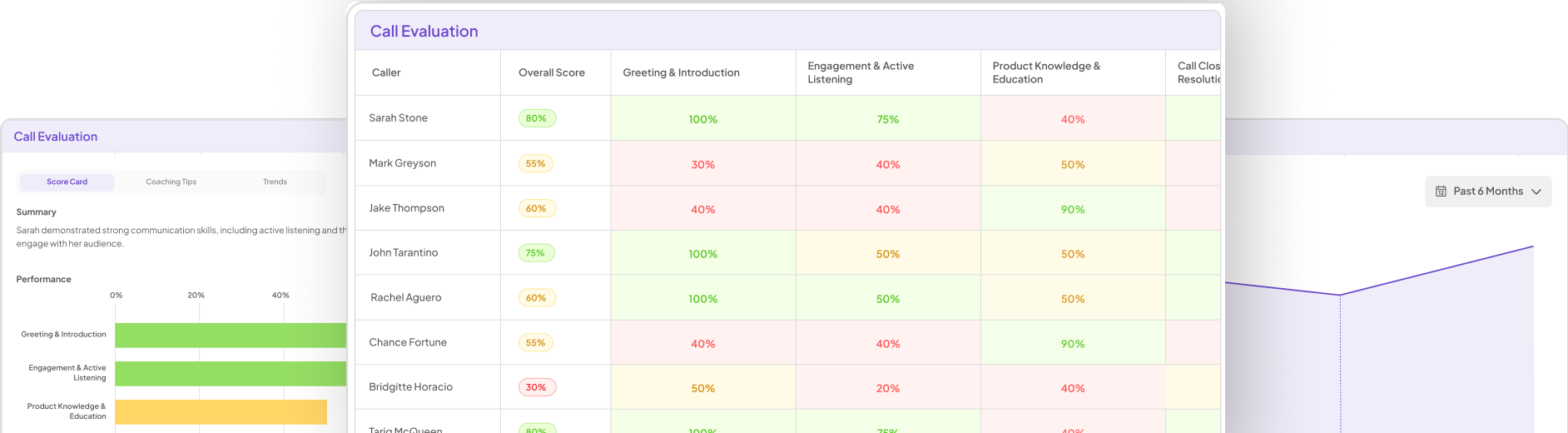
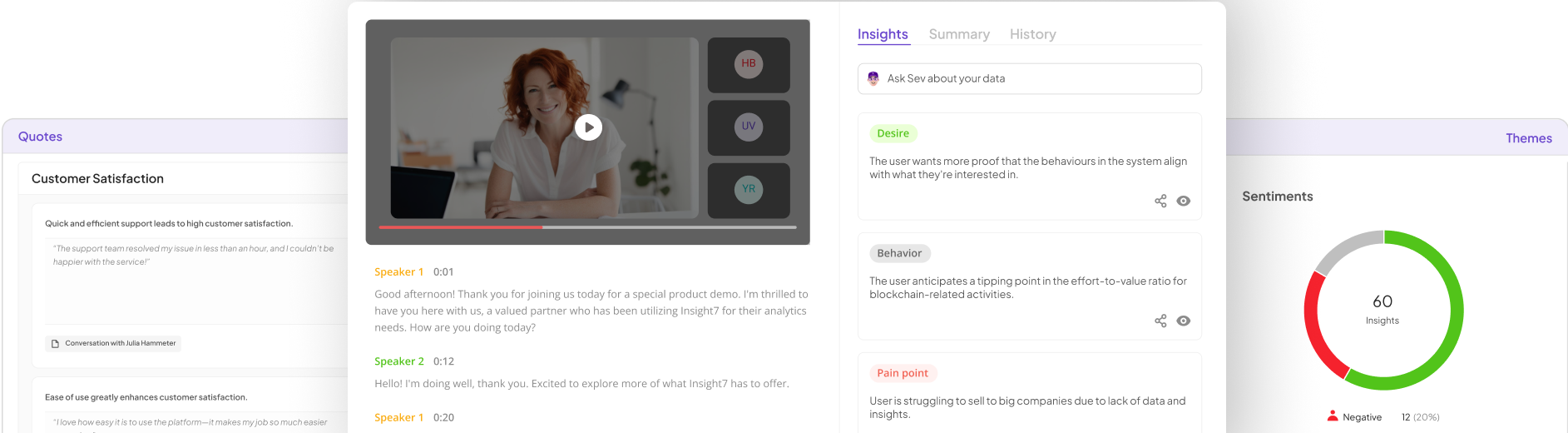


Buyer call insights visualization transforms how businesses interpret and utilize feedback from customer interactions. Imagine sifting through hours of recorded calls, only to uncover valuable data about customer experiences, pain points, and preferences. This process opens a pathway for informed decision-making, enabling companies to refine their strategies and better meet customer needs.
In this section, we will explore the importance of effectively visualizing buyer call insights. By organizing and presenting data in intuitive formats, stakeholders can quickly grasp key trends and actionable information. The goal is to provide a clear understanding of customer voices, making it easier to implement changes based on analyzed insights. Through visualization, businesses can achieve a more profound connection with their customers and drive impactful outcomes.
Methods for Buyer Call Insights Visualization
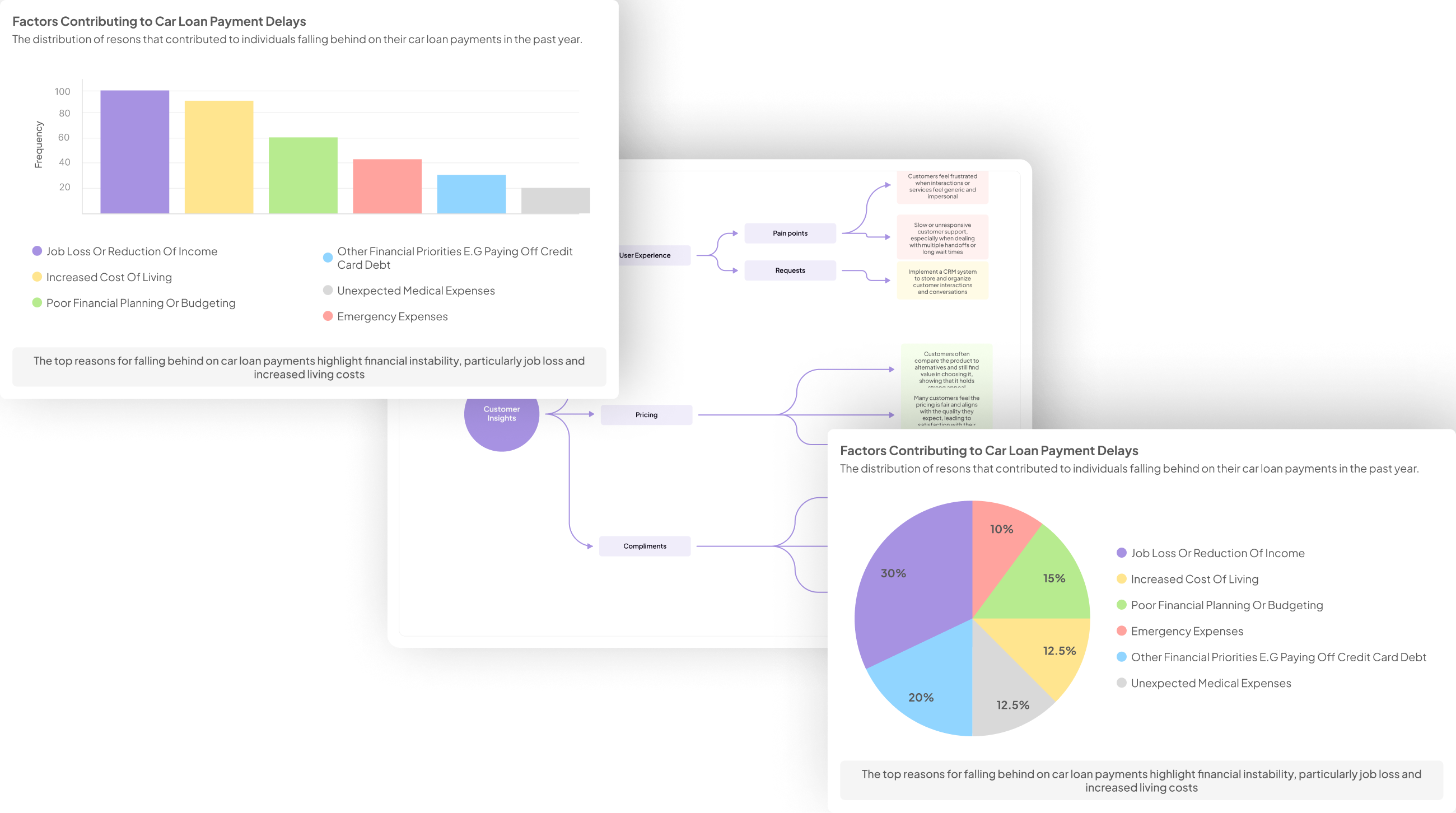
To effectively visualize insights from buyer calls, several methods can guide your efforts. Understanding how to extract data is the first step in this process. Start by transcribing audio recordings into text format, allowing for deeper analysis of conversations. This transcription creates a text library of calls that can be systematically organized for better accessibility. By categorizing these transcriptions, it’s easier to pinpoint specific insights based on customer feedback.
Next, organizing your data plays a crucial role. Once you have transcriptions, segment them according to themes like pain points or customer sentiments to facilitate targeted visualizations. Utilizing templates designed for common analyses can streamline data handling. Moreover, employing data visualization tools can enhance clarity and impact. Summarizing key terms or extracting direct quotes for visualization allows for more straightforward communication of findings, ensuring you make the most of the insights gathered from buyer calls.
Understanding Data Extraction from Buyer Calls
To effectively harness insights from buyer calls, understanding data extraction is essential. Buyer call insights visualization begins with analyzing the conversations recorded during those calls. The first step is transcribing the audio files into text format. This makes it easier to identify patterns, pain points, and recurring themes within customer interactions.
Once the data is transcribed, it can be systematically organized to facilitate analysis. By categorizing insights based on specific criteria, such as customer needs or objections, you can visualize key trends. You can utilize templates designed for different analysis types, ensuring that you focus on what matters most. This structured approach allows for a comprehensive review of buyer sentiments, ultimately guiding decisions on sales strategies and product improvements. By understanding how data extraction from buyer calls works, you can create impactful visual representations that inform decision-making and enhance customer engagement.
Organizing Data for Effective Visualization
When it comes to Buyer Call Insights Visualization, organizing your data effectively is crucial for producing clear and impactful visuals. Begin by categorizing the insights gained from calls into meaningful segments. For instance, classify feedback into themes like positive comments, negative critiques, and unique opinions. This structured approach allows for easier comparison and highlights key trends across multiple calls.
Next, utilize visual aids such as charts and graphs for a more impactful presentation of your organized data. Visual representations make it easier to identify patterns, discern areas for improvement, and make informed decisions based on customer feedback. By maintaining clarity and organization in your data, you will be better equipped to convey significant findings, driving your product development and marketing strategies forward.
Top Tools for Buyer Call Insights Visualization
In the realm of Buyer Call Insights Visualization, selecting the right tools is crucial for transforming conversation data into actionable insights. Popular tools such as Insight7, Tableau, and Power BI can help streamline this process. Each of these platforms offers unique features tailored for visualizing insights effectively.
Insight7 excels at capturing voice-of-customer insights, with capabilities for transcribing and analyzing calls systematically. Tableau and Power BI provide robust dashboards and visualization techniques that enable users to track trends and pain points over time. Google Data Studio stands out for its user-friendly interface, making it easy for teams to build visual reports without extensive training. Ultimately, the right choice depends on your specific needs and the type of data visualization you aim to achieve. By leveraging these tools, businesses can enhance their understanding of customer interactions and improve decision-making processes.
Insight7
In Insight7, the focus shifts to the visualization of buyer call insights, which is essential for deriving meaningful conclusions from customer interactions. Effective visualization turns raw data into accessible narratives, allowing teams to identify trends and actionable insights quickly. Leveraging various visualization techniques can enhance the understanding of buyer behaviors and preferences.
One effective method is using interactive dashboards that continually update with new buyer call data. This allows teams to track customer sentiment over time easily. Additionally, employing charts and graphs to illustrate key data points can enhance collaborative efforts, ensuring that insights are communicated clearly. By focusing on visualization, businesses can streamline decision-making processes and foster a more proactive approach to customer engagement. This not only helps in addressing current issues but also sets the stage for future strategies that align closely with buyer expectations.
Tableau
Tableau stands as a pivotal tool for visualizing insights garnered from buyer calls. With its intuitive interface, users can effortlessly create stunning visual representations of data to emphasize key trends and sentiments. As organizations collect feedback from customer interactions, Tableau enables them to distill complex data into straightforward dashboards that highlight pain points and desires.
One of its key strengths is the ability to visualize multiple data sources simultaneously. By consolidating insights from various calls, teams can discern broader patterns and themes that inform business strategies. In effect, Tableau transforms raw buyer call data into actionable insights, fostering a deeper understanding of customer experiences. This visualization empowers teams to make informed decisions, ensuring that they stay connected to their clients' needs and preferences. Engaging with Tableau facilitates a culture of data-driven decision-making within organizations, enhancing overall performance.
Power BI
Power BI is a powerful tool for visualizing insights derived from buyer calls. It enables users to transform raw data into interactive visuals that make it easy to identify trends and patterns in customer feedback. By integrating various data sources, Power BI allows teams to create comprehensive dashboards that highlight key metrics and insights from buyer calls. This functionality makes it an invaluable asset for businesses aiming to enhance decision-making based on real customer interactions.
When utilizing Power BI for Buyer Call Insights Visualization, there are several steps to consider. First, data extraction is crucial; collect audio or transcript data from buyer calls. Next, data organization becomes essential; categorize insights based on themes such as pain points, desires, and behaviors. Finally, create dynamic visualizations and reports. By representing this information visually, stakeholders can quickly grasp essential insights, leading to informed strategies and improved customer experiences.
Looker
Looker stands out as a powerful tool for visualizing insights from buyer calls. With its user-friendly interface, it simplifies data exploration, allowing teams to easily analyze and interpret customer interactions. In the world of Buyer Call Insights Visualization, Looker enables organizations to gather valuable metrics from such conversations, transforming raw data into intuitive visuals.
Utilizing Looker, users can create customized dashboards that provide real-time insights into buyer behavior and preferences. This functionality not only facilitates quick decision-making but also enhances collaboration among teams. By integrating seamlessly with various data sources, Looker helps to centralize insights, making them easily accessible for stakeholders. Overall, Looker serves as a crucial asset for businesses aiming to improve their strategies based on buyer interactions, driving growth and fostering a customer-centric approach.
Google Data Studio
Google Data Studio serves as a powerful tool for visualizing buyer call insights effectively. By transforming raw data into clear, interactive dashboards, it enables users to understand customer sentiments and feedback easily. This platform allows analysts to organize data from multiple buyer calls, making it seamless to derive meaningful insights. With Google Data Studio, you can visualize positive and negative comments from customers, helping teams pinpoint areas for improvement or success.
Additionally, the tool supports real-time data querying, allowing users to examine various attributes across numerous calls. You can segment insights based on different parameters, such as location or product type, to identify trends. Using this platform not only enhances the visibility of your data but also fosters collaboration among teams seeking to improve their strategies based on buyer call insights. Ultimately, Google Data Studio streamlines the visualization process, ensuring data-driven decisions can be made efficiently.
Conclusion: Maximizing Impact with Buyer Call Insights Visualization
Visualizing insights from buyer calls can significantly enhance decision-making within an organization. By effectively interpreting this data, businesses can identify trends that inform product development and marketing strategies. The visualization processes allow teams to quickly access key insights, such as positive and negative feedback, ultimately enabling them to address customer concerns proactively.
To maximize impact, it's crucial to employ the right tools and techniques for Buyer Call Insights Visualization. By using comparative analysis and data categorization methods, organizations can uncover valuable patterns and drive actionable improvements. This not only strengthens a company’s strategic initiatives but also enhances overall customer satisfaction and loyalty.