
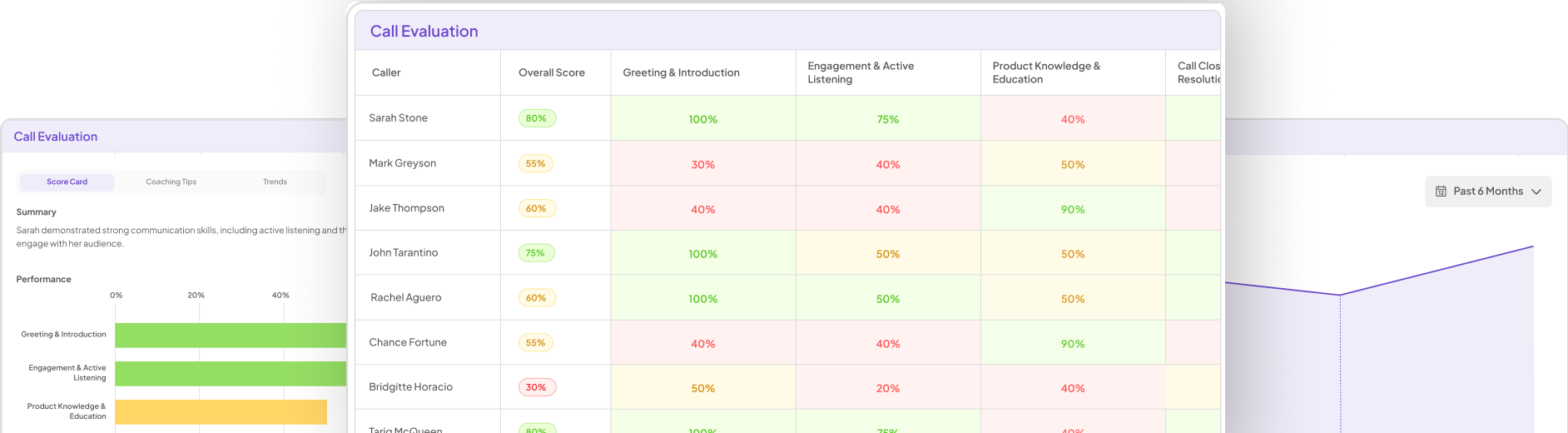


Visualization AI tools have transformed the way organizations interpret insights from prospect interviews. By converting qualitative data into compelling visuals, these tools enhance comprehension and facilitate data-driven decision-making. With an abundance of options available, it's essential to understand which tools effectively cater to the specific needs associated with prospect interviews.
The advantages of using these tools extend beyond mere aesthetics; they enable teams to identify trends, recognize patterns, and gain deeper insights from their qualitative research. As we delve into various options, we will explore how these tools not only streamline data processing but also make it easier to convey findings effectively to stakeholders.
Exploring Top Visualization AI Tools
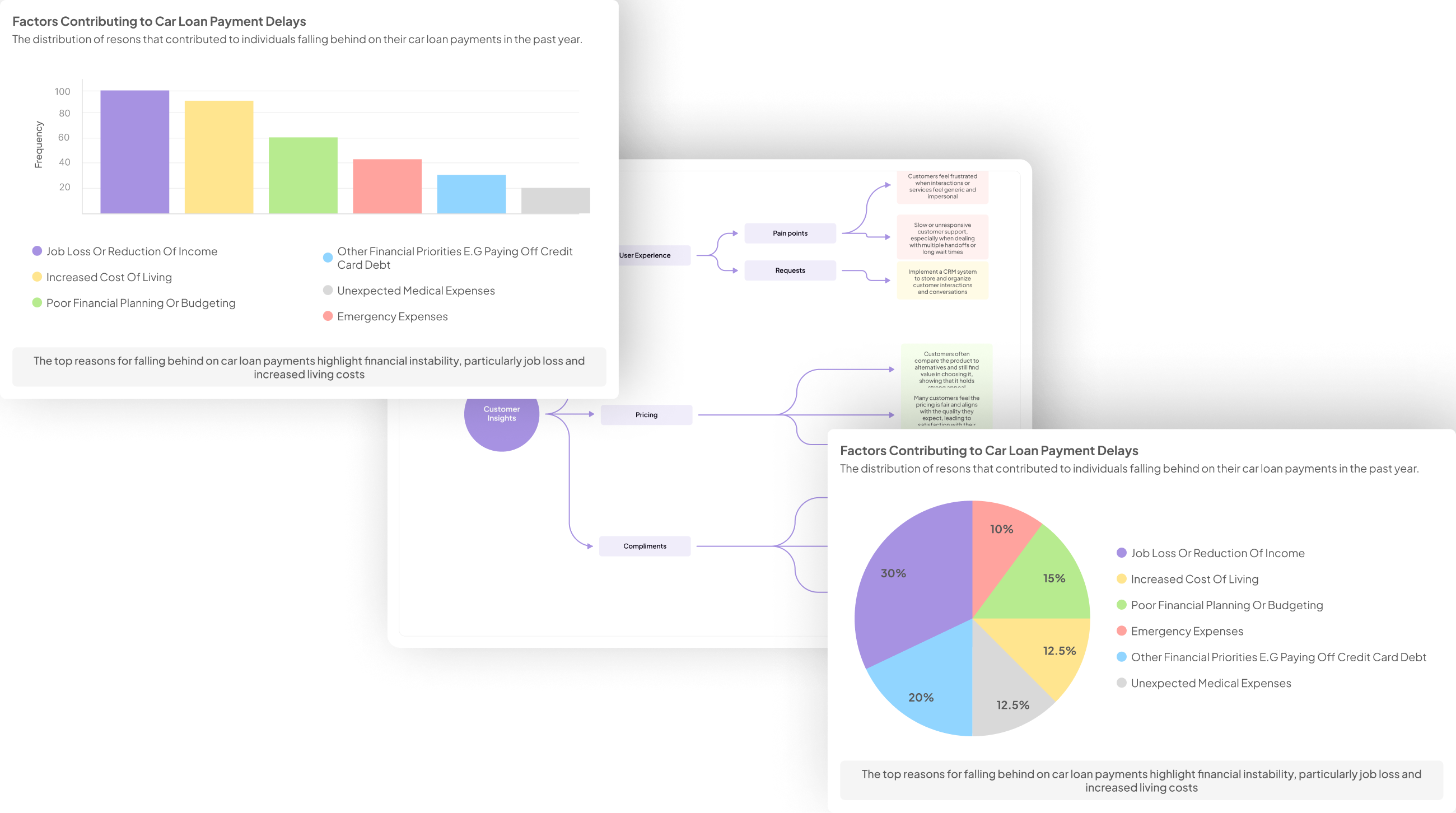
In today's data-driven world, utilizing effective Visualization AI Tools can significantly enhance the way insights from prospect interviews are analyzed. These tools not only simplify complex datasets but also enable you to highlight patterns and trends in feedback that might otherwise go unnoticed. By transforming raw interview data into engaging visual formats, such as graphs and charts, analyzing customer sentiments becomes more accessible and informative.
To explore the best options available, consider tools like Tableau, which creates interactive visualizations, and Power BI, known for its integrative capabilities. Additionally, Domo offers real-time visual insights, while Looker excels at simplifying complex data presentations. Each of these Visualization AI Tools plays a critical role in enhancing your ability to draw actionable conclusions from your interviews. By harnessing the power of these tools, you can turn qualitative data into a narrative that drives strategic decisions and fosters continuous improvement.
insight7: The Leading Choice for Data-Driven Visualizations
When navigating the complexities of prospect interviews, selecting the right Visualization AI Tools becomes crucial. These tools empower users to transform raw data into digestible and impactful visual formats. For organizations looking for clarity, this choice enables an informed analysis of customer sentiments, both positive and negative. Adopting a data-driven approach enhances understanding and decision-making processes.
Visualization AI Tools offer a myriad of capabilities, from real-time analytics to customized dashboards that highlight trends. By leveraging these technologies, businesses can extract actionable insights from thousands of interview responses, making it easier to identify patterns that influence product development. Moreover, engaging with such tools encourages collaboration across teams by providing everyone with access to consistent and visually appealing data representations. Ultimately, going forward with a solid visualization strategy means fostering a culture of data literacy, which is essential for long-term success.
Additional AI Tools for Generating Visual Insights
Visualization AI Tools play a pivotal role in transforming complex interview data into understandable formats. By leveraging advanced capabilities, these tools enable you to produce insights through compelling visualizations. This section explores additional AI resources that can enhance your ability to generate meaningful visual insights from prospect interviews.
Tableau is excellent for creating interactive graphs and dashboards, allowing teams to engage with the data dynamically. By easily linking interview data, it becomes simpler to identify patterns or trends relevant to the business.
Power BI stands out with its robust features for data integration, particularly useful when merging insights across various interviews. Its user-friendly interface simplifies the visualization process, ensuring that key findings are highlighted effectively.
Domo excels in delivering real-time visualization options. With its capability to process and display live feedback from interviews, stakeholders can make timely decisions based on current data.
Looker is beneficial for simplifying complex datasets derived from interview analytics. It offers an intuitive approach to data presentation, making it easier for teams to interpret and act on insights.
These tools collectively provide versatile options for enhancing the visualization process, ultimately allowing businesses to gain deeper insights from their prospect interviews.
- Tableau: Seamlessly transforms interview data into interactive graphs.
Transforming interview data into interactive graphs is a vital process in understanding customer insights. Tableau excels in this area, allowing users to visualize complex data intuitively. With its user-friendly interface, stakeholders can quickly interact with graphical representations of trends and pain points gathered from interviews. This accessibility ensures that teams can collaborate effectively without requiring extensive training.
Tableau's powerful analytics capabilities allow organizations to identify key themes, making it easier to highlight significant findings from customer conversations. By transcribing and analyzing interviews, data is transformed into visually appealing dashboards that make complex information digestible. It's a tool that empowers teams to derive actionable insights efficiently, paving the way for data-driven decision-making. Utilizing Visualization AI Tools like Tableau not only enhances understanding but also fosters a culture of insight-driven strategies across your organization.
- Power BI: Offers robust features for integrating interview insights.
Power BI stands out as a powerful tool for integrating insights gathered from prospect interviews. Its intuitive interface allows users to effortlessly import data, making it accessible to everyone in a business setting, regardless of technical expertise. This democratization of data opens up opportunities for everyone to uncover essential insights, transforming raw interview comments into meaningful visual reports.
One of the key strengths of Power BI is its ability to analyze vast amounts of data quickly and effectively. Users can visualize interview findings through interactive dashboards, which help in identifying trends and pain points. With features that allow customization of visuals, users can present insights in forms that resonate most with their audience. Power BI's versatility makes it an indispensable ally in extracting actionable insights from interviews, ultimately driving informed decision-making in your organization.
- Domo: Delivers real-time data visualization from interview feedback.
Real-time data visualization is essential for extracting meaningful insights from interview feedback. When organizations engage with customers, they generate valuable data that can inform decision-making strategies. Implementing effective Visualization AI Tools allows companies to swiftly interpret this data and respond proactively to customer needs.
Utilizing advanced tools enables teams to convert text-heavy feedback into dynamic visual representations. This provides immediate clarity on customer sentiments, trends, and opportunities. Unlike traditional analysis methods, which may prove slow and cumbersome, real-time visualizations streamline collaboration. By making insights accessible across departments, these tools enhance strategic discussions and promote informed actions based on customer insights.
Moreover, the integration of real-time visualization tools cultivates an environment where data-driven decisions become standard practice. When insights flow seamlessly across teams, organizations can capitalize on their learnings more effectively, ultimately driving better outcomes and staying ahead of competition in today’s fast-paced market.
- Looker: Simplifies complex data presentation from interview analytics.
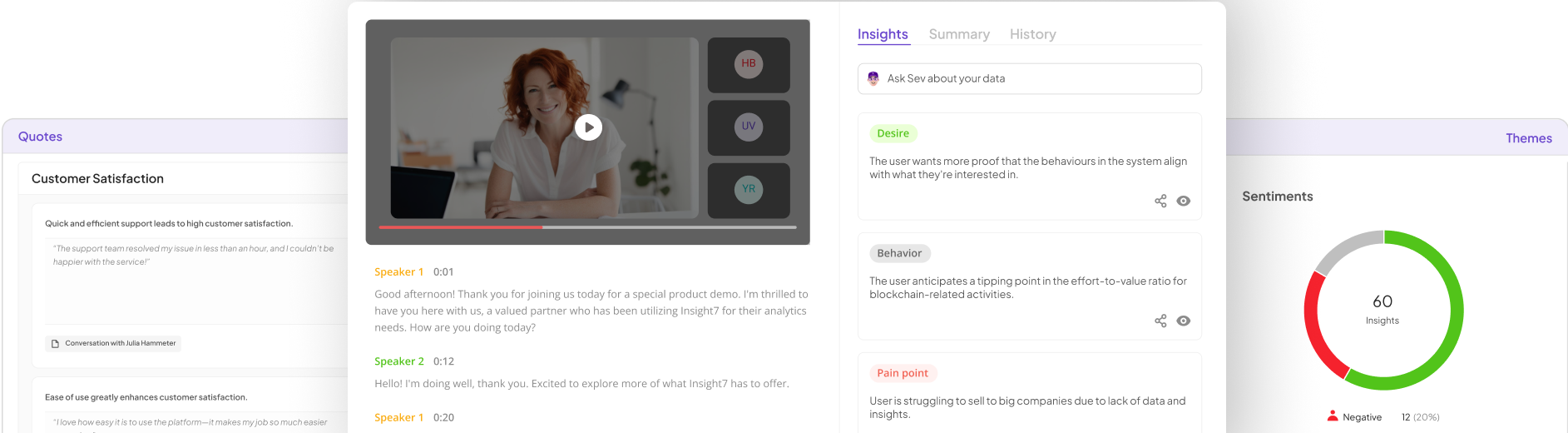
Looker excels in transforming complex data from interview analytics into easily understandable visual formats. By simplifying the presentation of data, it allows users at all experience levels to extract insights effortlessly. With an intuitive interface, users can access a library of call transcripts and visual insights without requiring extensive training. This accessibility democratizes data analysis, empowering everyone in the organization to derive actionable insights from interview data.
The tool also enhances the analysis by pulling out specific insights, such as pain points and desires from each conversation. Users can ask targeted questions, generate summaries, and visualize themes across multiple interviews. This streamlined process not only saves time but also encourages team collaboration in decision-making. Ultimately, Looker's ability to simplify and clarify complex analytics makes it an invaluable asset in the realm of Visualization AI Tools.
Steps to Effectively Use Visualization AI Tools
To effectively use Visualization AI Tools, begin by meticulously collecting and organizing your interview data. This foundational step ensures clarity and accessibility, allowing for streamlined processing. Consider categorizing responses based on themes or sentiment, which will create a structured dataset that’s easier to visualize later.
Next, it’s crucial to select the right tool for your specific needs. Different Visualization AI Tools offer various functionalities, so evaluating your objectives and desired outcomes is essential. Once you’ve chosen a suitable tool, proceed to create visualizations that highlight key insights. Effectively developed visuals not only clarify your findings but also enhance communication with stakeholders. Ultimately, engaging with these tools comprehensively will empower you to draw actionable insights from your prospect interviews, transforming raw data into meaningful narratives.
Step 1: Collecting and Organizing Interview Data
To effectively harness the power of Visualization AI Tools, the first step involves the meticulous collection and organization of interview data. This foundational phase is crucial because the quality of your insights relies heavily on how well you gather and structure the feedback. Begin by compiling raw transcripts from your interviews and categorizing them into specific projects. For example, if you're analyzing data from July, create a dedicated project for that month. This organized approach helps you identify patterns and trends across the interviews more efficiently.
Next, consider using tools that can pull out specific themes and key pain points. For instance, visualize the data through summary reports that highlight the most recurring feedback from customers. By methodically arranging and analyzing these insights, you can derive actionable data to make informed decisions. This step sets the groundwork for the subsequent use of Visualization AI Tools, ultimately enhancing your understanding of customer needs and experiences.
Step 2: Selecting the Right Tool for Your Needs
Choosing the right Visualization AI Tools is crucial to effectively communicate insights derived from prospect interviews. Begin by assessing your specific needs and objectives. For instance, consider whether your primary goal is to create interactive graphs, comprehensive reports, or real-time data dashboards. Each tool varies in functionality, so identifying your focus can streamline your selection process.
Next, evaluate the features that align with your requirements. Some Visualization AI Tools might excel at integrating various data sources, while others offer advanced analytical capabilities. Additionally, user-friendliness and accessibility can significantly impact how well your team adapts to the software. Finally, consider data security and compliance, especially if you're handling sensitive information from interviews. A thoughtful selection process will empower you to turn qualitative insights into compelling visual narratives, enhancing your overall data-driven decision-making experience.
Step 3: Creating Visualizations to Extract Key Insights
Creating effective visualizations is essential for extracting key insights from prospect interviews. By utilizing Visualization AI Tools, you can transform complex data into understandable visuals that highlight trends and patterns. First, ensure that your data is organized, as this will facilitate the creation of meaningful visuals. Analyze the interview responses and categorize the key themes that emerge. Such a structured approach helps in identifying the main pain points and sentiments expressed by your prospects.
Once the data is organized, you can start generating visual representations. Consider using tools like Tableau or Power BI that can illustrate your findings through dynamic graphs and dashboards. These visualizations provide clarity, allowing you to share insights with stakeholders effortlessly. A well-crafted visualization not only conveys information but also supports decision-making by showcasing the relationships and correlations within the data. By following these steps, you can leverage Visualization AI Tools to gain actionable insights from prospect interviews and enhance your strategic initiatives.
Conclusion: The Impact of Visualization AI Tools on Data Interpretation
The rise of Visualization AI Tools has significantly transformed how we interpret data from prospect interviews. By utilizing these advanced technologies, users can swiftly identify patterns and trends that might be overlooked in raw data. This not only enhances understanding but also facilitates more informed decision-making, leading to actionable insights.
Moreover, these tools empower organizations to visualize complex information clearly, making data interpretation accessible even to non-technical stakeholders. As a result, teams can collaboratively discuss findings and strategize effectively, ultimately driving better outcomes in product development and customer engagement. The integration of Visualization AI Tools stands as a pivotal advancement in making sense of qualitative data.