The journey to cultural understanding often begins with personal stories. Each interview holds a treasure trove of insights that can unveil the nuances of a community's values and beliefs. By transforming these raw narratives into Interview Insights Visualization, we can distill complex information into compelling visuals. This process not only enhances comprehension but also fosters empathy, encouraging deeper connections with diverse cultures.
Effective visualizations serve as a bridge, linking interview data to broader cultural themes. They enable stakeholders to quickly grasp significant patterns and trends, driving informed decisions rooted in genuine understanding. As we explore techniques for creating impactful visualizations, we will uncover best practices that empower anyone to transform interview insights into shaping strategies for engagement and collaboration.
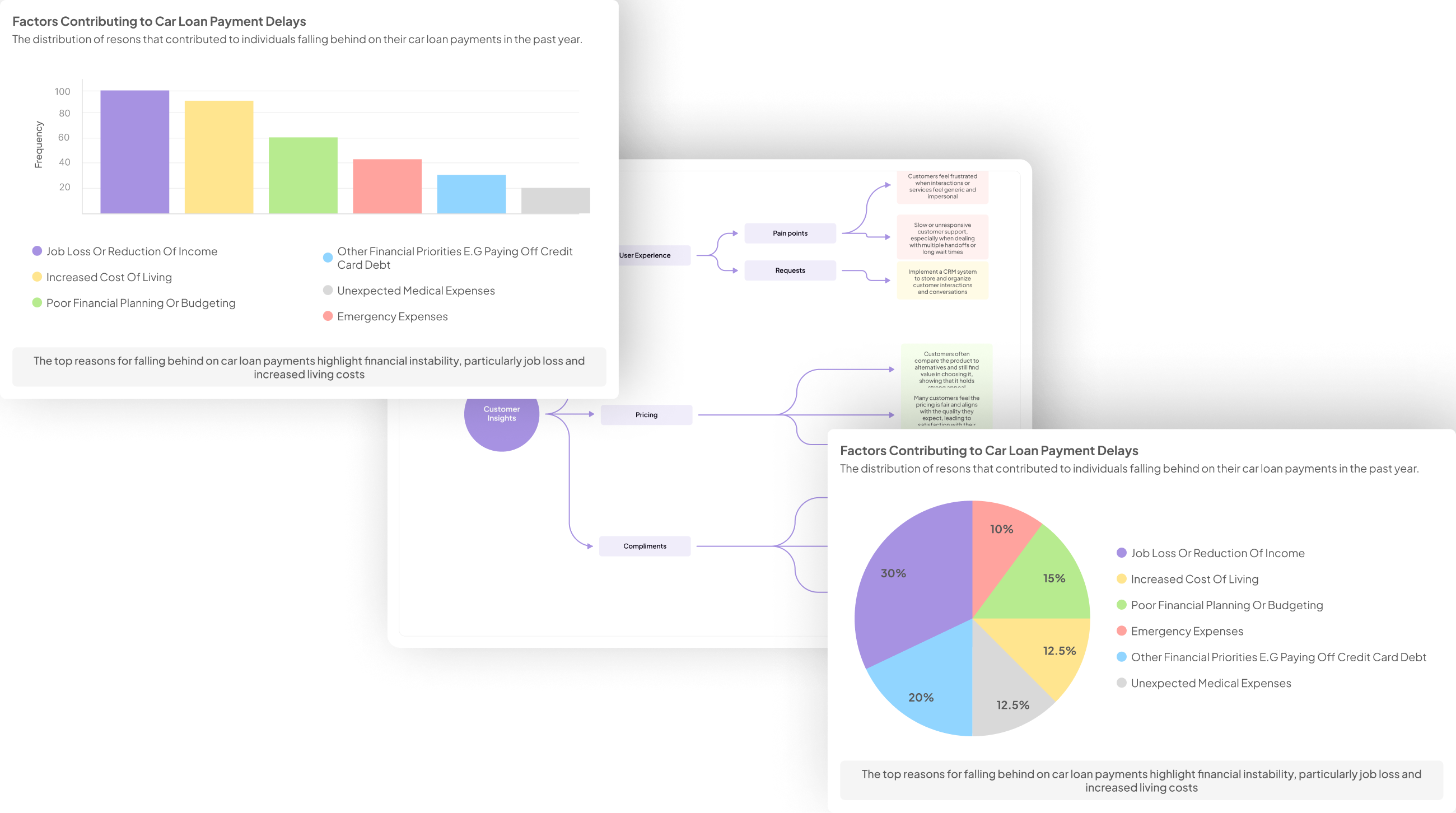
Tools and Techniques for Effective Interview Insights Visualization
When it comes to Interview Insights Visualization, utilizing the right tools and techniques is crucial for extracting meaningful insights from cultural interviews. Various software and platforms are available to help translate raw data into visual formats that are engaging and informative. Data visualization tools such as Tableau and Power BI enable users to create interactive dashboards and charts, enhancing the accessibility of insights for diverse audiences.
To effectively visualize interview insights, start by selecting tools that suit your needs. Using Google Data Studio, for example, can help you create shareable reports, while platforms like Infogram can transform your data into infographics that tell a compelling story. Additionally, employing techniques such as thematic analysis can help in structuring your visualization strategy. By combining these tools and methods, you can create impactful visuals that convey complex information clearly, allowing stakeholders to make informed decisions based on cultural interview insights.
Top Tools for Interview Insights Visualization
When looking to turn cultural interview data into meaningful visualizations, choosing the right tools is key. Top tools such as Insight7, Tableau, and Power BI provide user-friendly platforms for creating comprehensive visual reports. These tools enable users to aggregate insights from interviews and showcase trends that might otherwise go unnoticed. For instance, Insight7 simplifies the process by allowing users to easily transform raw data into visual formats, while Tableau excels in creating interactive dashboards that facilitate deeper analysis.
Google Data Studio and Infogram also stand out for their intuitive interfaces and versatile design options. Google Data Studio allows seamless integration with various data sources, making it ideal for dynamic reporting. Meanwhile, Infogram’s templates can help create stunning visuals quickly, perfect for presentations. By utilizing these top tools, individuals and organizations can enhance their ability to visualize interview insights effectively, driving better cultural understanding and strategic decisions.
- insight7
In insight7, we uncover the transformative nature of Interview Insights Visualization. This process allows organizations to distill rich qualitative data from cultural interviews into clear, actionable graphics. When properly visualized, insights gleaned from conversations can reveal patterns and trends that drive strategic decisions.
To create a compelling visualization, start by collecting and organizing your cultural interview data systematically. Next, choose a design strategy that emphasizes clarity and relevance. The aim is to convert complex narratives into visual elements that highlight key themes and findings. By employing effective visualizations, you enhance collaboration and communication among stakeholders, ultimately leading to better-informed decisions. Embrace this approach to harness the full potential of your interview insights and maintain a competitive edge.
- Tableau
Tableau serves as a powerful tool for transforming raw data from culture interviews into actionable visualizations. Through its intuitive interface, users can efficiently turn complex datasets into meaningful graphs and charts, allowing for deeper insights. When visualizing interview insights, it’s essential to focus on trends, sentiments, and prevalent themes that emerge from your data.
To effectively utilize Tableau for visualizations, consider the following:
-
Data Import: Begin by importing your interview transcripts or data sheets into Tableau. This will be your baseline for analysis.
-
Creating Visual Elements: Use Tableau’s various chart options, such as bar graphs or heat maps, to visualize positive and negative feedback.
-
Interactive Dashboards: Build interactive dashboards that enable users to filter the data based on specific criteria, enhancing the depth of analysis.
-
Comparative Analysis: Leverage Tableau’s capabilities to compare insights across different demographics or locations.
Each of these steps allows you to delve into the nuances of your interview insights visualization, providing clarity and direction for your projects.
- Power BI
Power BI serves as a robust tool for generating impactful Interview Insights Visualization, enhancing the analysis of cultural interview data. By allowing users to transform raw data into comprehensible visuals, it facilitates a deeper understanding of participant feedback. Through its dynamic features, such as customizable dashboards and data modeling, stakeholders can pinpoint key insights swiftly.
To effectively utilize Power BI, follow these key steps:
- Data Importing: Begin by importing your collected interview data into Power BI. This centralized database allows for streamlined analysis.
- Data Transformation: Utilize Power Query to clean and organize your dataset. This ensures accurate insights with minimal discrepancies.
- Visualization Creation: Leverage Power BI’s variety of visualization options, such as charts and graphs, to represent your insights visually. Each visual can be tailored to highlight positive or negative sentiments from interviews.
- Interactive Dashboard Design: Craft an interactive dashboard incorporating various visuals. This enables users to explore the data intuitively, revealing patterns and trends effectively.
By mastering Power BI, you can create compelling Interview Insights Visualization that drives informed decision-making.
- Infogram
Infogram serves as a crucial tool in the quest to create impactful visualizations from cultural interview data. With its intuitive interface, it allows users to effortlessly transform raw insights into visually appealing graphics. This is particularly important when dealing with Interview Insights Visualization, as clear depictions of findings can significantly enhance understanding and retention among stakeholders.
Using Infogram, you can represent a wide range of data types, from charts to infographics, making complex information more accessible. It helps in highlighting trends, patterns, and even contrasting positive versus negative feedback gathered from interviews. By visually organizing insights, Infogram not only improves engagement but also supports data-driven decision-making processes. In the realm of cultural interviews, effective visualization can bridge the gap between qualitative insights and quantitative analysis, thereby offering a holistic view of user experiences.
- Google Data Studio
Google Data Studio serves as a powerful tool for transforming cultural interview insights into engaging visualizations. With its user-friendly interface, users can effortlessly connect data sources, providing a foundation for effective analysis. By importing your qualitative and quantitative data, you can create customized dashboards that highlight key trends from the interviews, illuminating patterns that may otherwise go unnoticed.
In practice, Interview Insights Visualization allows teams to present findings interactively, making it easier to communicate critical messages to stakeholders. With features like drag-and-drop functionality and various chart options, Google Data Studio enhances storytelling through data. Moreover, its integration with other Google products ensures seamless collaboration among team members. By adopting Google Data Studio, teams can revolutionize their approach to data visualization, enabling more informed decision-making based on clear, compelling insights derived from cultural interviews.
Steps to Create Impactful Interview Insights Visualization
Creating impactful interview insights visualization begins with a structured approach to transforming raw data into meaningful representations. The first step involves collecting and organizing cultural interview data. Gather transcripts, notes, and key quotes that encapsulate the participants' experiences. Organize this information in a way that allows for easy access and analysis, as efficient data management is critical for insightful visualization.
Next, design a visualization strategy that best conveys the collected insights. Choose visualization tools that suit your audience's needs, such as charts or infographics, and consider what story you want to tell. Ensure that your visualizations highlight key themes, pain points, and desires articulated during the interviews. By following these steps, you can create engaging and informative interview insights visualizations that resonate with your target audience, making complex data more digestible and impactful.
Step 1: Collecting and Organizing Cultural Interview Data
Effective visualization starts long before the actual graphical representations are made. Step 1 involves meticulously collecting and organizing cultural interview data, which forms the backbone of any meaningful analysis. Begin by designing a structured interview template aimed at capturing qualitative insights. This ensures that the data collected relates directly to your research goals, fostering relevant interview insights visualization later on. Transcriptions of the interviews should also be created to maintain accuracy and depth in understanding participant responses.
Once your data is collected, categorization is essential. Group insights into themes or topics to illustrate correlations and trends later. Utilize tools for data management to keep your materials organized and easily accessible. By creating a clear and systematic approach to managing your interview data, you set the stage for effective visualizations that represent genuine cultural perspectives. This foundational step ultimately enhances the interpretation and impact of your visualizations, delivering valuable insights that resonate with your audience.
Step 2: Designing Your Visualization Strategy
Designing Your Visualization Strategy is a crucial step in transforming raw data from cultural interviews into meaningful insights. This process involves identifying the key themes, sentiments, and patterns that emerge from the interviews. First, consider the audience and the context; understanding who will view the visualizations is essential to tailor the presentation effectively. Effective Interview Insights Visualization should highlight the most impactful findings without overwhelming viewers with excess information.
Next, determine the type of visualizations that will best represent the data. Options might include charts, graphs, or infographics that can effectively convey the complexities of cultural narratives. Additionally, think about integrating comparative analyses, such as examining responses from different demographics or locations. By focusing on clarity and relevance, you can create visualizations that not only inform but also engage, making the insights from your interviews accessible to a broader audience.
Conclusion: Unleashing the Power of Interview Insights Visualization
The power of Interview Insights Visualization lies in its ability to transform qualitative data into compelling narratives that drive understanding. By converting insights from cultural interviews into visual formats, organizations can quickly grasp trends, pain points, and themes that may otherwise remain hidden in text-heavy reports. This approach not only facilitates easier data comprehension but also promotes collaborative discussions among team members.
Embracing Interview Insights Visualization ultimately enhances decision-making. With clear visual representations, stakeholders can identify actionable strategies based on customer feedback, leading to improved products and services. As you explore the potential of these tools, remember that the true value comes from making insights accessible and engaging for all, fostering a culture of informed action.